
Direct Debit Fundamentals
Within GymOS, all Direct Debits are processed by GoCardless. Your relationship with GoCardless is directly between you and them. GymOS solely sits as the initiator for your Direct Debit transactions.
Some of the content for this article has been sourced directly from our payment partner, GoCardless. The complete set of originating GoCardless articles may be found here. The GoCardless articles should be considered the latest, complete, and correct information. The following precis is provided for the convenience of our clients.
What is a Direct Debit Mandate?
A Direct Debit mandate, also known as a Direct Debit Instruction (DDI), is an authorisation you provide to a company, permitting them to collect recurring payments from your bank account automatically. The mandate includes your bank details and specifies the dates and amounts for the payments. Once set up, these payments are protected by the Direct Debit Guarantee.
The details of each authorisation are standardised:
- All future payments are authorised so you can collect any amount at any time from your customer.
- Your customer must be notified of each payment before it is collected.
- All payments are covered by the Direct Debit Guarantee which protects customers from payments taken in error.
In many cases, your customer will have a specific payment schedule in mind, such as a fixed subscription, when they authorise a DDI to you. The notification requirements of a DDI and the Direct Debit Guarantee help protect them from any other payments taken in error or fraudulently.
Setting up a Direct Debit payment for a membership
Direct Debits for the collection of membership fees are set up in GymOS. Learn more…
How long does it take to set up a Direct Debit?
A Direct Debit can take up to 10 days to be activated and become chargeable, depending on the bank. In the UK, most banks set up Direct Debits within three working days, with an increasing number being immediate.
Direct Debit Timings
Once submitted to the banks, Direct Debit payments are processed using the Bacs three-day cycle. Because of the specifics of how Direct Debit works they can only be considered successful if no failure report is received several days later.
Full details of the optimised collection time is provided below, but in summary:
If a Direct Debit mandate is already in place, payment is collected 2 working days after submission, can be considered 99% confirmed 3 working days after submission, and 100% confirmed after 4 working days.
If a Direct Debit mandate needs to be created, payment is collected 4 working days after submission, can be considered 99% confirmed 5 working days after submission, and 100% confirmed after 6 working days.
The key to understanding both payment timings is the Bacs three-day cycle, which we explain below.
The Bacs three-day cycle
All Direct Debit processes operate using the Bacs three-day cycle. Designed in the 1970s, the cycle specifies the timescales on which banks must respond to input from each other.
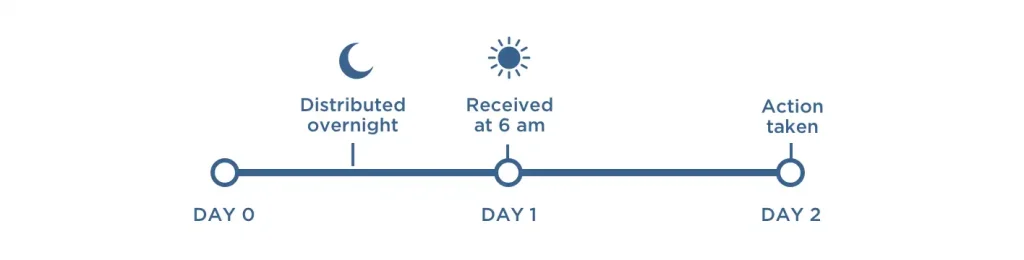
- Working day 0 (submission): A message (e.g., a payment request) is submitted to Bacs between 7:00 am and 10:30 pm. Bacs then distribute this request to the relevant parties overnight.
- Working day 1 (processing): Having received the message at 6:00 am, the relevant parties prepare to respond. For example, your customer’s bank would prepare to debit their account.
- Working day 2 (action): All parties take the action required. For example, your customer’s bank would debit their account, whilst your bank would simultaneously credit yours.
The Bacs three-day cycle is used for collecting payment by Direct Debit, setting up new Direct Debit Instructions, and for notifying the merchant of any payment failures. Chaining several three-day cycles together gives the optimal timeline for collecting a payment by Direct Debit.
When a payment fails
If a Direct Debit mandate has been cancelled at the point of submission, GymOS knows immediately and will raise a non-payment alert. However, if the Direct Debit is in place, it can take 4-5 days after the payment request has been submitted to the bank until the failure is known.
Because of the way Direct Debit works, even payments which have failed will be credited to your account on day 2.
If your customer’s bank thinks the payment should not have happened (if the customer’s account was overdrawn, for example), they will notify your bank to get the payment reversed.
Failure notifications are sent via an additional Bacs three-day cycle, and generally, the customer’s bank will submit this notification on working day 2 (the day the payment was due):
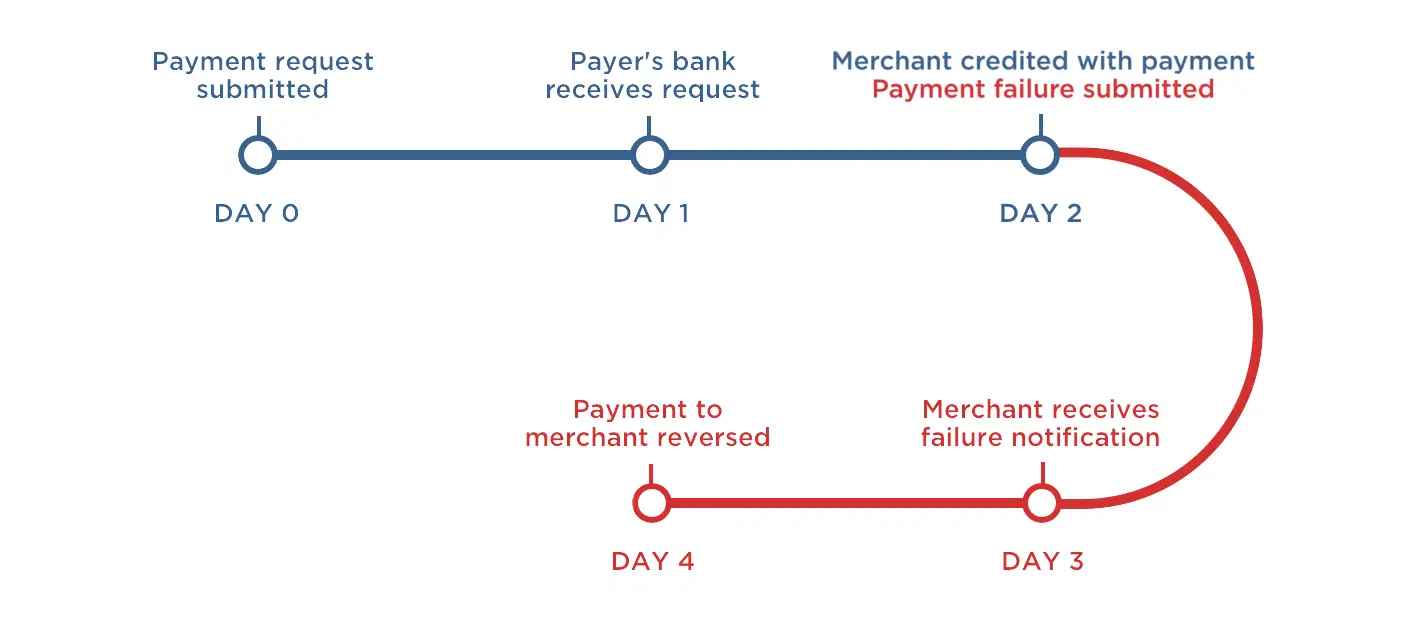
However, in around 1% of cases, the notification is only submitted the following day. In this case, it is received by the merchant’s bank 4 workings days after payment submission:
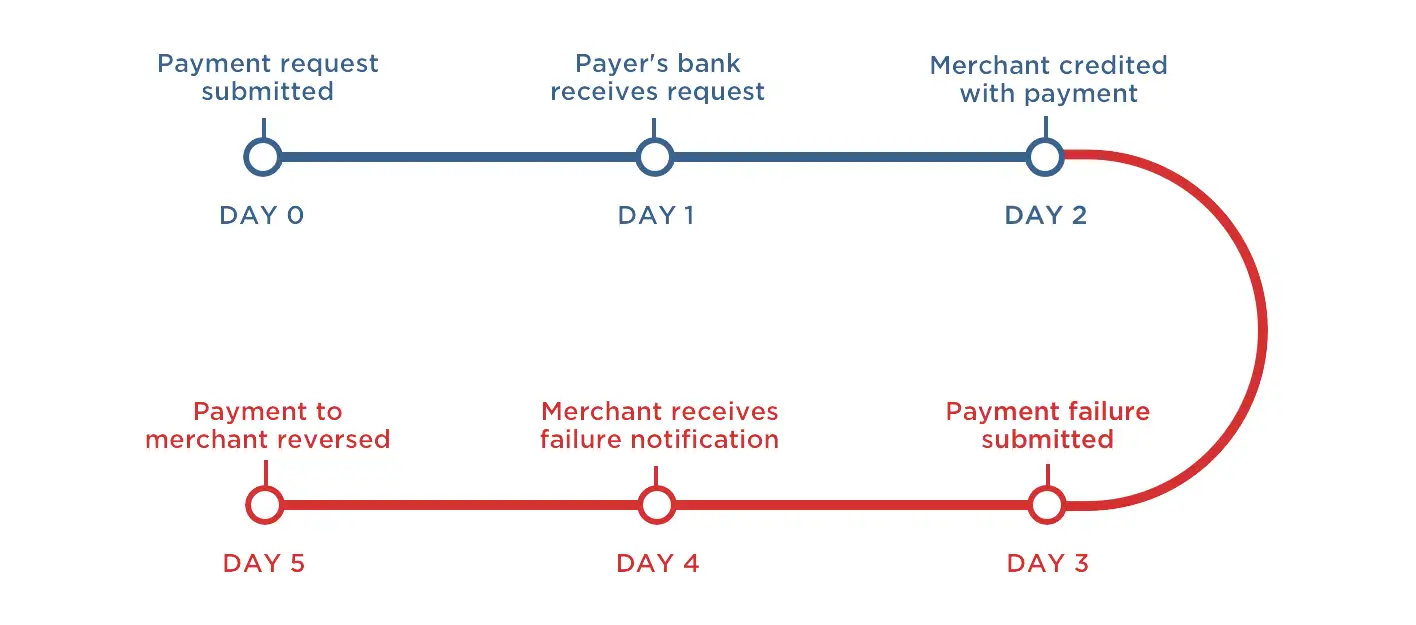
If a failure notification is received, the payment will be automatically reversed. As a result, a payment cannot be considered complete until there is no receipt of failure notification on day 4.
Why a Direct Debit may not be taken on the due date
It’s important to be aware that funds are not collected on non-working days or weekends in order for you to be able to optimise your collection timings.
Bacs provide a list of working days for the Direct Debit system in their annual Bacs processing calendar. Submissions to the banks cannot be made on non-working days, and the banks themselves will not process any Bacs messages on non-working days.
This means that Direct Debit payments are not made on weekends or bank holidays. If a payment date falls on a Saturday or Sunday, it will be processed on the next working day. You can find out more about Bacs payments made on Fridays here.
While the banks may not work on non-working days, it is possible to receive messages they previously sent you. For example, payment failure reports distributed overnight on a Friday are available to download on a Saturday morning.
Important timing considerations in the context of GymOS
In alignment with the Direct Debit rules, GoCardless will send your members an “advisement of a forthcoming charge” email 3-4 days prior to the charge being submitted to the bank. This forms part of the charge cycle, and sits on top of the processings timings outlined above which are once the request has been submitted to the bank.
GymOS will submit a charge request to GoCardless 3 days before the target charge date to try to keep the timings roughly in line with expectations. However, please note that timings are affected by holidays and weekends, as mentioned earlier.
If your member is due to pay their membership dues on the 25th, GymOS will send the payment request to GoCardless on the 22nd. This is the point at which the member will get their invoice, and the date on which the invoice will be dated. However, the payment request will not be submitted to their bank until on/after the 25th, and the charge to their account will not be made until on/after the 27th.
The timing cycle of Direct Debits is the same for any company, regardless of size. This is why your energy bills use phrasing similar to “your payment will be taken by Direct Debit on or shortly after x”.
Handling Direct Debit payment failures in GymOS
As mentioned above, if a Direct Debit fails at the point of request due to the mandate being cancelled, this will be immediately displayed in the corresponding dashboard widget.
If the payment fails later in the cycle, you will receive a “payment failure” email from GoCardless. You can set up a Payment Failure trigger within GymOS to take steps when GymOS receives the non-payment alert.
Note: Direct Debit payment failures still incur a transaction cost, so you may wish to pass this on to your members.
Payouts
GoCardless offer payouts on either a daily (weekday) basis or weekly. The default is weekly. The payout schedule can be changed in your GoCardless dashboard.
Refunds
The Direct Debit process does not provide a method for refunding transactions. If you need to refund a member, please do so via direct bank transfer between you and the customer. Neither GymOS nor GoCardless is involved in that process.