
Mobile App: Cancelling a Session
Cancelling a Session
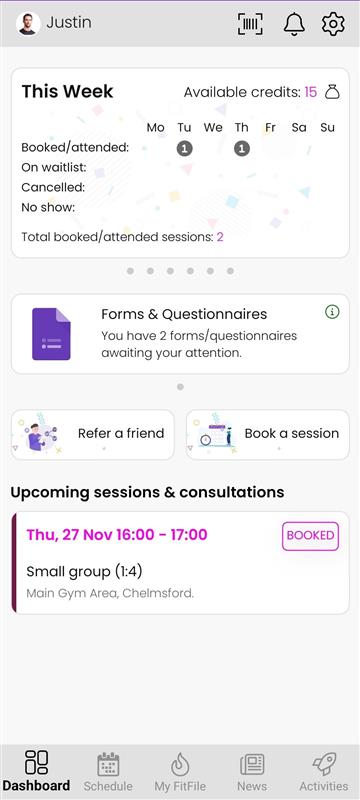
Members can cancel any upcoming session directly through the app. All future bookings are displayed conveniently on the Dashboard, making it easy to manage and update sessions when needed.
Accessing a Session to Cancel
On the Dashboard, the member will see an Upcoming Sessions section. This lists all of the sessions they are currently booked onto.
To cancel a session, the member should:
- Tap on the session they wish to cancel.
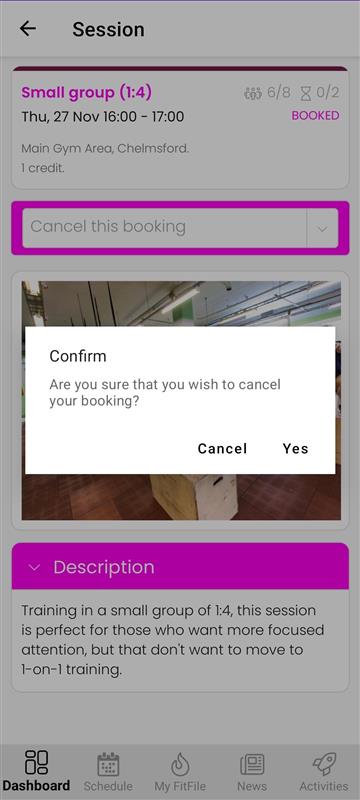
- They will then be taken to the same session details screen used when the session was originally booked.
Cancelling the Booking
On the session details page, a dropdown menu is displayed. The member can tap this dropdown and select Cancel this booking.
After choosing this option, a confirmation pop-up will appear asking the member to confirm that they wish to cancel the booking.
Refunds and Credit Returns
Whether a refund or credit return is issued will depend on the cancellation policy set by the gym. The app processes cancellation according to the settings that the gym has set, which may include:
- Not issuing a refund or credit if the member cancels too late
- Issuing a refund if the member cancels X minutes before a session
Once the cancellation is confirmed, the session will be removed from the member’s Upcoming Sessions list.