Lead creation API
The lead creation API is a restricted function within GymOS, available only to authorised partners of Quoox. It provides the ability for a third-party system to create or update a lead record within GymOS, apply tags and notes, and optionally convert the lead record to a member record.
A corresponding event trigger, Leads > Creation and Conversion > Lead ingested from webhook, specifically relates to this event, along with other relevant triggers (E.g., lead created, lead converted, etc).
Endpoint
The endpoint URL for the lead creation API is https://my.gymos.com/_webhooks/inbound/leads/
The API accepts a correctly structured JSON object (detailed below) in the body of a POST object sent via HTTPS. An authentication header is required (detailed below). If the request uses a method other than type POST, a 405 - Method Not Allowed error will be raised.
Authentication
The API requires a host header X-Gymos-Webhook-Key to be provided. The value should be that of the unique authentication key provided to you by Quoox, which is to be used only by your organisation.
Each key is restricted for use with one or more GymOS APIs. If the key is missing or invalid for the API, a 401 - Unauthorized error will be raised.
Request payload
The lead creation API requires a JSON payload of the correct structure to be present in the body of the POST request. If the payload is missing or invalid, a 400 - Bad Request error will be raised.
{
  "customerId": "[CUSTOMER REFERENCE]",
  "yourReferenceId": "mm1029",
  "firstName": "Marsha",
  "lastName": "Mallow",
  "email": "[email protected]",
  "mobile": "+447803123456",
  "dateOfBirth": "1973-12-20T00:00:00",
  "tagsToAssign": [
    "Black Friday 2025",
    "Google Ad"
  ],
  "notes": "03/12/2025 Call conducted by Dave C. Interested in a trial.",
  "convertToMember": false
}| Field | type | req’d | notes |
|---|---|---|---|
customerId | STRING | YES | The unique identifier for the customer in the GymOS system, comprising the customer’s GymOS ID, shortcode, or fully-qualified trading name. |
yourReferenceId | STRING | NO | An optional unique reference for the lead or request, which is passed back to you in the response object. |
firstName | STRING | YES | The first name of the lead. Do not use made-up or “padding” values. |
lastName | STRING | YES | The last name of the lead. Do not use made-up or “padding” values. |
email | STRING | YES | The lead’s unique email address. |
mobile | STRING | YES | The lead’s unique mobile number. Use local country or E164 format. |
dateOfBirth | DATE? | NO | The lead’s date of birth. |
tagsToAssign | STRING() | NO | An array of tags to assign to the lead in the GymOS system. Tags not previously registered will be created. |
notes | STRING | NO | Optional notes to record in the “notes” section of the lead record. |
convertToMember | BOOLEAN | NO | If TRUE, the lead record will be created/updated and then converted to a member record. The corresponding “Lead Converted” event trigger will fire. |
For specific guidance on how the data is validated and processed, please refer to the Notes section below.
Response object
Having processed a valid request, GymOS will set a corresponding Status Code and return a JSON response object.
A successful request will return a status code of 200 - OK and the status “success”, alongside other return values.
Success
{
  "status": "success",
  "customerId": "[CUSTOMER REFERENCE]",
  "leadId": "215C660F-5934-4463-B798-78A6D98FF28A",
  "yourReferenceId": "mm1029",
  "message": "Webhook processed successfully.",
  "timestampUtc": "2025-12-03T09:49:34.986663Z",
  "campaignDataParam": "qrxRwavaauyAj7+SYWwvskxSXOFoTn3pjqytxHA2vVdjwZhGCW0ofrIIqzJIeoxX"
}
Failure
{
  "status": "error",
  "customerId": "[CUSTOMER REFERENCE]",
  "yourReferenceId": "mm1029",
  "message": "An error occurred.",
  "timestampUtc": "2025-12-03T09:49:34.986663Z",
  "error": {
    "code": "MISSING_FIELDS",
    "message": "One or more required fields are missing.",
    "fieldErrors": {
      "firstName": "First name is required."
    }
  }
}| field | type | notes |
|---|---|---|
status | STRING | success or error |
customerId | STRING | The customer ID provided in the original request. |
leadId | GUID? | The unique GymOS ID of the new or updated lead record. |
yourReferenceId | STRING | Your reference ID from the original request. |
message | STRING | A readable summary of the response. |
timestampUtc | DATETIME | The date/time the request was processed, in UTC. |
campaignDataParam | STRING | A unique parameter that may subsequently be used with some GymOS campaigns. More information is provided below. |
error | ERROR? | If present, this object (as defined below) provides more details of an error. |
| field | type | notes |
|---|---|---|
code | STRING | A summary code of the error. E.g. MISSING_FIELDS |
message | STRING | A readable summary of the error. |
fieldErrors | DICTIONARY(OF STRING, STRING)? | If present, a list of field-specific errors.fieldName : Problem description |
Campaign Data Param
The campaignDataParam is a unique string that can be appended to many GymOS campaign URLs as the whd query parameter. When provided and assuming it is valid, this parameter will uniquely identify the lead and will prefill the form with the corresponding data from the lead record. This shortcuts the process of, say, a membership purchase campaign.
Example
If a GymOS customer has configured a membership purchase campaign with the URL below:
https://members.demogym.co.uk/c/r/ABCDE/ABCDEFGH/
The campaignDataParam may be appended as shown to pre-fill the first stage of the form.
https://members.demogym.co.uk/c/r/ABCDE/ABCDEFGH/?whd=qrxRwavaauyAj7+SYWwvskxSXOFoTn
Use of this parameter is optional. Fields may also be pre-filled by providing the following (suitably URL encoded) query string parameters:
| PARAMETER | FIELD FILLED |
|---|---|
pn | Name |
pe | Email address |
pm | Mobile number |
E.g., https://members.demogym.co.uk/c/r/ABCDE/ABCDEFGH/?pn=Justin%20Credible&pe=justin.credible%40gmail.com&pm=07803123456
Processing notes
- If one or more fields are missing, a
MISSING_FIELDSerror will be raised. Theerrorobject will provide details of the problematic fields. The status code will be400 - Bad request. - If one or more fields are invalid, an
INVALID_DATAerror will be raised. Theerrorobject will provide details of the problematic fields. The status code will be400 - Bad request. - The
customerIdfield may contain the GymOS customer id, which is a GUID. It may also use the GymOS customer shortcode, which is a short, unique 5-character string. Both of these can be obtained from the GymOS support team. Finally, thecustomerIdmay also contain the fully-qualified (I.e., exact matching) customer trading name as used for the customer in GymOS. - If the customer cannot be identified from the
customerIdfield, aCUSTOMER_NOT_FOUNDerror will be raised. The status code will be404 - Not found. - Before creating a record, checks will be performed against existing records:
- A check will be performed on the email address. If an existing lead record is found with the same email address and either the mobile number or first name also match, the record will be updated. If neither the mobile number nor the first name match, a
CONFLICTerror will be raised. The status code will be409 - Conflict. - A check will be performed on the mobile number. If an existing lead record is found with the same mobile number and either the email or first name also match, the record will be updated. If neither the email address nor the first name match, a
CONFLICTerror will be raised. The status code will be409 - Conflict. - If a matching lead record is found, but it has already been converted to a member, a
CONFLICTerror will be raised. The status code will be409 - Conflict. - If a matching lead record is found, and the lead has been marked as “terminated”, they will be reinstated.
- If the email address and/or mobile number match an existing member record, a
CONFLICTerror will be raised. The status code will be409 - Conflict.
- A check will be performed on the email address. If an existing lead record is found with the same email address and either the mobile number or first name also match, the record will be updated. If neither the mobile number nor the first name match, a
- New leads will be assigned the default venue.
- New leads will be assigned an “originating source” value related to the provider.
- Tags may optionally be provided, and these are assigned to the lead. Duplicate tags are ignored. Missing tags are added. Existing tags on an existing lead record that are not present in the payload remain in place.
- If provided, notes are appended to the notes section of the lead record.
- Upon a lead being created, the Lead Created event trigger will fire.
- Upon a lead being created or updated, the Lead ingested from webhook event triggers will fire.
- Upon a lead being converted to a member, the Lead converted event trigger will fire.
Lead ingested from webhook event trigger
The Leads > Creation and Conversion > Lead ingested from webhook event trigger fires when a lead record is created or updated via the Lead creation API.
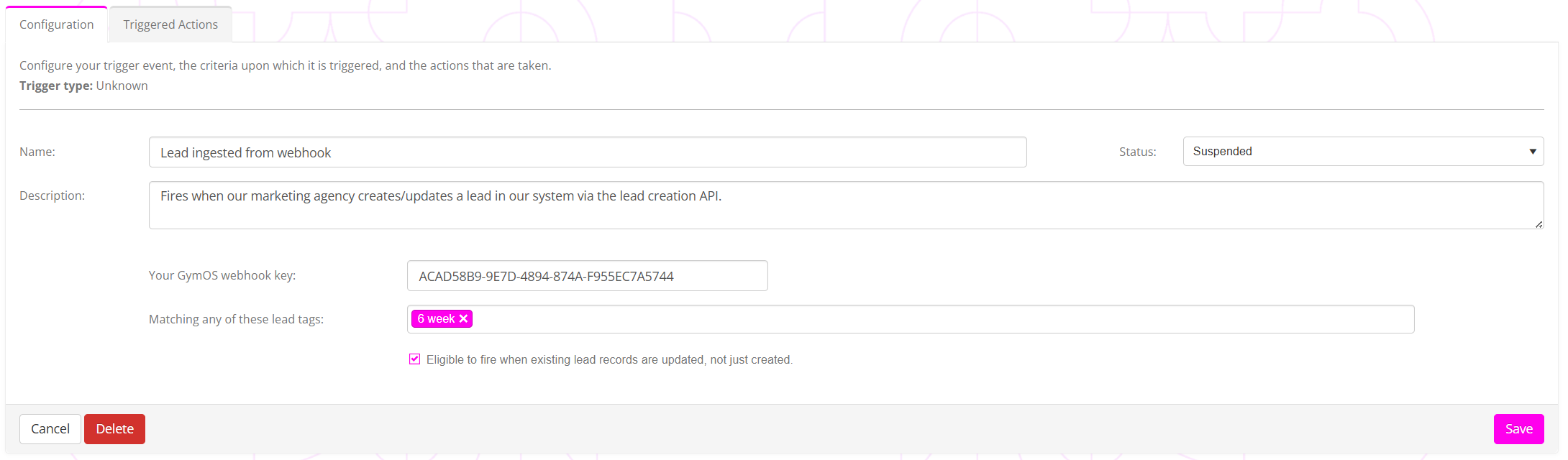
The event trigger works in the same manner as all other GymOS event triggers.
Optional parameters may be provided:
- Your GymOS webhook key
By providing a webhook key, the trigger is restricted to firing only for the provider with the corresponding key. Leaving the field blank renders the trigger eligible for all providers using the lead creation API. - Matching any of these lead tags
You may provide one or more lead tags. If the inbound payload includes one or more of the listed tags and all other criteria are met, the trigger is eligible to fire. Leaving the tag field empty will match all inbound payloads. - Eligible to fire when existing lead records are updated, not just created
When checked, the trigger is eligible to fire when an existing lead record is updated. If unchecked, the trigger is only eligible to fire when a new lead record is created.
Example usage
There are a vast number of ways the trigger could be used, but, for example, you could set a trigger that fires upon the creation of a lead from a given provider with a given tag, which then sends the lead an immersive email with a link to book a call, or purchase a membership.