
Mobile App: App Settings
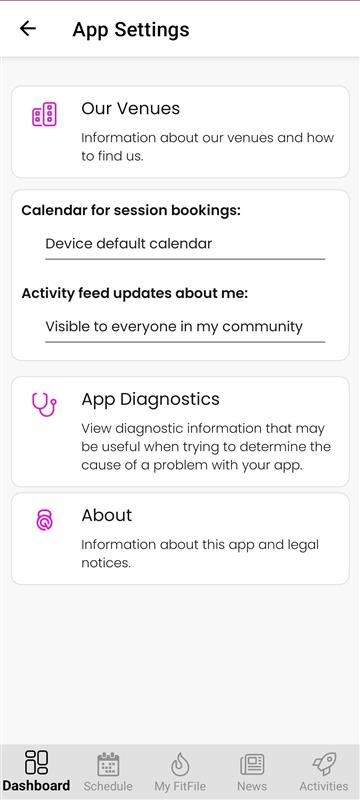
App Settings
The App Settings section allows members to manage preferences and view information relating to how the app operates on their device. This area can be accessed from the Dashboard by tapping the cog icon in the top-right corner and selecting App Settings.
The following options are available within this section:
Our Venues
This option provides information about the gym’s different venues. By tapping on Our Venues, the member can view details about each location, including how to find them.
Calendar for Sessions Bookings
This setting allows the member to choose which of the calendars available on their device should be used for adding session bookings. The member can select the preferred calendar from the list presented.
Activity Feed Updates About Me
This section controls who can see activity feed updates related to the member. There are three visibility options:
- Visible to everyone in my community
- Visible only to my buddies
- Visible only to me
The member can select the preferred privacy level based on their personal preferences.
App Diagnostics
Tapping on App Diagnostics displays detailed technical information about the device, the app version, and other relevant data. This information may be used to assist with troubleshooting any issues the member experiences.
About
The About section provides general information about the app, along with legal notices and other relevant documentation.