
Mobile App: Personal Bests
Personal Bests
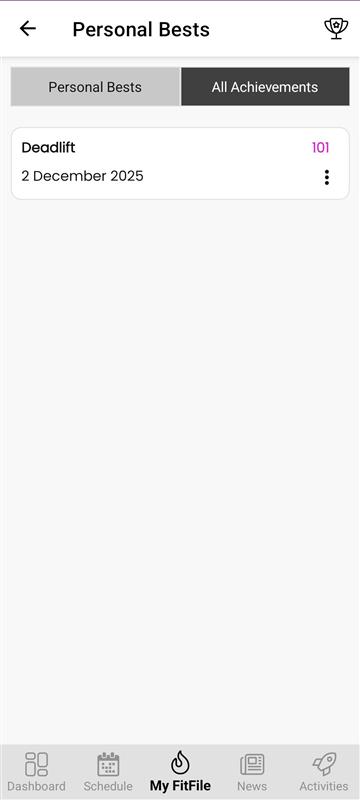
The Personal Bests section can be accessed through the My FitFile menu. From here, the member can view any personal bests and recorded achievements logged within the app.
Upon opening the Personal Bests screen, the member will see two tabs:
1. Personal Bests
By tapping on the Personal Bests tab, the member can view all previously recorded personal bests. Each entry shows the exercise and the result achieved.
If a member wishes to delete a personal best, they can do so by swiping left on the entry and tapping the red bin icon that appears.
2. My Achievements
The My Achievements tab displays previously recorded results, allowing the member to track how their performance has progressed over time.
Entries within My Achievements can also be deleted by swiping left on the result and tapping the red bin icon that appears.
Recording a New Personal Best
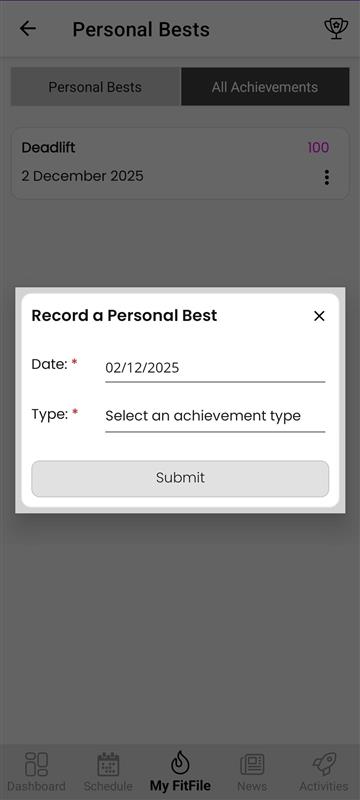
If the member wishes to add a new personal best, they can tap on the trophy icon located in the top-right corner of the screen. A form will appear where they can:
- Set the date the personal best was achieved
- Select the exercise
- Input the number or result achieved
Once saved, the new personal best will appear in their list and contribute to their achievements history.