
Campaigns
GymOS Campaigns provide a way to capture lead data and/or offer a self-service sign-up option to new members.
GymOS provides four types of campaign:
- Lead Capture
A simple lead capture process, whereby a lead record is created in GymOS, and you can then progress as you see fit. - Appointment Promotion
A campaign to promote a marketing session, providing the lead with the ability to register and to book onto a session. The session may be paid or free. - Membership Promotion
A campaign to promote one or more membership types, providing the lead the ability to register and to sign-up for a membership. - Member Account Creation
A campaign that enables the immediate creation of a member account in GymOS, without the need for a membership.
Campaign Listing
The campaign functionality is accessed by selecting Campaigns from the Connect and Promote section of the main navigation menu.
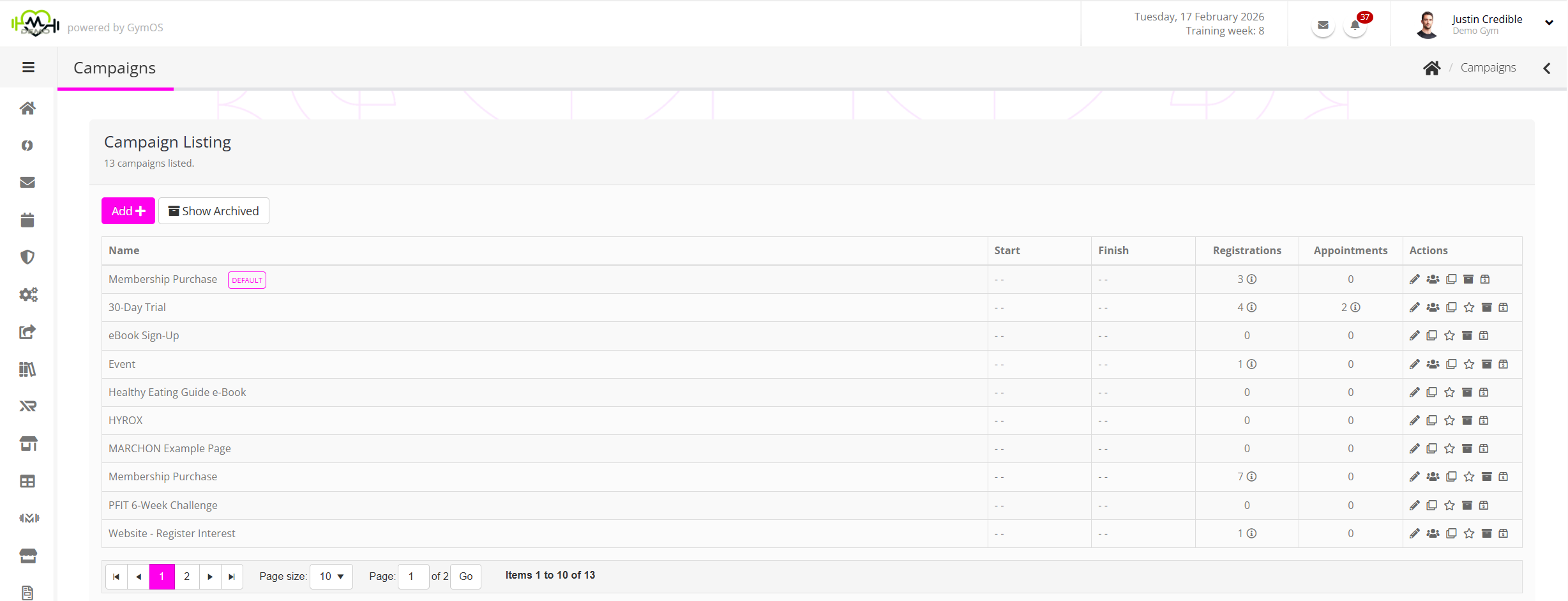
By default, the listing shows all non-archived campaigns. Archived campaigns may be viewed by clicking the Show Archived button.
The information shown for each campaign comprises:
- The campaign name.
- The start date for the campaign (optional).
- The finish date for the campaign (optional).
- The number of appointments booked (for appointment promotion campaigns).
For each campaign, a number of actions are provided. The availability of these depends on the context of the campaign:
- – Edit the campaign. This may also be achieved by double-clicking on the campaign row.
- – View the registrations arising from the campaign.
- – Clone the campaign.
- – Mark the campaign as the “default” campaign.
- – Archive the campaign.
Creating a new campaign
To create a new campaign, click the Add button.
Follow the process subject to the campaign type that you wish to create: