
Skip to content Skip to main navigation Skip to footer
Loading GymOS audio player...

Viewing scheduled broadcast statistics

You may view the statistics for a scheduled broadcast sent by email for up to 90 days after its dispatch.

To view the statistics, click the Show Sent button on the scheduled broadcast listing. Click the icon alongside the sent broadcast for which you wish to see the statistics. This will open the view page, as below.
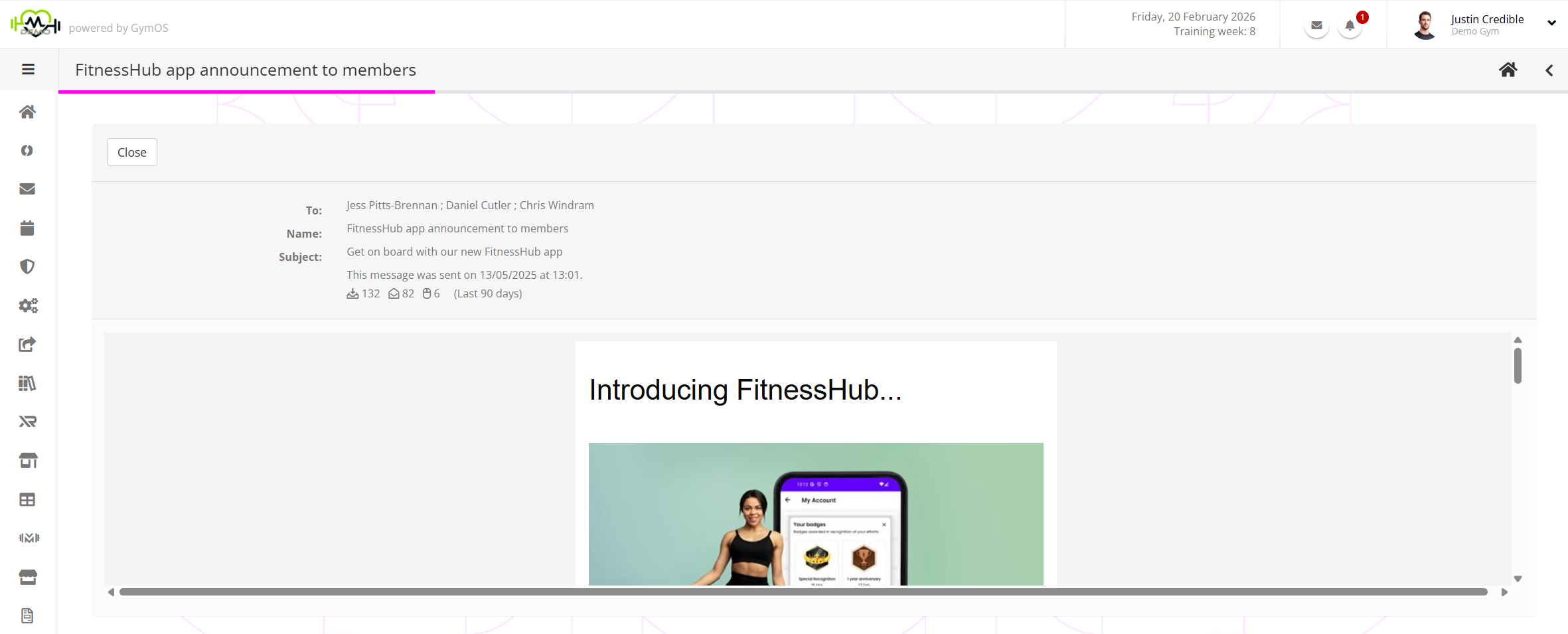
In the information panel for the broadcast, you will be able to see the dispatch statistics:

  • – The number of messages that were sent. This number is reliable.
  • – The number of messages that were opened. This number should be taken as a rough indicator (see below).
  • – The number of clicks that were received on links within the email message. This number is reliable.

Alphonso Wolfe

Know your facts from your wishful-thinking fiction

For many years, there were reasonably reliable techniques for tracking email opens. That all changed in 2021, when Apple released Mail Privacy Protection in iOS 15. These were then replicated by Google, Microsoft and others. It is now impossible for any email sender to reliably know how many times an email is opened.

GymOS continues to use the “most reliable” method for determining opens, but it should be noted that, these days, it is subject to both false positives and false negatives. As such, the “opens” number in any email sending product should always be taken with a “pinch of salt”.

Related Articles