Email and layout templates
In GymOS, email templates are either a wrapper for email content or the starting point for an immersive email.
GymOS has two built-in templates, which are fixed in design and may not be edited:
- Plain template
- Standard system templates.
You may also create as many additional templates as you wish.
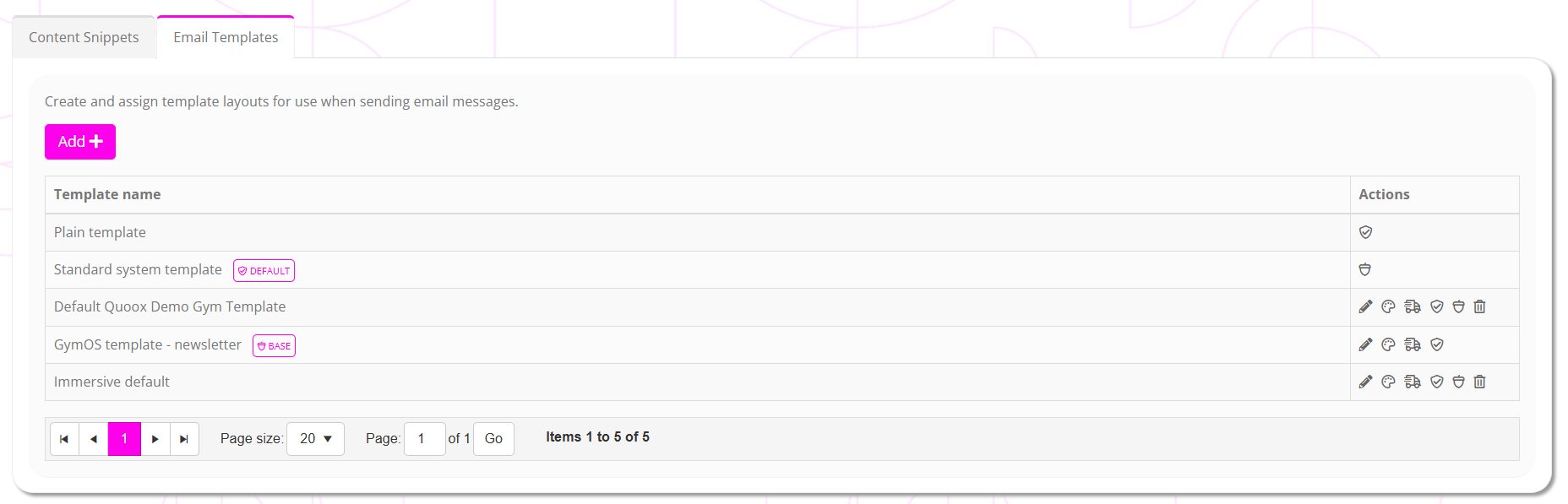
Email templates are administered by selecting Message Templates from within the Settings section of the main navigational menu. Once on the page, select the Email Templates tab. A list of your existing templates will be displayed:
Creating a new email template
To create a new email template, click the Add button. The immersive email editor will open, in which you can build your structure.
Within the body of your email, enter the merge tag [[CONTENT]] where you want GymOS to insert the message body content. Your template will not work without this tag, and a warning will be displayed on the listing.
Assigning default templates for their intended purpose
There are two types of assignments you can make for a template:
- Default – this template is, by default, used as the “wrapper” for non-immersive emails.
- Base – this template is, by default, used as the starting point for any new immersive email.
Clicking the and/or icons alongside a given template will assign that template as the default, accordingly.
The currently allocated templates are indicated by DEFAULT and BASE indicators.