
Amending a session schedule
Updating a session schedule can, from time to time, cause confusion. It is, however, straightforward once you understand the principles.
To update an existing session schedule, first navigate to the session type of interest by selecting Sessions & Events from the Settings section of the main menu.
Click the icon next to the schedule you wish to update. This will open the edit schedule window, as shown below.
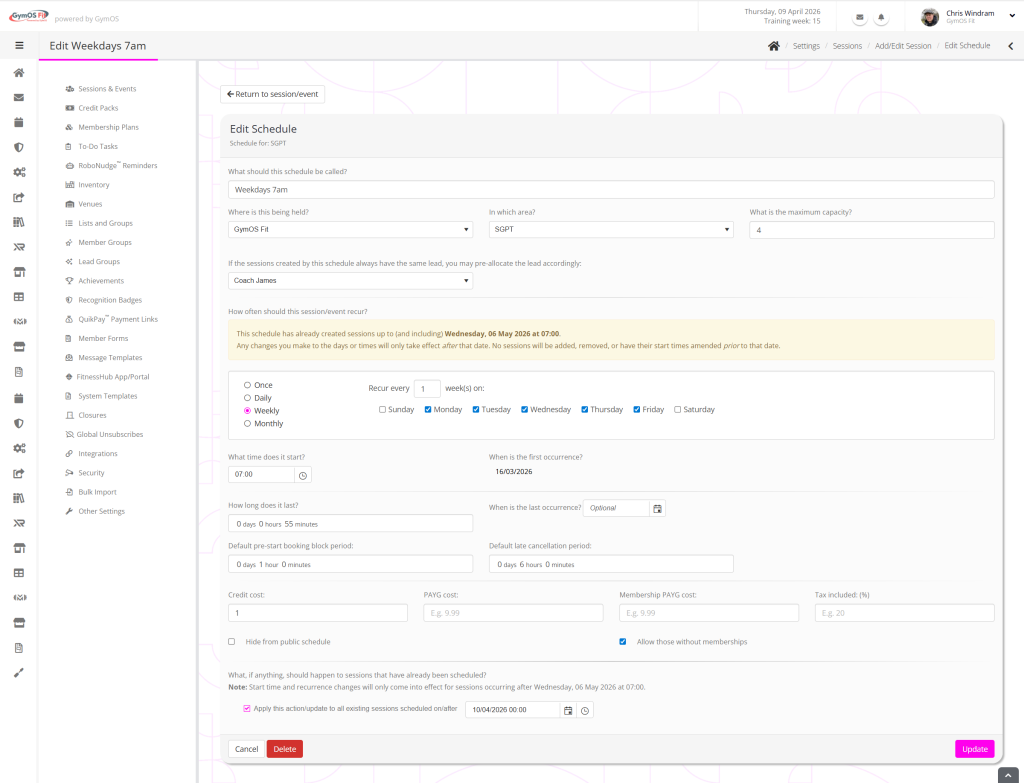
In the yellow panel, GymOS will draw your attention to the fact that any changes you make to the session schedule will only take effect after the sessions that are already scheduled. It provides the date for when that will be.
Start time and recurrence changes will only take effect for sessions occurring after the specified date. However, in the “Apply this action/update to all existing sessions scheduled on/after” field you may provide a date on/after which any other changes you specify take place. For example, you might change the capacity or the pricing.
Any changes to existing sessions are done as part of a background process, that typically occurs within a minute of you updating your schedule.