
Employee tab: Summary
The Summary tab is the default tab for the employee record. It provides high-level information about the employee, plus some basic configuration options.
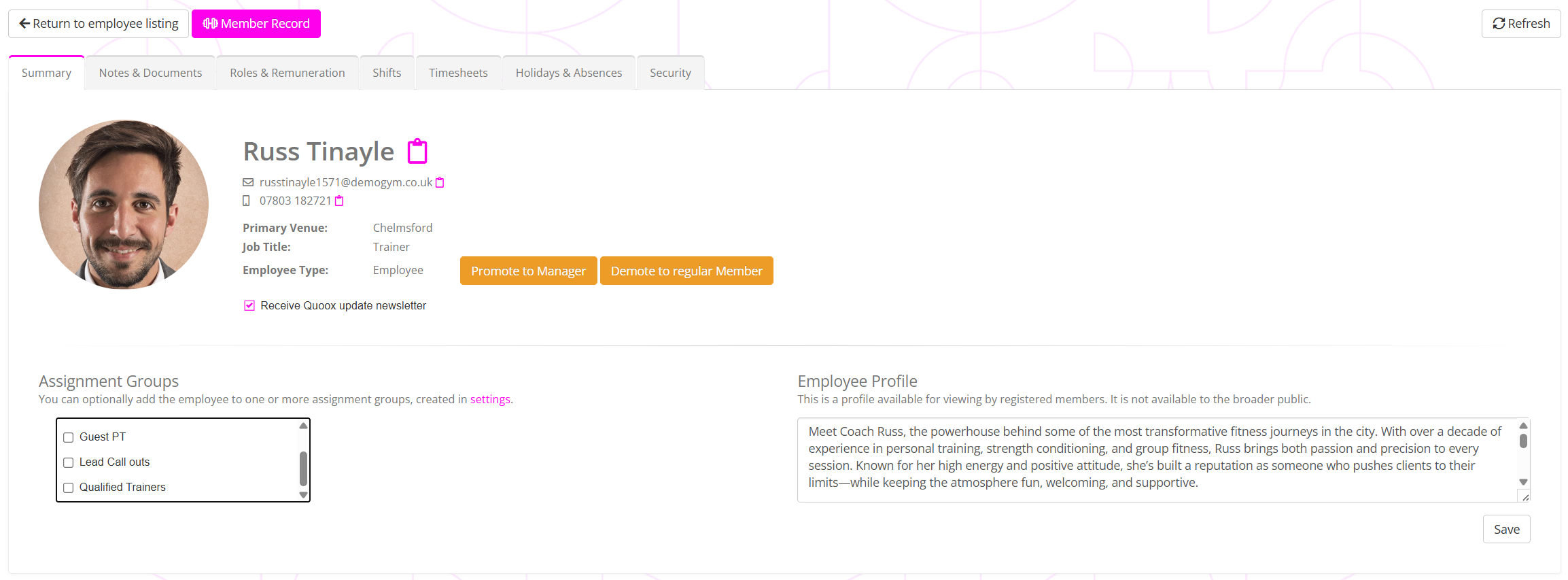
On the summary tab, you may view the employee’s main contact details. These are sourced from their member record, which you may access by clicking the Member Record button.
Promoting or demoting an employee
Once you have created an employee, you may optionally promote them to a manager by clicking the Promote to Manager button.
Similarly, if they have left your employ, you may click the Demote to regular Member button.
Assignment groups
Assignment groups are configured with Lists and Groups, but associated to an employee on the Summary tab.
To add/remove the employee from assignment groups, check or uncheck the groups accordingly in the scrollable list. Click Save to commit the changes.
Employee profile
If an employee is assigned to a member as their mentor, the member can view their employee’s profile in the GymOS FitnessHub member app. It is therefore worthwhile spending a couple of minutes adding something meaningful and reassuring to the profile box for members.
Click the Save button to save the profile.
Quoox newsletter
From time to time, we may send update newsletters to users of the GymOS administration portal. Whilst these will always be sent to the registered contact at your facility, you may opt employees in/out of receiving these newsletters.