
FitnessHub: Memberships/Credits
The Memberships / Credits section allows members to view their active memberships, payment details, and any credits that have been issued to their account.
Accessing Memberships / Credits
Members can access this section by:
- Hovering over My Account in the navigation menu.
- Selecting Memberships/Credits from the dropdown menu.
This will take the member to the Memberships/Credits screen.
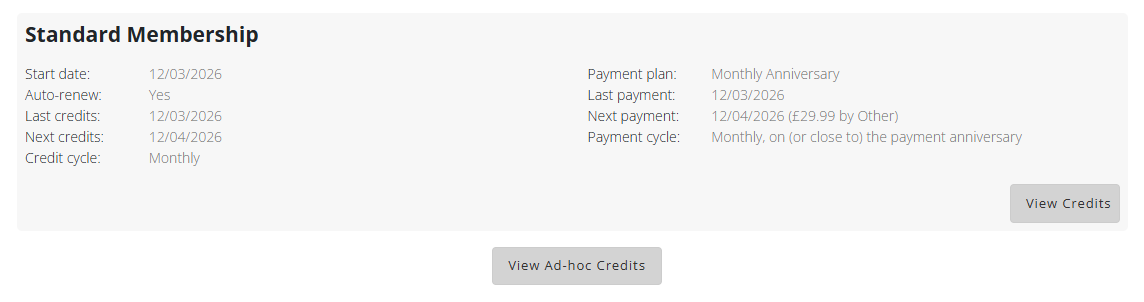
Viewing Membership Details
On this page, the member will see a list of any currently active memberships linked to their account.
For each membership, the following information may be displayed.
- Membership title
- Start date
- Auto-renew status (Yes or No)
- Credits last issued date
- Credits next issue date
- Credit cycle (for example weekly, monthly, or every X days)
- Payment plan title
- Date of the last payment
- Date and amount of the next payment
- Payment cycle
This provides a clear overview of how the membership works and when payments and credits are issued.
Viewing Membership Credits
Below the membership information, members will see a View Credits button.
When this button is clicked, the member will be shown any credits issued as part of their membership, including:
- Valid credits, and
- Credits that expired within the last 90 days
For each credit pack, the following information will be displayed:
- Valid from and to dates
- Number of available credits
- Venues where the credits can be used
- Sessions the credits can be used for
Each credit pack will also include a View Usage button. Selecting this will show the sessions that have been booked using those credits.

Viewing Adhoc Credits
Members will also see a View Adhoc Credits button on the Memberships / Credits screen.
This section displays any adhoc or top-up credits that have been issued to the member, including those that expired within the last 90 days.
The same information is displayed for adhoc credits as with membership credits, including:
- Valid dates
- Number of available credits
- Venues where the credits can be used
- Eligible sessions
Each adhoc credit pack also includes a View Usage button, which shows the sessions that have been booked using those credits.