
FitnessHub: Workout Of the Day
The Workout of the Day feature allows members to complete gym-assigned workouts online or at home if they are unable to attend a scheduled session. Workouts are created by the gym and assigned to specific dates.
Accessing Workout of the Day
To access the Workout of the Day, the member should:
- Hover over Schedule in the main navigation menu
- Select Workout of the Day.
The member will then be taken to the Workout of the Day page.

Selecting a Date
At the top of the page, the member will see a date filter.
- Selecting a different date will display the workout assigned to that day, if one has been created.
- If no workout has been assigned, no session details will be displayed.
If a workout is available, the member will see:
- The workout name
- A brief description
- A demonstration video
Workout Options
Below the workout information, the member will see two buttons:
Browse Session
Selecting Browse Session allows the member to view the workout without starting it. The member will be taken to the first exercise and can click through the workout to see what it involves.
Start Session
Selecting Start Session will begin the workout session.
Completing a Workout
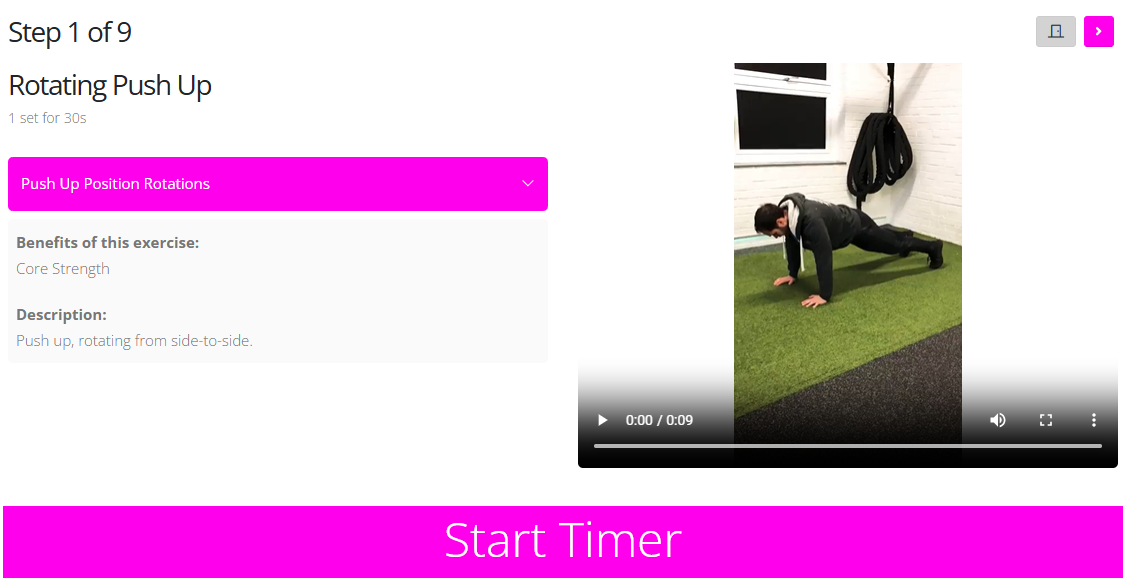
When the member starts the session, they will be taken to the first exercise. Each exercise includes:
- A brief exercise description
- A demonstration video
Below the video, the member will find a timer that can be used to track exercise durations and rest periods.
Above the video, the member will see two buttons:
- A grey door icon , which closes the session.
- A pink arrow icon , which moves the member to the next step of the workout.