
GymOS Today
GymOS Today is the dashboard in the administration portal. It answers one question each morning: what needs you today, and how is the business doing? Alongside the dashboard there is a morning email for managers, a spoken version of the briefing, and a GymOS Today tile in the FitnessHub app.
GymOS Today opens when you log in, and from GymOS Today at the top of the menu. Managers, employees and Quoox support see it. Clients never do.
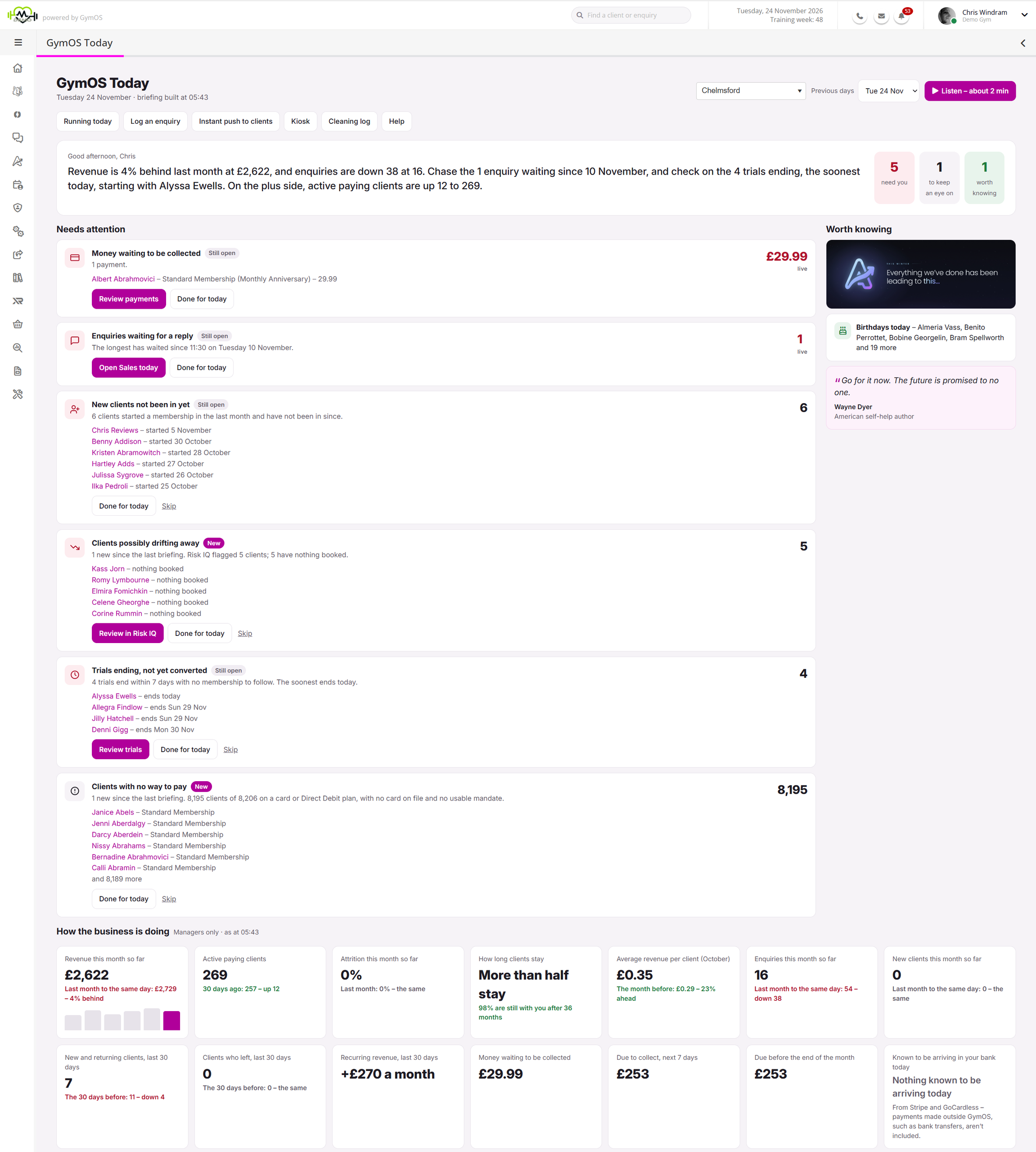
One briefing a day
Early each morning, GymOS prepares one briefing for your gym. The dashboard, the email, the spoken briefing and the app all read that same briefing, so they never disagree.
- GymOS calculates every figure. AI writes the short summary and the spoken script from those figures, and never works out a figure itself.
- A figure GymOS does not hold is shown as “Not available”, never as a zero.
- The briefing covers the whole gym. The venue picker changes the day’s lists, not the briefing.
- Morning figures, live counts. The briefing and the business figures are as at the time shown at the top. The money and enquiry counts on their Needs attention cards update during the day.
Until your gym’s first briefing has been made, the page says so, and the first one arrives early the next morning.
The dashboard, from the top
- Quoox alerts, in their own band, when there are any.
- The header: “GymOS Today”, today’s date and the time the briefing was made; the venue picker; Previous days (the last 30); and Listen.
- Quick actions: Running today, Log an enquiry, Instant push to clients (managers), Kiosk, Cleaning log and Help.
- Strongly recommended: setup that needs finishing, such as GoCardless or Sales Desk’s Getting started.
- The briefing: a greeting, two or three sentences on the day, and three counts – “need you”, “to keep an eye on” and “worth knowing”. Click a count to go to those cards.
- Needs attention, How the business is doing (managers) and Worth knowing, described below.
- The sections below: Running today, To do, People, Log an enquiry, Team noticeboard, and From GymOS – updates and articles. See The dashboard’s sections.
The layout is fixed. Each section opens and closes, and your browser remembers which you left open. Every section starts open except Log an enquiry.
Needs attention
The most important matters come first. Six show, then Show more. Each card says what it is, why it matters, names a few people where that helps, and is marked New or Still open.
| Card | Who sees it | What it means |
|---|---|---|
| Money waiting to be collected | Managers | Failed and overdue payments, including Direct Debits that failed after collection. Review payments takes you to the overdue payments list. |
| Enquiries waiting for a reply | Everyone, once Sales Desk is on | Enquiries nobody has answered, and the longest wait. Open Sales today. |
| Clients possibly drifting away | Managers, and the team for their share | Clients Risk IQ has flagged, at a score of 6 or your own Risk IQ threshold, whichever is higher. Review in Risk IQ. |
| New clients not been in yet | Managers, and the team for their share | Started a membership in the last month and not been in since. |
| Trials ending, not yet converted | Managers, and the team for their share | Trials ending within 7 days with no membership to follow, by the same rules as Trial Analysis. |
| People with injuries booked in today | Managers, and the team for their share | How many people, across how many sessions. |
| Clients with no way to pay | Managers | On a card or Direct Debit plan, with no card on file and no usable mandate. |
Done for today and Skip are your own, for today only, and each has Undo. They change nothing for anyone else. Skip is not offered on the urgent cards (money and enquiries). A card also closes itself when the data shows the matter has been dealt with.
How the business is doing
Managers only. Headed with the time the briefing was made, the tiles show this month so far against last month to the same day, or the last 30 days against the 30 before:
- Revenue this month so far, with a small trend.
- Active paying clients, against 30 days ago.
- Attrition this month so far.
- How long clients stay – the point at which half of new clients have left, or “More than half stay”.
- Average revenue per client, for the last complete month.
- Enquiries and new clients this month so far.
- New and returning clients, and clients who left, in the last 30 days.
- Recurring revenue gained or lost in the last 30 days.
- Money waiting to be collected, due in the next 7 days and due before the end of the month.
- Money known to be arriving in your bank today, from Stripe and GoCardless. Payments made outside GymOS, such as bank transfers, are not included.
Green is good news and red is not. For attrition and leavers, lower is better. “About the same” has no colour. If Business Analysis is not set up, one card says so and lists the figures it would give, with Set up Business Analysis.
Worth knowing
Good news and useful notes, up to four, such as birthdays today and matters resolved since yesterday. Managers also see Not yet activated: GymOS features your gym can switch on and has not, each with Activate. A daily quote closes the section, the same for everyone that day.
The morning email
- Who gets it: your gym’s default manager, and any other manager who chooses it. Choose it in the administration portal’s settings, under GymOS Today, or for yourself with Email me a summary of this each morning at the foot of the dashboard. Quoox support logins never receive it, and nor does a manager on your gym’s unsubscribe list.
- When: 30 minutes before your gym’s earliest venue opening that day, otherwise at your work-day start, otherwise 07:00, and never before 05:30.
- What it holds: the summary, a link to listen, what needs you today, six business figures, Worth knowing, the daily quote and a link to view it in your browser.
- It is not filed in Conversations, the Message Centre or sent history, and a reply does not reach your Conversations.
- It may name a few clients, but never anyone with an injury – only how many. Please do not forward it.
- To stop it, use Stop these emails at its foot. Your dashboard is not affected.
Listen
Listen plays a spoken briefing of two to three minutes, from the dashboard, the app or the email. It greets you by your first name, at your gym’s local time of day. It never names a client: it gives counts, what to do and which assigned coach should act. Gyms in Ireland hear an Irish voice, and everyone else a UK English voice.
The email’s link needs no login, so it works straight from your inbox. It cannot be guessed, stops working for someone who is no longer a manager, and covers roughly the last month. Treat it as you would the email.
In the FitnessHub app
Staff see a GymOS Today tile on the Home page, saying how many things need them, for example “6 things need you today”. It opens the day’s briefing, Listen, Needs you today, How the business is doing (managers) and Worth knowing. Pull down to refresh. The app is for reading: Done for today, Skip and the payment actions are in the administration portal.
Who sees what
| Managers | Your team | The email | Listen | |
|---|---|---|---|---|
| Business figures and money | Yes | No | Six figures | Yes, in words |
| Clients by name | Yes | Their share | A few | Never |
| People with injuries, by name | Yes | Their share | A count only | A count only |
A team member’s share is their own assigned clients and any client with no assigned coach, so nobody falls between coaches. For injuries, it also includes the people in the sessions they coach. Birthdays are the whole gym’s.
Overdue payment actions and the instant push to clients are for managers only. On the classic dashboard any employee could use them.
The classic dashboard
If you need time with the change, Switch to the classic dashboard at the foot of the page takes you back to the previous dashboard, until 1 March 2027. Switch to GymOS Today returns you. The choice is yours alone, and the classic dashboard is unchanged.
Common questions
Can I go back to the old dashboard?
Yes, until 1 March 2027. Use Switch to the classic dashboard at the foot of GymOS Today.
Why does a figure say “Not available”?
GymOS does not hold that figure for your gym, or Business Analysis needs setting up. It is never shown as a zero.
Why doesn’t a morning figure match what I see now?
The briefing’s figures are as at the time shown at the top. The money and enquiry cards update through the day.
Can my team see our revenue?
No. The business figures and money are for managers.
Does AI work out my figures?
No. GymOS calculates them, and AI only puts them into words.
Is it safe to forward the morning email?
Please don’t. It holds your business figures and may name clients.