
The dashboard widgets
The Dashboard provides an overview of your business today, filtered by a specific venue. The venue may be changed by selecting an alternate venue from the drop-down list at the top of the dashboard.
The GymOS administration dashboard consists of several widgets. Each of these is a mini-block of functionality.
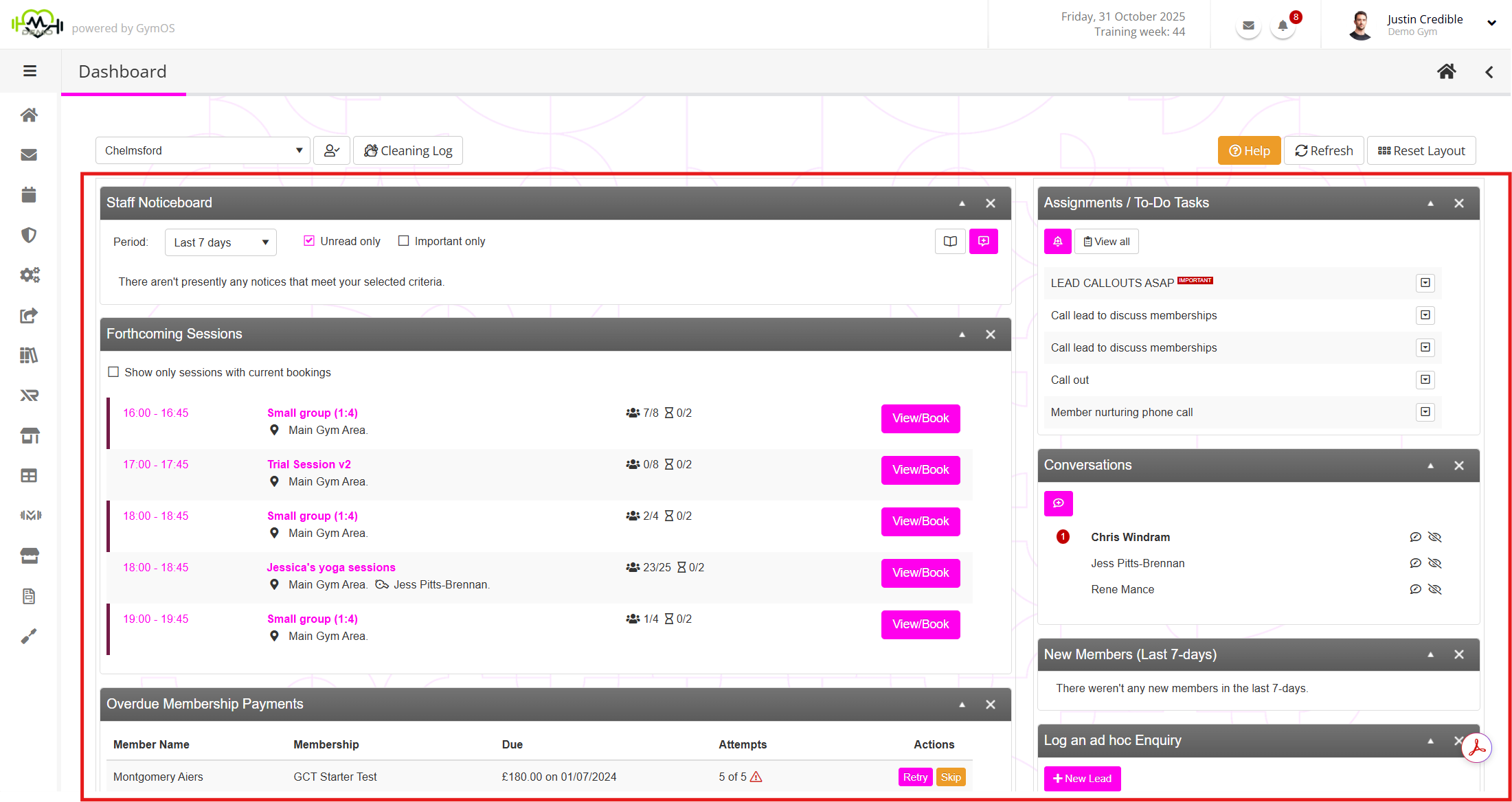
Widgets can be moved between different areas on the dashboard by dragging and dropping them. Some of the larger widgets are restricted to the wider columns and cannot be transferred to the narrower columns.
You can refresh the data on the screen by clicking the Refresh button. Similarly, the layout can be reset to the default by clicking the Reset Layout button.
Widgets may be collapsed and expanded using the and icons. Where provided, a widget may be closed by clicking on the icon. Widgets that have been closed may be recovered by clicking the Reset Layout button.
Widgets
The current widgets available for the dashboard comprise:
Staff Noticeboard
The staff noticeboard is a convenient place to share information with team members. This might be information about a given member that it is essential they know, or an update on when the showers are going to be fixed, etc. Learn more…
Forthcoming Sessions
The forthcoming sessions widget provides an at-a-glance view of the sessions scheduled for the remainder of the day, for the selected venue. Learn more…
Assignments/To-Do Tasks
The assignments/to-do tasks are specific to you as the logged-in user. It shows the list of tasks or duties that you have been assigned and that you need to review and/or undertake. Learn more…
Conversations
The conversations widget provides a place where you can communicate with other team members in a “chat like” environment. Learn more…
Overdue Membership Payments
The overdue membership payments widget brings to your immediate attention members with overdue membership fees. Learn more…
New Members (Last 7-days)
All employees should be aware of new members, and the new members widget provides an easy-to-view list of the names of those members that have been signed up within the last 7 days. Learn more…
Pending FitnessHub Store Orders
Non-electronic (I.e. physical items) ordered from the FitnessHub Store need to be processed manually. The Pending FitnessHub Store Orders widget provides the location for determining those orders that require fulfilling, and to action them accordingly. Learn more…
Log an ad hoc Enquiry
If a lead walks through the front door or calls up, their details should be immediately logged. The Log an ad hoc Enquiry widget provides an easy method for doing this. Learn more…
Forthcoming Marketing Appointments and DropSlot Consultations
Within this widget, you can see the forthcoming marketing appointments you have scheduled (sessions of the type ‘marketing’), along with consultations and appointments that have been booked using the DropSlot appointment booking functionality. Learn more…
Forthcoming Employee Shifts
It is useful for your team to be able to see who is coming on shift and when, so they know who they are working with on a given day. The forthcoming employee shifts widget gives them this insight. Learn more…
Member Birthdays
Everybody knows that celebrating your members’ birthdays is a crucial aspect of building community and fosteringbonds with your members. The member birthdays widget shows you those birthdays coming up soon. Learn more…
Send an Instant Push Broadcast
It is effortless to send a push broadcast to all of your members using the Send an Instant Push Broadcast widget. Learn more…
GymOS Updates
The GymOS Updates widget provides a list and brief summary of the latest updates performed to the GymOS system. Learn more…
Recent Quoox Articles
From time to time, we might highlight articles that may be of interest to our customers. These are presented in the Recent Quoox Articles widget. Learn more…
Recent toast notifications
It is inevitable that, from time to time, you may miss one or more pop-up toast notifications. This widget shows the most recent toast messages sent for the current day. Learn more…