Member tab: Calls & Consultations
The Calls & Consultations tab on the member record is where you can view a member’s forthcoming DropSlot bookings, issue or cancel an invitation, and issue or cancel an invitation schedule. You can also view any calls that have been scheduled with that member and any recordings or transcripts that have been produced from those calls that used Konduo.
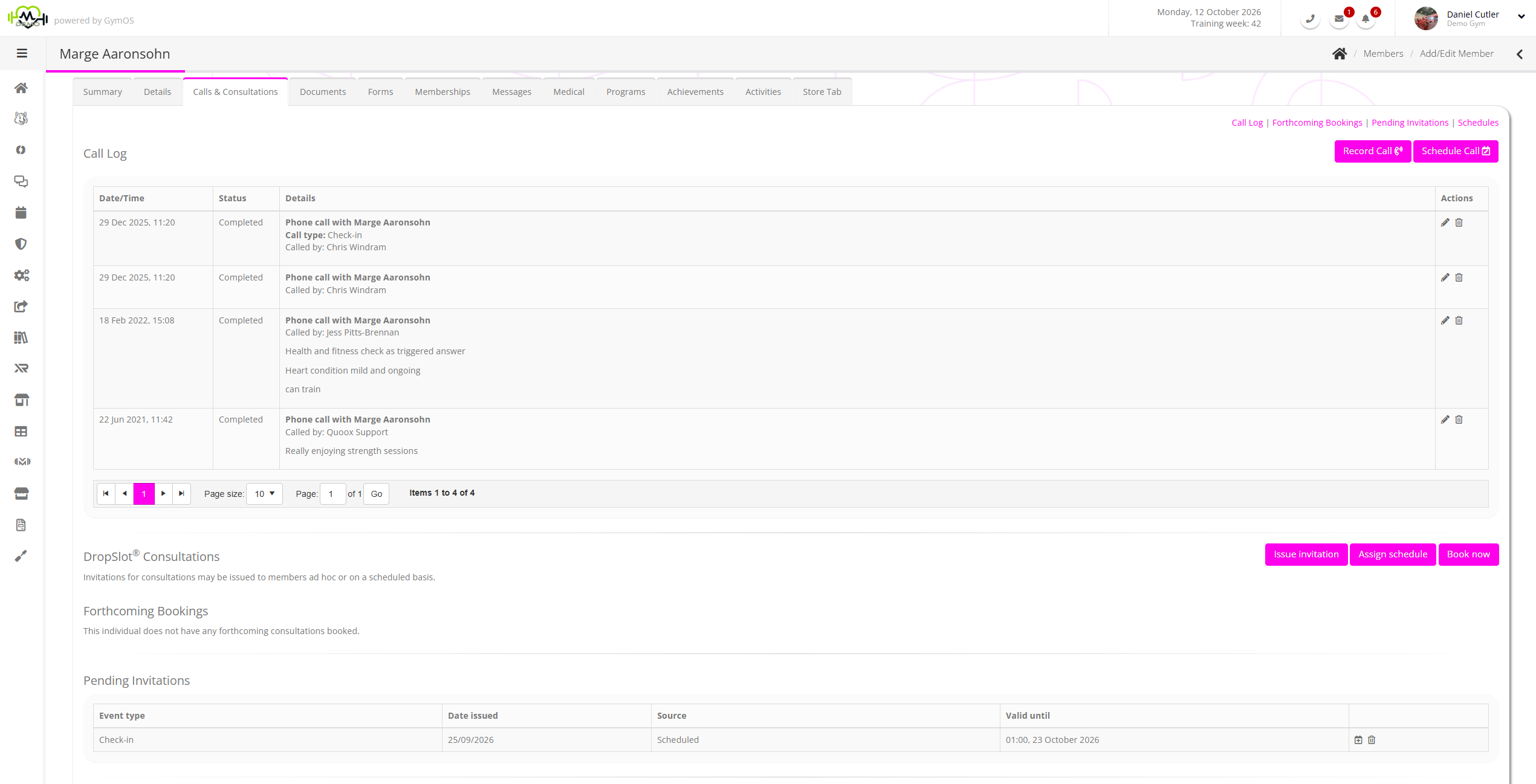
The page is split into five distinct sections:
Call log

Every Konduo call appears on the member’s or lead’s record, under Call log.
By clicking on the Record a call button, you can then log a call that you may have had with the member from outside of GymOS. This enables the coach to keep every discussion with the member in one place. You’ll be able to set the date and time that the call occurred, the call type and the journey point. You will also be able to include further details of the call in the text field at the bottom. By clicking Save, you ensure that this is recorded against the member’s profile.
By clicking on the Schedule Call button, the coach can set a reminder to call a specific member. With the ability to select a call type, who it’s being assigned to and what the call is going to be about.
Recordings & Transcripts

If your gym transcribes calls, the transcript and summary are usually ready a few minutes after the call ends. The summary is written as the call concludes. Calls shorter than 30 seconds are not transcribed.
If a summary could not be produced, the outcome says so and asks you to write it yourself.
Forthcoming Bookings

GymOS lists the future DropSlot bookings for the member.
An event may be viewed or edited by clicking the icon. It may be cancelled by clicking the icon.
It is possible to create a new consultation booking on behalf of the member by clicking the Book now button, and following the process outlined in the Creating a DropSlot booking for a member article.
Pending Invitations

GymOS lists the presently valid DropSlot invitations assigned to the member, showing their creation source, date of issue, and validity period.
A booking may be made using an allocated invitation by clicking on the icon. The process is as outlined in the Creating a DropSlot booking for a member article.
An invitation may be immediately revoked by clicking on the icon.
A new, ad hoc invitation can be issued to the member by clicking the Issue invitation button. The process is as described in the Assigning an ad hoc DropSlot invitation to a member article.
Schedules
GymOS lists the DropSlot schedules currently assigned to the member, showing the number of invitations issued, as well as when the following scheduled invitation is set to be released.
A new schedule may be assigned by clicking the Assign Schedule button and following the process outlined in the Assigning a DropSlot schedule to a member article.
An existing assigned schedule may be cancelled by clicking the icon. Note: This does not revoke any current invitations that were issued by the schedule.