
Mobile App: Buddies
Using the Buddies Feature
The Buddies feature allows members to connect with friends, family, or training partners within the app. Adding someone as a Buddy enables the member to view that person’s booked sessions, making it easier to train together and book into the same classes.
This feature can be accessed from the My FitFile tab.
Accessing the Buddies Section
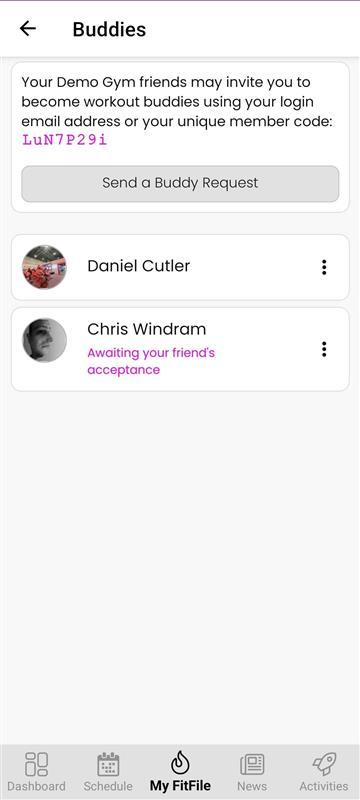
From the My FitFile screen, the member can tap on Buddies to open the Buddies page. Here, they will see:
- Their unique Buddy code
- Options to send a Buddy request
- A list of approved and pending Buddy requests
Sending a Buddy Request
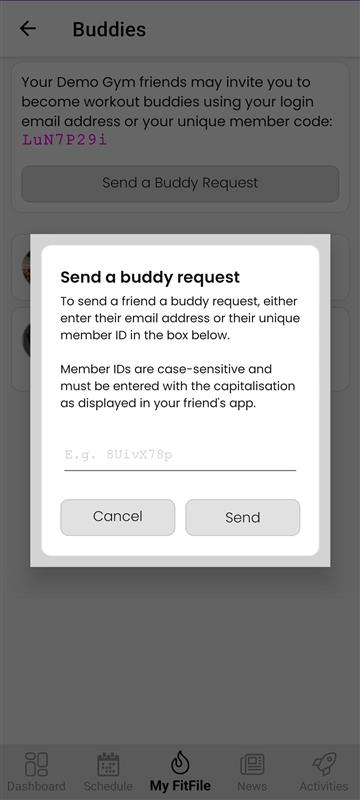
To add someone as a Buddy, the member can tap the Send a Buddy Request button. They will then be asked to enter either:
- The other members email address, or
- Their unique Buddy code
Once entered, the member can send the request. The request will remain pending until the recipient approves it.
Approving and Viewing Buddies
After the other member approves the request, they will appear in the member’s Buddies list. From here, the member can:
- Tap on their Buddy’s name
- View which sessions that Buddy has already booked
This makes it easy to coordinate training, see which classes friends are attending, and book onto the same sessions.
Deleting a Buddy
If the member wishes to remove someone from their Buddy list, this can be done quickly and easily. They simply need to:
- Swipe left on the Buddy’s name
- Tap the red delete bin button that appears
The buddy will then be removed from the list.