
Mobile App: Progress Tracking (My FitFile)
Weight and Progress Tracking
The Weight and Progress Tracking feature allows members to log, review, and update their training achievements directly within the app. This helps them monitor improvements over time and keep an accurate record of their personal progress.
This section can be accessed by navigating to My FitFile and selecting Weight and Progress Tracking.
Using Filters to View Achievements
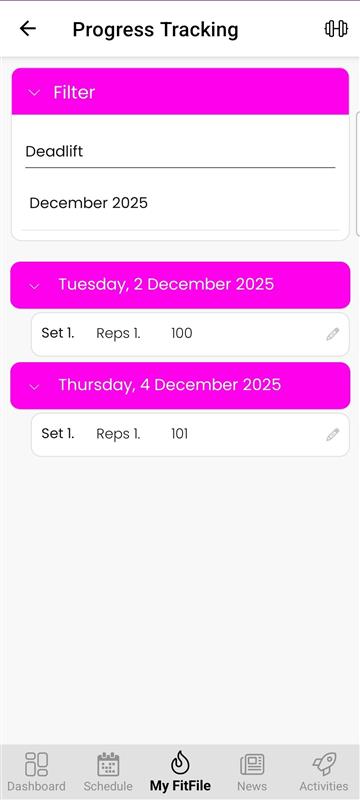
On the Progress Tracking screen, the member will see a pink Filter button. Tapping this opens two filter options:
- Achievement Type / Exercise – e.g., Deadlift, Squat, 100m Sprint
- Month and Year – Allows the member to select a specific time period
For example, selecting Deadlift and December 2025 will display all deadlift achievements logged during December 2025.
Each logged entry will show:
- Number of sets
- Number of reps
- Weight or result recorded
- Date of achievement
Editing an Achievement
If the member needs to amend a previous entry, they can do so by tapping the edit pencil on the achievement. This allows them to update:
- Sets
- Reps
- Result (e.g., weight lifted, distance, time, etc.)
Deleting an Achievement
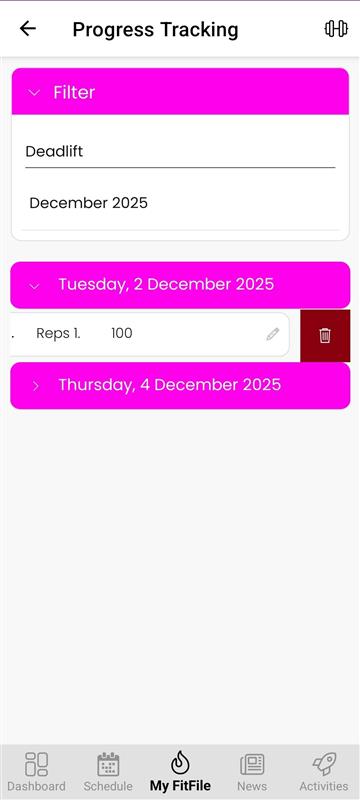
To delete an existing record, the member can:
- Swipe left on the entry
- Tap the red delete bin icon that appears
This will permanently remove the selected achievement.
Adding a New Achievement
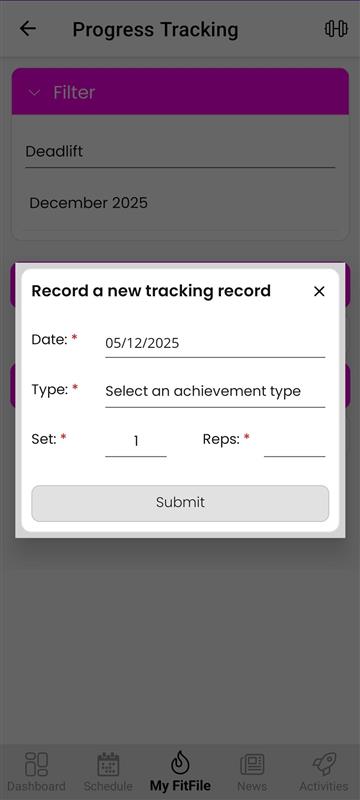
To log a new result, the member can tap the dumbbell located in the top-right corner of the screen. They will then be asked to enter:
- Date
- Achievement type / exercise
- Number of sets
- Number of reps
- Result (e.g., weight lifted)
Once saved, the new entry will appear in their progress log.