
Switching a membership from credits to allowance
Many gyms sell “x classes per week” by having a membership issue credit packs on a regular cycle, for example 8 credits every month. A weekly allowance says the same thing far more simply, and is easier for your members to understand. If you would like to move a membership like this from credits to allowances, GymOS can do it for you in one step, moving the membership’s members and their bookings across at the same time. A membership that issues several credit packs, for example one for strength classes and one for Open Gym, becomes a membership with an allowance for each.
If you are not yet familiar with allowances, please read Allowance principles first.
Which memberships can switch
A membership plan can be switched when:
- it issues one or more credit packs, and each of them issues credits;
- each credit pack is valid for at least one session type and at least one venue;
- its members’ memberships renew (or run for more than one period), so there is a regular cycle to work from;
- it is not unlimited, and doesn’t already have a weekly allowance;
- at least one of its credit packs works out at about a class a week or more; and
- the credit packs that would become allowances don’t overlap: no session type is in two of them, and a pack valid for every session type isn’t beside another.
Each credit pack that works out at about a class a week or more (rounded to the nearest whole class, so half a class a week rounds up to 1) becomes an allowance of its own. A smaller pack stays as credits, issued as before, and pays for anything the allowances can’t.
Memberships that can switch are labelled Can switch to allowance in the Membership Plans list (see Membership plans). Click the label to go straight to the membership’s Deliverables tab. A membership that can’t switch shows no offer; it carries on with its credits exactly as before, and you can still set up an allowance on it yourself (see Configuring a membership allowance).
Before you start
GymOS does not tell your members about the change. Their credits from the membership disappear and are replaced by weekly allowances, so please let them know yourself, ideally before you switch. Tell them, too, to update to the latest version of the FitnessHub app, which shows their weekly allowances.
Switching a membership
Open the membership plan and select the Deliverables tab. At the top, GymOS tells you what the membership issues today, and roughly how many classes a week that is, for example “This membership issues 8 credits every month from “8 classes”. You can switch it to a weekly allowance instead – about 2 classes a week – and move its 24 members across in one go.” A membership with several credit packs names each pack that would become an allowance, and any that would stay as credits.
Click Convert to a weekly allowance… (or Convert to weekly allowances…) to open the conversion window. Nothing changes until you confirm it.
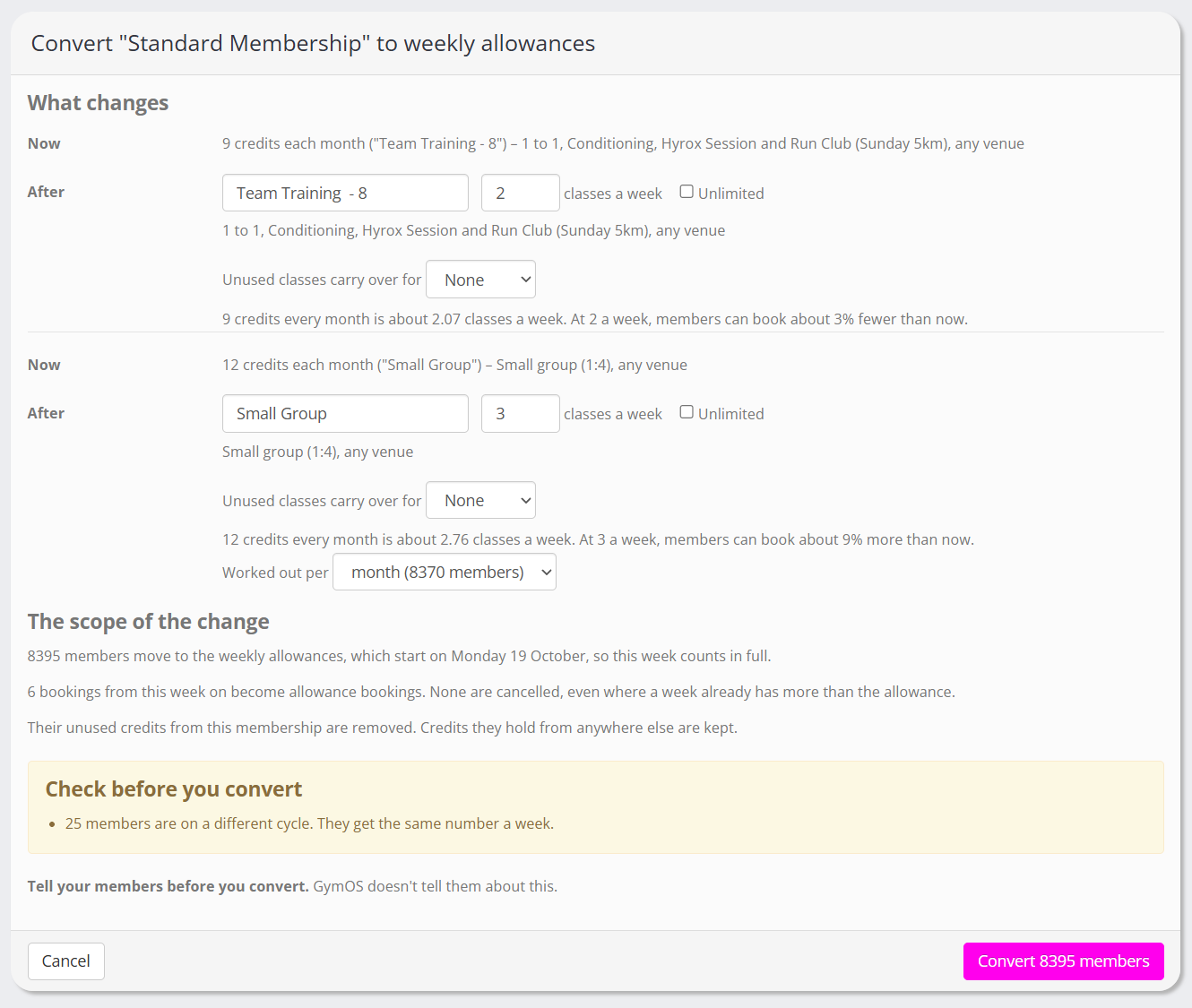
What changes
For each credit pack that would become an allowance, Now shows what the membership issues today, and the session types and venues the pack covers. After shows the weekly allowance that would replace it, covering the same session types and venues. Each allowance takes its pack’s name, which you can change: members see it beside the allowance when a membership has more than one.
GymOS suggests a number of classes a week for each, worked out from the credits issued each cycle. A month counts as about 4.35 weeks, so 8 credits a month is about 1.84 classes a week, which rounds to 2. A line beneath tells you how the number you choose compares with what members can book today, for example “At 2 a week, members can book about 9% more than now.” You can change the number, from 1 to 50, and the comparison updates as you type. Or tick Unlimited, which GymOS suggests for a pack that works out at 7 or more classes a week.
You can also choose, for each, whether unused classes carry over, and for how long (None, or 1 to 4 weeks). If the membership’s members are on different cycles, for example some monthly and some every four weeks, choose the cycle to work the numbers out from. The suggestion is based on the cycle held by the most members.
Any credit pack too small for an allowance is listed under Stays as credits: members keep being issued it, and its credits pay for anything the allowances can’t.
The scope of the change
- The allowances start on the Monday of the current week, so this week counts in full.
- Bookings from this week on that were paid for with credits from a pack that becomes an allowance become allowance bookings. None are cancelled, even where a member has already booked more classes in a week than the allowance gives. Those bookings stand; the member simply can’t book more that week on the allowance.
- Members’ unused credits from those packs are removed. Credits from a pack that stays as credits are kept, as are credits they hold from anywhere else, such as a pack bought in the store or credits you added for them. They still pay for classes the allowances can’t.
- Earlier bookings, before this week, are left exactly as they are.
Check before you convert
GymOS warns you about two things worth thinking about:
- Classes costing 2 credits or more in the next four weeks. On an allowance, every class counts as one, so these become relatively cheaper for members.
- Members on a different cycle from the one you chose. They get the same number of classes a week as everyone else.
If the membership’s credit packs overlap (the same session type in two packs, or a pack valid for every session type beside another), the window says which, and the membership can’t be converted until you change the packs so that each session type is in one only.
Converting
The window reminds you to tell your members before you convert, as GymOS doesn’t tell them. When you are ready, click Convert (the button says how many members will move).
For a membership with a few members, the switch happens straight away. For a larger one, it happens in the background, and the Deliverables tab shows its progress, for example “Moving members to the weekly allowances – 120 of 340 done.” Click Refresh to update it. If any members could not be moved, click Try again. When it has finished, the tab records when the membership was converted, by whom, and how many members moved.
After switching
- The membership has its weekly allowances, which you can adjust at any time on its Deliverables tab, like any other.
- The credit packs that became allowances are no longer issued by the membership, and members are no longer issued credits for them. The credit packs themselves are kept, so you can still sell them in the store or add them to clients. A pack that stayed as credits is issued as before.
- New members on the membership simply get the allowances.
- The switch is recorded in the event log, against the membership plan and against each member’s membership.
Changing your mind
Within 14 days of switching, GymOS support can undo the switch for you. Please raise a support request, naming the membership plan.
Undoing puts the credit packs back on the membership, and puts members’ credits, bookings and credit schedules back as they were before the switch. The weekly allowances are removed. Classes booked on the allowances in the meantime are paid for from the members’ restored credits where a credit can pay. Any that can’t be paid stay booked, and the Deliverables tab tells you how many, so that you can check them with the members.
After 14 days, you can still remove the allowances and add credit packs yourself, but members’ credits and bookings are not put back.
Common questions
Why doesn’t my membership show the offer?
It doesn’t meet one of the conditions above, most often because its memberships don’t renew, because no credit pack works out at a class a week or more, or because its credit packs overlap. You can still add allowances yourself, and remove the credit packs if the allowances replace them. Credits members already hold stay until they expire, and the allowance is used before them.
Will members lose classes they have already booked?
No. Every booking stands. Bookings from the current week on are simply paid for by the allowance instead of credits.
A member had credits left over. What happens to them?
Unused credits from the packs that became allowances are removed, because the allowances replace them. If you would like to honour them, you can add the member some credits yourself.
Do members have to do anything?
Nothing, other than updating the FitnessHub app. They book exactly as before; the payment choice reads Membership.
Does switching change what members pay?
No. Payment plans and members’ prices are not touched.