
Allowance principles
Most gyms sell their memberships as “x classes per week”. A weekly allowance says exactly that, and nothing more. You set it on a membership plan (for example, 3 classes a week, of chosen session types, at chosen venues), and every member on that membership can book that many classes in each week.
Allowances sit alongside credits, which are unchanged. Credits remain the right choice for gyms that need finer control, and they work well alongside an allowance as a top-up for extra classes.
Please take a few moments to review the fundamental principles of a weekly allowance, as summarised below.
The principles
- An allowance belongs to a membership plan. It sets the number of classes per week, the session types it covers, the venues it covers, and whether unused classes carry over. A membership plan has one allowance. See Configuring a membership allowance.
- Nothing is issued. There are no credits, no allocation schedule, no grace credits and no expiry dates. When a member books, GymOS counts the classes they have already booked in that week and decides there and then.
- The week is the class’s week, Monday to Sunday, in your gym’s local time. It is the week the class takes place in, not the week the booking was made. Members can book as far ahead as your schedule lets them see, as long as that week has classes left.
- One booking uses one class, whatever the class would cost in credits. A class that is free to everyone uses nothing.
- The allowance comes before credits. When a member books with their membership, GymOS tries, in order: an unlimited membership; a free class; the weekly allowance; and then credits. So once a week’s allowance is used, any valid credits the member holds pay for further classes automatically. The order is fixed: neither members nor staff can choose to use credits while the allowance can pay. Paying by card, where the class allows it, remains a separate choice.
- Part weeks are pro-rated. In a week when the membership is only active on some days (it starts, ends or is cancelled part way through the week), the allowance is reduced in proportion to the active days, rounded to the nearest whole class. For example, 3 classes a week with 4 active days gives 2. Paused days are not active days, so a pause reduces that week’s allowance automatically. A membership that starts on its first booking starts when that booking is made.
- Membership is judged at the date of the class. The allowance never pays for a class outside the membership’s dates, or during a pause, even if the booking is made while the membership is active.
- Carryover is optional. If you allow it, a week’s unused classes can be used for up to 1, 2, 3 or 4 following weeks. A class always uses its own week’s allowance first, and only then classes carried over from weeks that have already ended, oldest first. So booking ahead never uses up this week’s classes, and carried-over classes expire on a Sunday, when you said they would.
- Two memberships, two allowances. A member with two memberships that each have an allowance has each counted separately. A booking uses the membership ending soonest first.
- The class decides whether an allowance can be used. Each session type, schedule and session has a Can be booked with a weekly allowance option, ticked by default. Untick it for a class members should pay for separately.
- Unlimited comes first. An unlimited membership already covers every class, so an allowance on an unlimited membership is never used.
- Payment status does not affect the allowance, just as credits are issued regardless of whether the payment cycle is up to date. GymOS provides methods to suspend bookings, if required.
Waitlists, cancellations and pauses
- Waitlist. When a member joins a waitlist, GymOS checks that their allowance or credits would cover the class, but holds nothing. When a place becomes available (whether the member claims it, it is filled automatically, or staff move them to attending), GymOS decides again at that moment. If neither the allowance nor credits cover the class then, the member is not moved. Staff can still book them in by another method, such as complimentary.
- Cancelling on time gives the class back to the week it came from.
- A late cancellation or a no-show keeps the class as used, exactly as a credit would be, under your existing late cancellation rules. Staff can still refund it from the session’s bookings, using Refund credit or payment.
- When you cancel a class, members’ bookings are cancelled and their classes given back.
- Pausing or cancelling a membership. The existing options to cancel a member’s bookings during a pause, or after a membership’s cancellation date, cancel the bookings that this membership paid for, whether by its allowance or its credits. Bookings paid for by card, offline, complimentary or by another membership are left as they are. If you leave those options unticked, bookings already made stand.
Booking on a member’s behalf
When staff book a member onto a class, the Credits payment option uses the member’s membership in the same order: unlimited, then the weekly allowance, then credits. The booking summary says “{Member}’s membership covers this booking.” when the allowance pays.
Autobooks work in the same way: an autobook paying by Credits uses the weekly allowance first.
What members see
Members see the same in the FitnessHub app and on the member website. They need the latest version of the app.
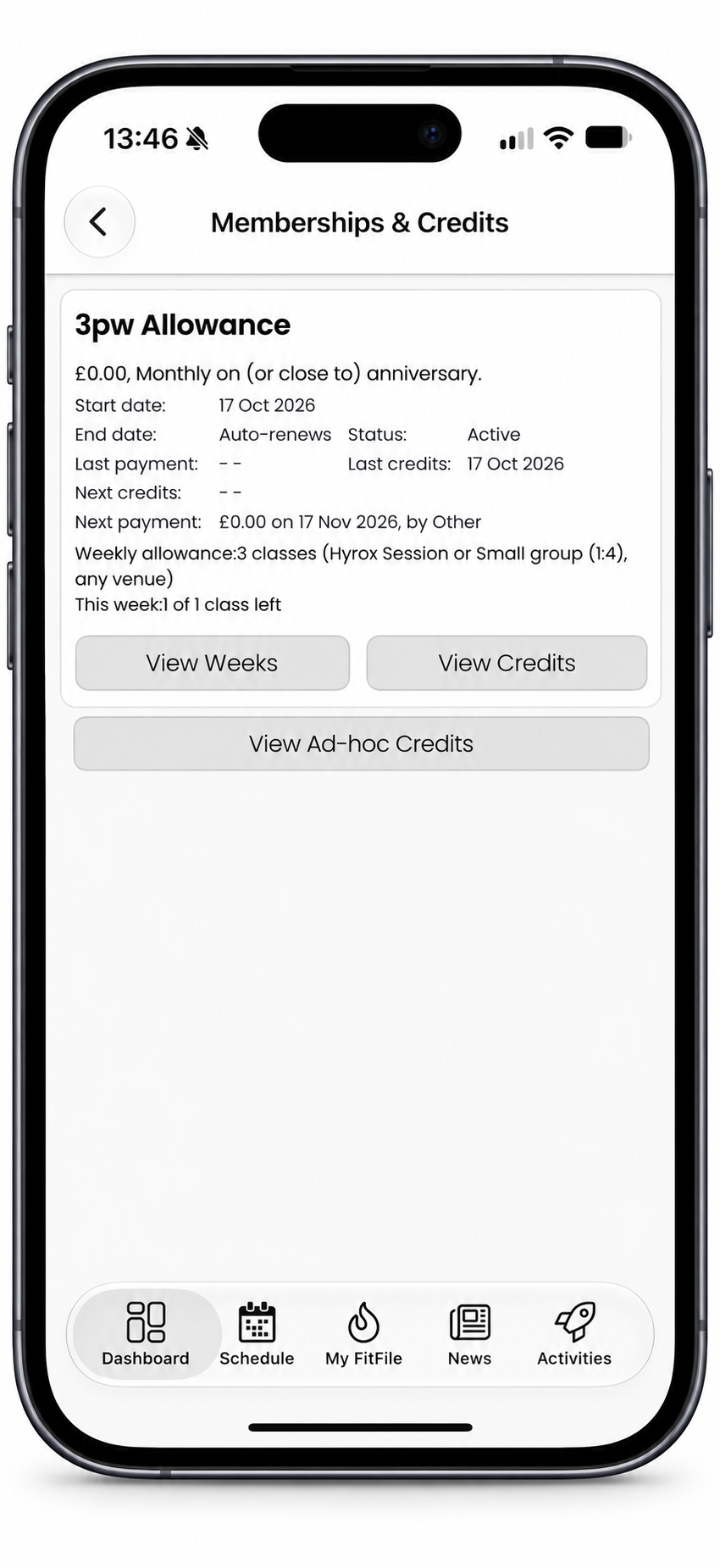
- Their memberships show the allowance (for example “Weekly allowance: 3 classes (any session type, any venue)”) and this week’s position (for example “This week: 2 of 3 classes left”, with any carried-over classes and how long they can be used for). View Weeks shows recent and coming weeks, with the classes booked in each, including any given back, cancelled late or carried over.
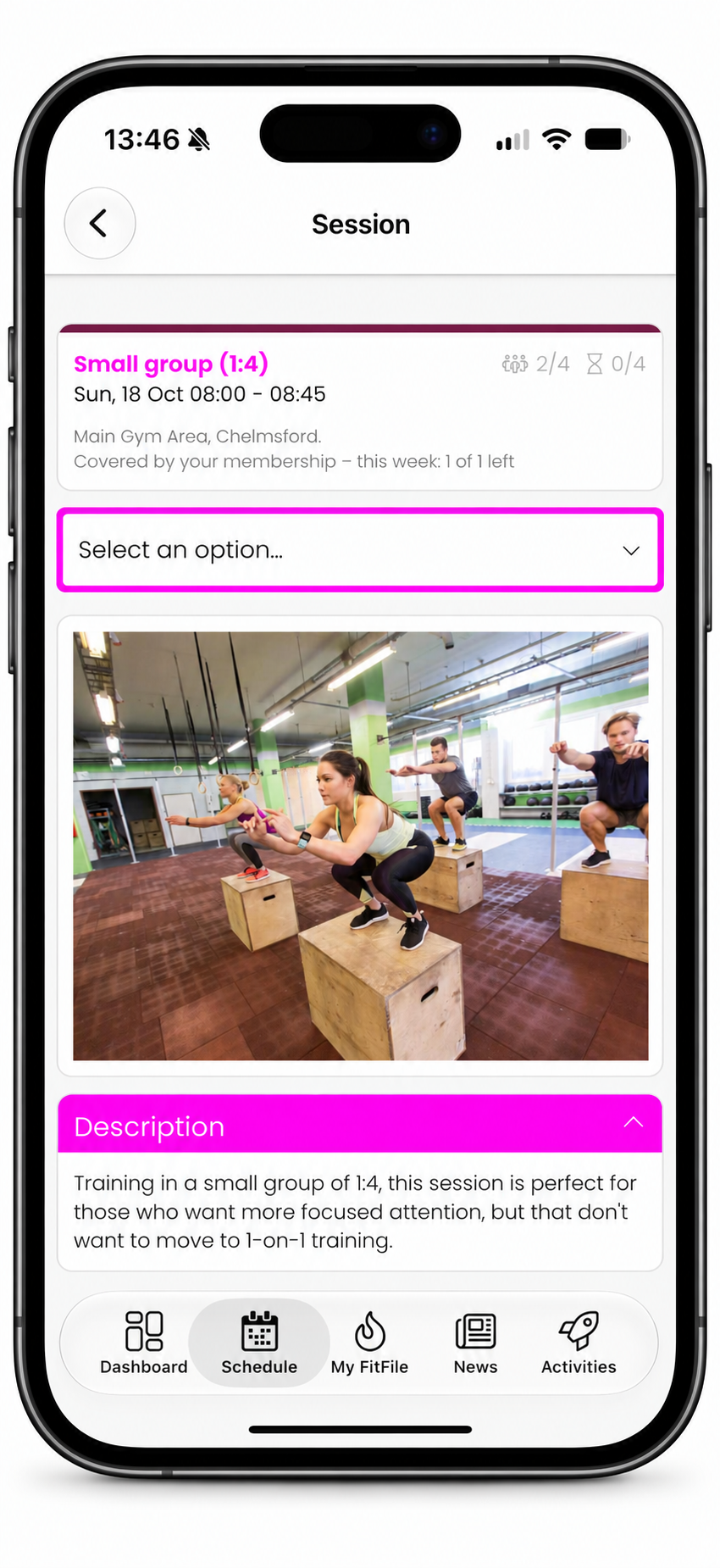
- A class says how it would be paid for, for example “Covered by your membership – this week: 2 of 3 left” or “Uses 1 credit”.
- When booking, the payment choice reads Membership: “Your weekly allowance, then your credits”.
- When a week is used up and no credits can pay, the member is told so, for example “You have used all of this week’s classes on your membership, and you do not have enough credits valid for this session.”
- On the app’s home screen, the This Week card shows “Available credits” without a number for a member with an allowance, as their classes are shown on their membership instead.
What staff see
- The member’s Memberships tab shows each weekly allowance and this week’s position, with View weeks for the same week-by-week detail the member sees.
- A session’s bookings have a Paid by column, which shows “Allowance” for a booking the allowance paid for (alongside, for example, “1 credit”, “Card” or “Complimentary” for others). The member’s activity shows the same.
- The booking eligibility check shows whether the allowance would pay for a class and, if not, why not, with each week’s classes. See Determining why a member cannot book a session.
- Ask Alphie understands allowances. You can ask why a member cannot book a class, how many classes a member has left, or whether your memberships and allowances are set up correctly.
Reports and automations
A booking paid for by an allowance is recorded with the payment method Allowance, and uses no credits. It therefore does not appear in credit reports, and does not prompt the “running out of credits” trigger.
Common questions
Should I use an allowance or credits?
If your memberships are sold as “x classes per week”, use an allowance: it is simpler to set up, and simpler for your members to understand. Use credits where you need more control, for example different numbers of classes for different session types, classes that cost more than others, or packs that members buy in the store.
I already sell memberships with credits. Can I move them to an allowance?
Yes. If a membership issues a single credit pack on a regular cycle, GymOS can switch it for you, members and bookings included. See Switching a membership from credits to an allowance.
Why does a member have fewer classes than usual this week?
Most often because their membership started, ended or was paused part way through the week, so the week is pro-rated. The member’s weeks (View weeks, on their Memberships tab) show each week’s allowance.
A member has booked more classes in a week than their allowance. How?
Bookings made before an allowance was reduced, or before a membership was switched from credits, are never changed or cancelled. They stand; the member simply can’t book more that week until it is back within the allowance (or carried-over classes allow it).
Why don’t my business metrics’ weeks match?
Allowance weeks run Monday to Sunday, as every booking screen does. GymOS’s business metrics count weeks from Sunday. In their own context, both are right.
I can’t find allowances anywhere.
Weekly allowances are being made available to gyms in stages. If you can’t see the Weekly allowance section on a membership plan’s Deliverables tab, they are not yet available to your gym.