
Switching Scribe on
Scribe is off until a manager activates it for your gym. Once it is on, every member of your team can record discussions with it in the FitnessHub app.
Before you start
- Only a manager can switch Scribe on or off. The Scribe section is on your settings page, which only managers can open.
- Your team needs the latest FitnessHub app. Scribe records on Android and iPhone.
- Decide how your gym will use it. Your gym is responsible for its recordings. Before you switch Scribe on, decide what you will record and why, how long you will keep recordings, and how you will tell your members. Our suggested wording for your privacy notice is in Scribe – tips, rules, privacy and troubleshooting.
Switching Scribe on
- In the administration portal, open your Settings page and scroll to the Scribe section, below Conversations and messaging.
- Press Switch Scribe on. A panel opens, headed Before you switch Scribe on.
- Read the terms. They set out what Scribe does and what your gym is agreeing to (see below).
- Tick both boxes: I understand that Scribe incurs additional usage charges, and I have read the above, and accept it on behalf of your gym.
- Press Switch Scribe on.
The section then reads Scribe is switched on, with who switched it on and when. Your team can start recording straight away.
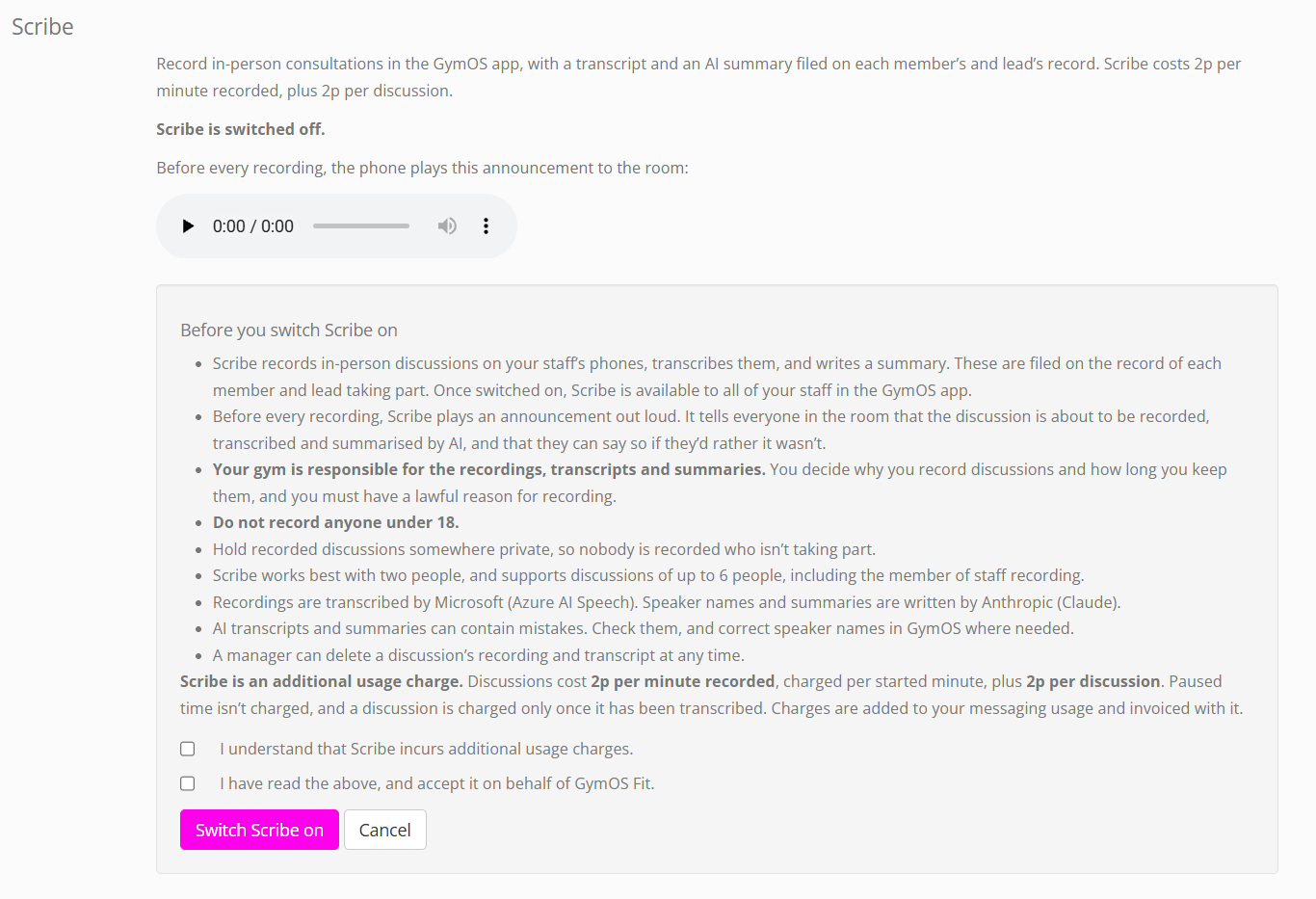
What you are agreeing to
The terms in the panel say, in summary:
- Scribe records in-person discussions on your staff’s phones, transcribes them and writes a summary, which are filed on the record of each member and lead taking part. Once it is on, it is available to all of your staff.
- Before every recording, Scribe plays an announcement out loud, so everyone in the room knows, and can say if they would rather it wasn’t recorded.
- Your gym is responsible for the recordings, transcripts and summaries. You decide why you record discussions and how long you keep them, and you must have a lawful reason for recording.
- Do not record anyone under 18.
- Hold recorded discussions somewhere private, so nobody is recorded who isn’t taking part.
- Scribe works best with two people, and supports discussions of up to six people, including the member of staff recording.
- Recordings are transcribed by Microsoft (Azure AI Speech). Speaker names and summaries are written by Anthropic (Claude).
- AI transcripts and summaries can contain mistakes. Check them, and correct speaker names in GymOS where needed.
- A manager can delete a discussion’s recording and transcript at any time.
The panel also shows Scribe’s prices, and explains that charges are added to your messaging usage and invoiced with it. See Scribe pricing.
Hearing the announcement
The Scribe section has a player for the announcement the phone plays before every recording, so you can hear exactly what your members will hear:
“This conversation is about to be recorded, transcribed and summarised by AI. If you’d rather it wasn’t, please say so now.”
It lasts about seven seconds and does not name your gym. Gyms in Ireland hear it in an Irish voice.
Switching Scribe off
Press Switch Scribe off in the Scribe section, and confirm. Your team can no longer start new recordings, but:
- every discussion already recorded stays on the records of your members and leads, where your team can still read it, and managers can still delete it;
- a recording in progress, or one still uploading from a phone, is allowed to finish.
You can switch Scribe on again at any time. You are asked to read the terms and tick both boxes again each time.
When the terms change
If we update Scribe’s terms, the Scribe section says so, and a manager presses Review the updated terms to read and accept them. Scribe carries on working in the meantime.
Common questions
I can’t see the Scribe section on my settings page.
Scribe is being released to gyms in stages, and is available in the United Kingdom and Ireland. If your gym is in either and you don’t see the section, contact our support team. See Raising a support request.
The section says Scribe’s prices are not set up for our country.
Contact our support team for further information. It may be that Scribe is not available in your country yet.
Can I choose which members of staff can use Scribe?
No. Once Scribe is switched on, it is available to all of your staff in the FitnessHub app. Who can play, correct and delete recordings depends on their role. See Introducing Scribe.
Do we need Konduo switched on to use Scribe?
No. Scribe and Konduo are switched on separately, and each works without the other.
If we switch Scribe off, do we lose our recordings?
No. Everything already recorded stays on your members’ and leads’ records.
Does switching Scribe on record anything by itself?
No. Nothing is ever recorded until a member of staff starts a recording on their phone, and the announcement has played.