
Adding/creating a new lead

A lead record is created as a result of a self-sign-up campaign, when it is ingested from a Meta form or webhook, when they schedule a lead DropSlot consultation, when an existing member makes a referral, or on an ad hoc basis, such as when a lead emails you requesting information about your services.
To manually add a new lead to the GymOS system:
- Access the lead listing by selecting Leads from within the Connect and Promote section of the main navigation menu.
- Click the Add button.
The Add Lead page will be displayed:
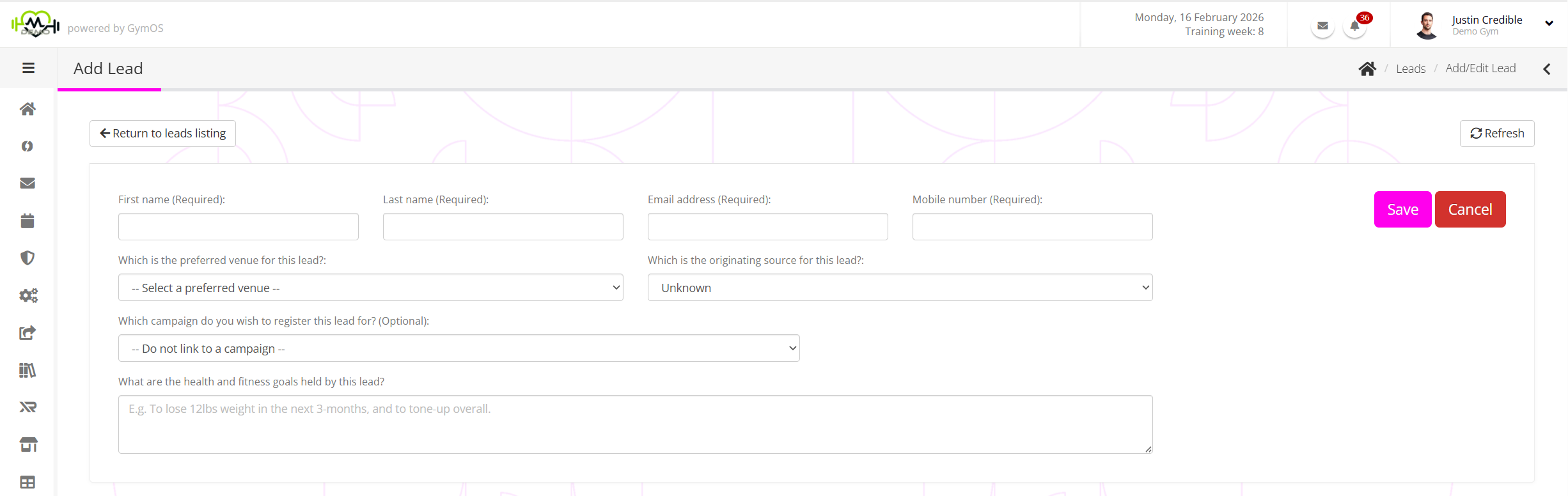
You must enter the lead’s first and last name, along with their email address and mobile number. You should also select the preferred venue for the lead.
Note: Within the GymOS system, each lead/member’s email and mobile number should be unique. GymOS will not allow you to add an email address or mobile number that is already in use.
For reporting purposes, we recommend that you select the original source for the lead. This will help you later assess which lead sources are working for you, especially if they are paid sources.
You may optionally assign an existing Campaign to a lead, by selecting the corresponding campaign from the drop-down.
Clicking Save will validate and create the lead record. If the data has been entered correctly, you will be taken to the new lead record.