
Nurturing programs
Nurture programs are among the most important tools in GymOS. They give you the ability to ensure that your leads and members are being communicated with (“nurtured”) on a recurring basis, and that they receive a consistent experience with your gym.

Nurture program listing
Nurture programs are accessed by selecting the Nurture option from within the Connect and Promote section of the main navigation menu.
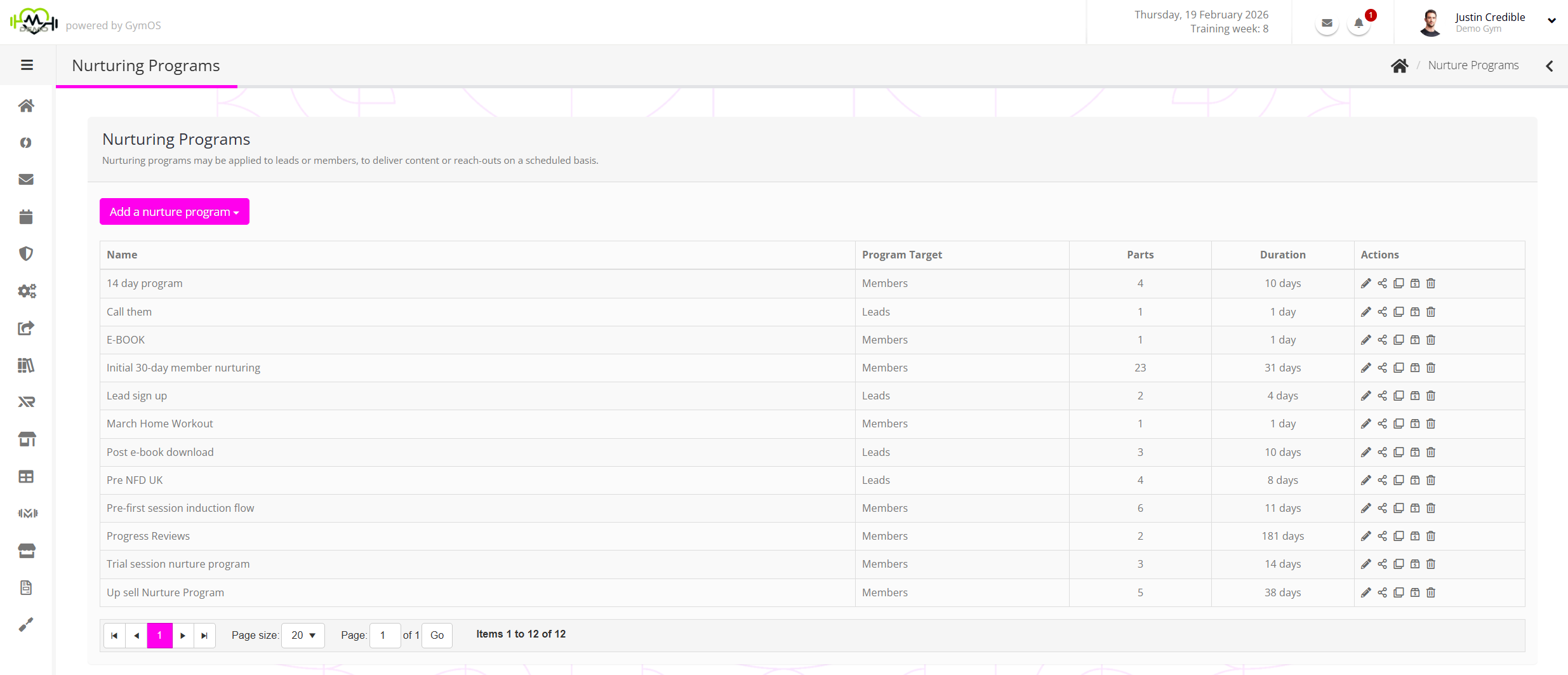
The listing shows all of the current nurture programs. The information provided for each program comprises:
- Name – the name of the nurture program.
- Program type – whether the nurture program is aimed at leads or members.
- Parts – the number of individual parts to the program.
- Duration – the number of days that the nurture program is scheduled to run (in its entirety).
- Actions, comprising:
- – Edit the nurture program.
- – Bulk assign the nurture program.
- – Clone the nurture program.
- – Delete the nurture program.
Creating a new nurture program
To create a new nurture program, select either Add a member nurture program or Add a lead nurture program from the Add a nurture program drop-down. Nurture programs are specific to their target audience, and therefore the type of recipient must be determined at the outset.
Check out the Creating a nurture program article for guidance on configuring your new program.
Allocating a nurture program
There are multiple methods for assigning a nurture program, both manual and automated. Details of these may be found in the Allocating a nurture program article.