
Awarding a recognition badge to a member
Four system badges are awarded automatically: “App User,” “Motivator,” “Photogenic,” and “Referral Hero.” You do not need to issue these badges manually.
All other badges are available for use at your discretion. Most are designed to be issued by triggers, using the “Award Badge” trigger action against any of the member triggers.
Additionally, you can award badges and/or publish announcements to the activity feed on an ad hoc basis. This is done by selecting Award badge or recognition from the drop down Actions menu for the member to whom you are awarding a badge, or about whom you are making an announcement.
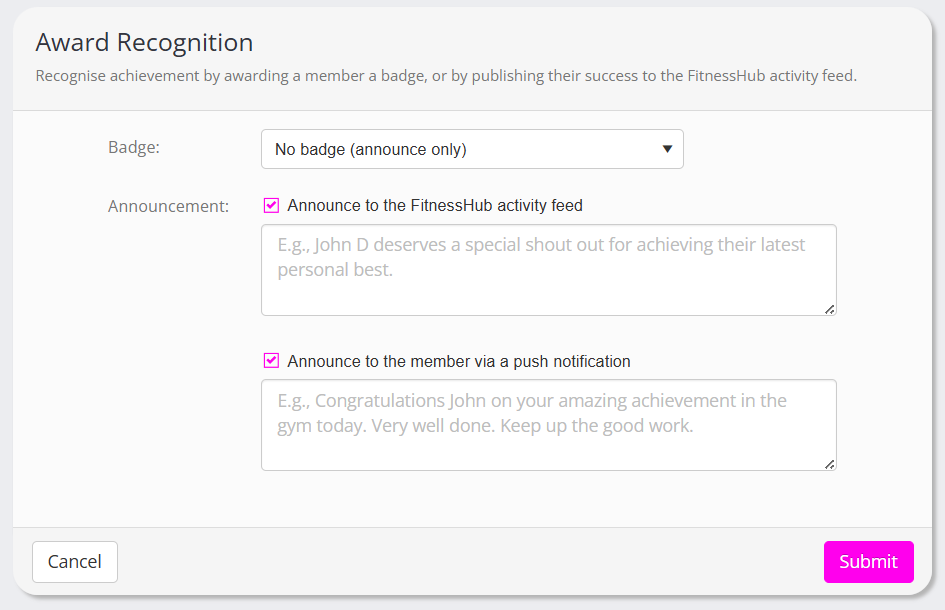
To award a badge on an ad hoc basis, select it from the dropdown list. Alternatively, if the announcement does not require a badge, select the “No badge” option.
When selecting a badge, the activity feed and push message boxes will pre-fill with the default messages. You can override these if you wish. If you are not awarding a badge, enter the activity feed message and/or member push notification manually.
Click the Submit button to process the award, or the Cancel button to abort.
Note: If you select to award a member a “once only” badge that they have already received, no action will be taken at all.