
In-flow booking registrations
In-flow registrations provide a zero-effort way of delivering a member sign-up workflow as part of a session booking when using the FitnessHub member web portal. They are designed for when you don’t need the flexibility of a custom workflow, and just want to get members registered with the least exertion.
Note: This workflow does not apply to the FitnessHub mobile app, as those who are yet to register as members do not have access to the mobile app, and therefore this workflow does not apply to it.
Enabling in-flow registrations for a session
In-flow registrations are enabled on a per-session basis, and propagate from the session schedule configuration which, in turn, propagates from the session type configuration.
To enable in-flow registrations, check the “Allow in-flow sign-ups” checkbox on the session. To enable in-flow for an entire session schedule, check the “Allow in-flow sign-ups” checkbox on the session schedule.

The workflow for existing and new members
The FitnessHub member portal is accessible without being logged in. When a user selects to book a session, if they are not logged-in, they are presented with a login form:
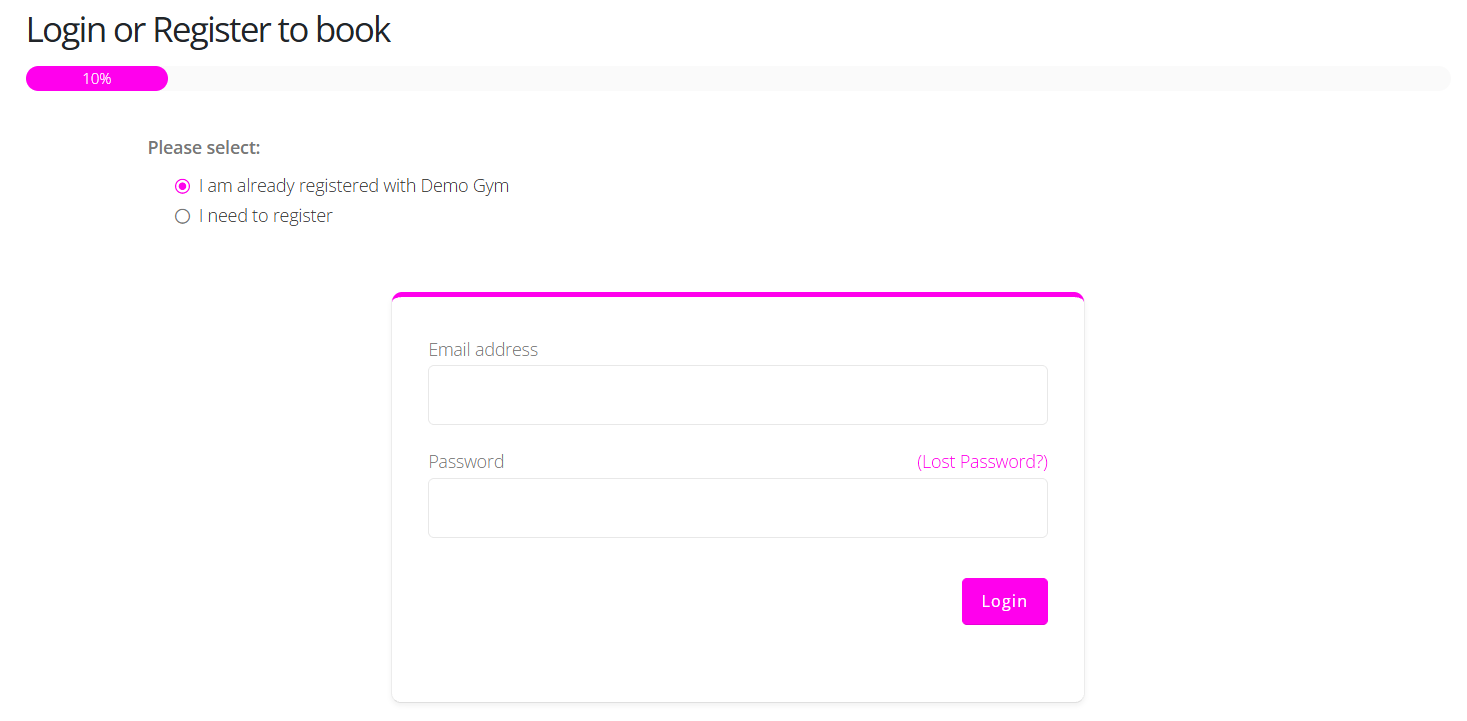
If the user is not yet a registered member, and they are accessing an in-flow enabled session, they may select the “I need to register” option. This will show the registration form:
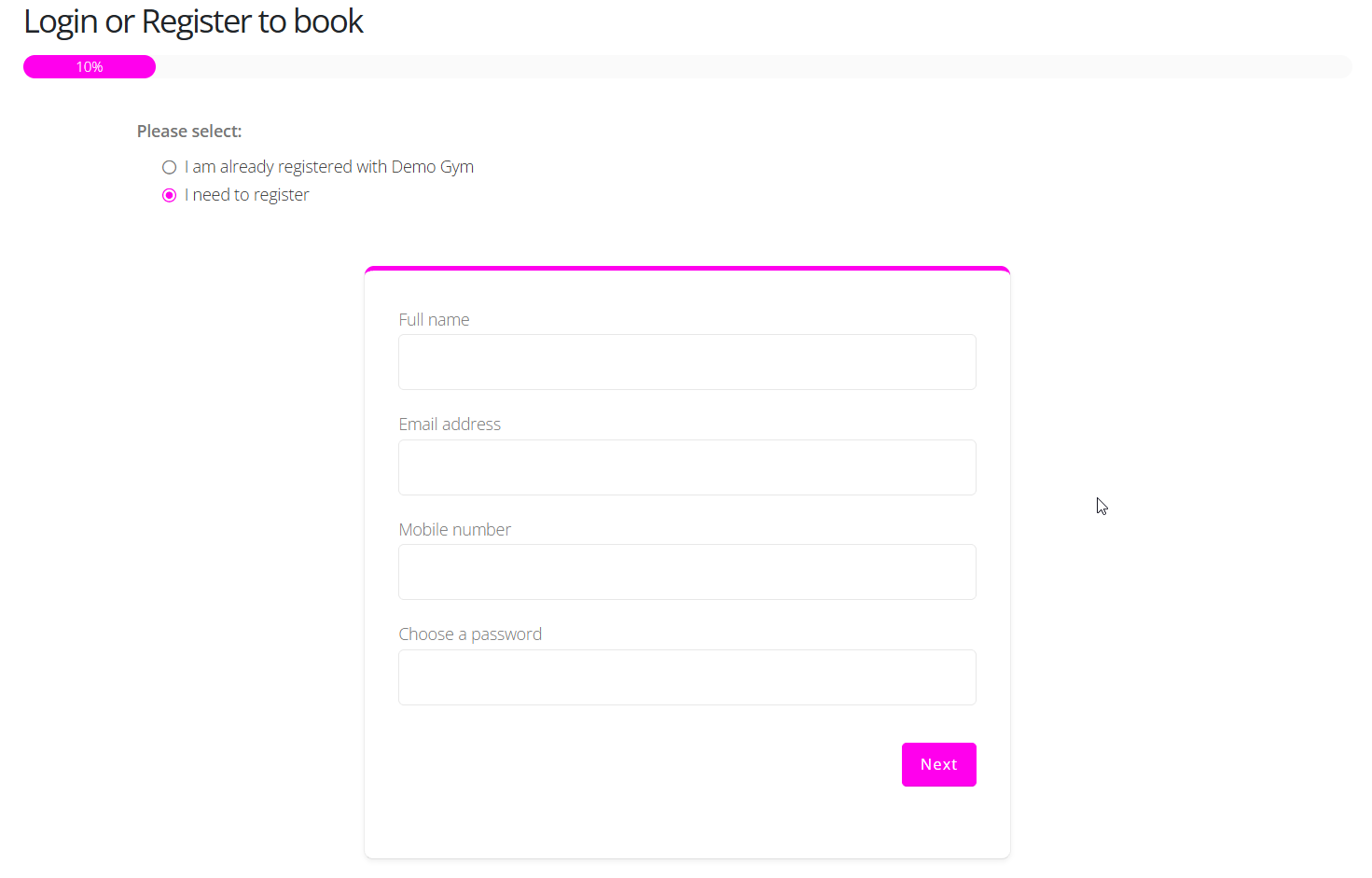
The new user may register by completing the four fields provided. They are registered associated with the venue of the session that they are seeking to book.
The usual existing lead and member checks are performed. If the information provided wholly matches a lead record, the lead will be converted to a member. If there is no match, a new member record will be created. A partial match will result in an error message being displayed.
Once the member is registered, they continue through the session booking process as per usual.
Note: Members arriving through this route are not sent the default member welcome email. They select their own password during the registration process.
Registration triggers
A new member registration through the in-flow process triggers two trigger types:
- Members > Creation and Conversion > Member sign-up
- Members > Creation and Conversion > Member sign-up via in-flow session booking
The second trigger may be filtered by session type, enabling it to fire only when a registration occurs as part of a booking for a given session type.
Important: The usual system wide member actions apply when a registration occurs, such as form assignment where you have enabled the forms to be allocated to every new member.

Configuration mistakes
Whilst enabling in-flow registration is a simple, single checkbox click, there are several scenarios that will prevent the flow from working sensibly. This is when you have competing requirements configured. Examples include:
- The session only being available via credits. A newly registered member will not have any, so they will be registered and then cannot book. This scenario is flagged with a warning on the session schedule listing.
- The session being configured for those members with active memberships only. A newly registered member will not have a membership, so they will be registered and then cannot book.
- Blocked by mandatory form requirements. If you allocate a form to a member upon creation and it is mandatory before they book, the member will be created, the form allocated, and then they will be stuck until they complete the form.
As always, it is strongly recommended that you test a workflow you plan to deploy prior to it being used by leads or members.
Prefilling the form for leads
The session detail page takes the usual pn, pe, and pm query string parameters, which you may use to pre-fill the form for leads.
It also supports the [[LEAD.CAMPAIGNPREFILL]] merge format, which you may insert prior to the “g=” parameter in the query string.
Example, if the URL for your session when viewed in the FitnessHub portal is:
https://members.demogym.co.uk/schedule/book/?g=31fff618-e293-480d-9190-a1d0edff1801
the URL you can send the following link in a mailout to leads, which will pre-fill their data:
https://members.demogym.co.uk/schedule/book/[[LEAD.CAMPAIGNPREFILL]]&g=31fff618-e293-480d-9190-a1d0edff1801
Note: The question mark is replaced by an ampersand (&), and the field is inserted immediately after the final slash (/).