
Switching a membership from credits to allowance
Many gyms sell “x classes per week” by having a membership issue a credit pack on a regular cycle, for example 8 credits every month. A weekly allowance says the same thing far more simply, and is easier for your members to understand. If you would like to move a membership like this from credits to an allowance, GymOS can do it for you in one step, moving the membership’s members and their bookings across at the same time.
If you are not yet familiar with allowances, please read Allowance principles first.
Which memberships can switch
A membership plan can be switched when:
- it issues exactly one credit pack, and that pack issues credits;
- the credit pack is valid for at least one session type and at least one venue;
- its members’ memberships renew (or run for more than one period), so there is a regular cycle to work from;
- it is not unlimited, and doesn’t already have a weekly allowance; and
- the number of classes a week it works out at is between 1 and 50.
Memberships that can switch are labelled Can switch to allowance in the Membership Plans list (see Membership plans). Click the label to go straight to the membership’s Deliverables tab. A membership that can’t switch shows no offer; it carries on with its credits exactly as before, and you can still set up an allowance on it yourself (see Configuring a membership allowance).
Before you start
GymOS does not tell your members about the change. Their credits from the membership disappear and are replaced by a weekly allowance, so please let them know yourself, ideally before you switch. Tell them, too, to update to the latest version of the FitnessHub app, which shows their weekly allowance.
Switching a membership
Open the membership plan and select the Deliverables tab. At the top, GymOS tells you what the membership issues today, and roughly how many classes a week that is, for example “This membership issues 8 credits every month from “8 classes”. You can switch it to a weekly allowance instead – about 2 classes a week – and move its 24 members across in one go.”
Click Convert to a weekly allowance… to open the conversion window. Nothing changes until you confirm it.
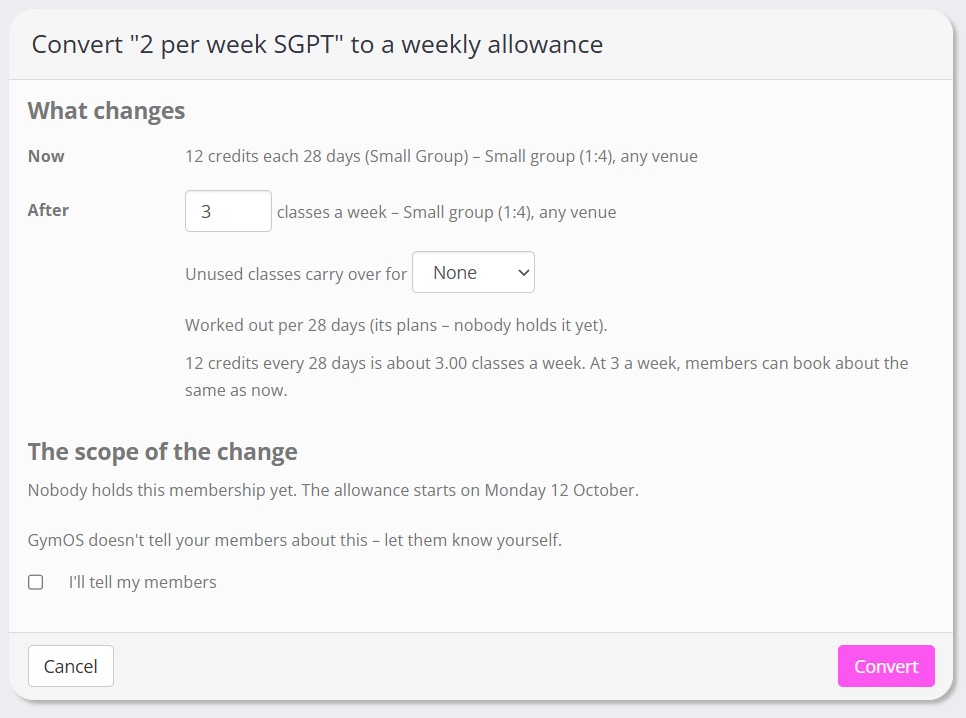
What changes
Now shows what the membership issues today, and the session types and venues its credit pack covers. After shows the weekly allowance that would replace it, covering the same session types and venues.
GymOS suggests a number of classes a week, worked out from the credits issued each cycle. A month counts as about 4.35 weeks, so 8 credits a month is about 1.84 classes a week, which rounds to 2. A line beneath tells you how the number you choose compares with what members can book today, for example “At 2 a week, members can book about 9% more than now.” You can change the number, from 1 to 50, and the comparison updates as you type.
You can also choose whether unused classes carry over, and for how long (None, or 1 to 4 weeks). If the membership’s members are on different cycles, for example some monthly and some every four weeks, choose the cycle to work the number out from. The suggestion is based on the cycle held by the most members.
The scope of the change
- The allowance starts on the Monday of the current week, so this week counts in full.
- Bookings from this week on that were paid for with the membership’s credits become allowance bookings. None are cancelled, even where a member has already booked more classes in a week than the allowance gives. Those bookings stand; the member simply can’t book more that week on the allowance.
- Members’ unused credits from this membership are removed. Credits they hold from anywhere else, such as a pack bought in the store or credits you added for them, are kept, and still pay for classes once the allowance is used.
- Earlier bookings, before this week, are left exactly as they are.
Check before you convert
GymOS warns you about two things worth thinking about:
- Classes costing 2 credits or more in the next four weeks. On an allowance, every class counts as one, so these become relatively cheaper for members.
- Members on a different cycle from the one you chose. They get the same number of classes a week as everyone else.
Converting
Tick I’ll tell my members to confirm that you will let them know, then click Convert (the button says how many members will move).
For a membership with a few members, the switch happens straight away. For a larger one, it happens in the background, and the Deliverables tab shows its progress, for example “Moving members to the weekly allowance – 120 of 340 done.” Click Refresh to update it. If any members could not be moved, click Try again. When it has finished, the tab records when the membership was converted, by whom, and how many members moved.
After switching
- The membership has a weekly allowance, which you can adjust at any time on its Deliverables tab, like any other.
- The credit pack is no longer issued by the membership, and members are no longer issued credits for it. The credit pack itself is kept, so you can still sell it in the store or add it to members.
- New members on the membership simply get the allowance.
- The switch is recorded in the event log, against the membership plan and against each member’s membership.
Changing your mind
Within 14 days of switching, GymOS support can undo the switch for you. Please raise a support request, naming the membership plan.
Undoing puts the credit pack back on the membership, and puts members’ credits, bookings and credit schedules back as they were before the switch. The weekly allowance is removed. Classes booked on the allowance in the meantime are paid for from the members’ restored credits where a credit can pay. Any that can’t be paid stay booked, and the Deliverables tab tells you how many, so that you can check them with the members.
After 14 days, you can still remove the allowance and add a credit pack yourself, but members’ credits and bookings are not put back.
Common questions
Why doesn’t my membership show the offer?
It doesn’t meet one of the conditions above, most often because it issues more than one credit pack, or because its memberships don’t renew. You can still add an allowance yourself, and remove the credit packs if the allowance replaces them. Credits members already hold stay until they expire, and the allowance is used before them.
Will members lose classes they have already booked?
No. Every booking stands. Bookings from the current week on are simply paid for by the allowance instead of credits.
A member had credits left over. What happens to them?
Unused credits from the membership are removed, because the allowance replaces them. If you would like to honour them, you can add the member some credits yourself.
Do members have to do anything?
Nothing, other than updating the FitnessHub app. They book exactly as before; the payment choice reads Membership.
Does switching change what members pay?
No. Payment plans and members’ prices are not touched.