Configuring a membership payment plan
A Membership Plan/Type has corresponding payment plans. At least one payment plan is required; additional plans may be added as desired. If you have not already read it, we suggest familiarising yourself with the GymOS Membership Principles.

For a small-group personal training gym, the most popular configuration is to charge a monthly membership fee and issue credits every 28 days (4 weeks). This approach provides a product sold on a weekly basis (E.g., 2 sessions per week) but charged monthly. GymOS’s flexibility also allows charging on a fixed date (E.g., 1st of every month) or on an anniversary date (E.g., every month on the anniversary of the membership’s commencement).
Payment Plans are administered from the Payment Plans tab, within the corresponding membership plan. Upon accessing the tab, the list of current payment plans is displayed.
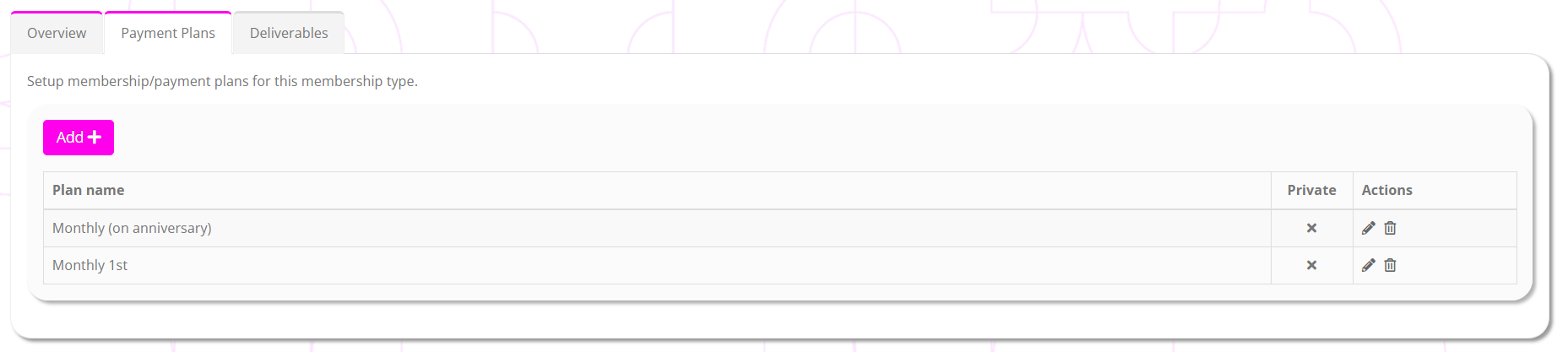
The information displayed for each payment plan comprises:
- Plan name – the name assigned to the payment plan. This is visible to members.
- Private – whether the plan is available for selection by members self-serving via a campaign or the store.
- Actions, including:
- Edit the payment plan
- Delete the payment plan
Deleting a payment plan does not impact any members to whom it is currently assigned. It remains functional, but ceases to be available for assignment.
To add a new payment plan, click the Add button on the payment plans tab. This will open the payment plan configuration screen. Existing plans can be edited by clicking the icon next to the corresponding payment plan.
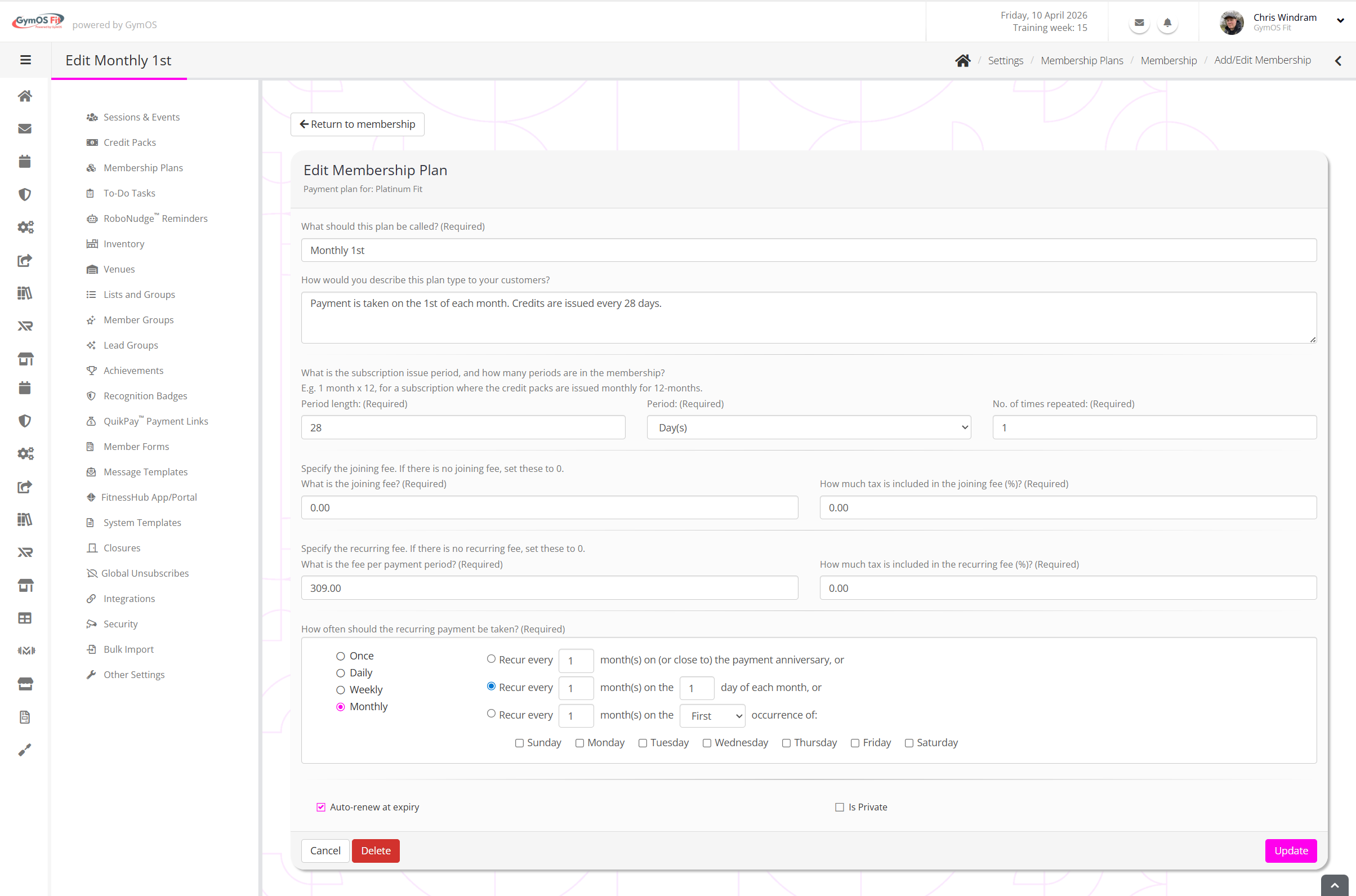
You should review and complete every field on the page.
What should this plan be called?
Provide a meaningful name for the membership payment plan. This will be visible to members. An example might be “Monthly, 1st”.
How would you describe this plan type to your customers?
Provide a meaningful description of the plan. This is shown to members in various parts of the GymOS product, such as campaigns.
An example might be “Payment is taken on 1st of each month. Credits are isssued every 28 days”.
What is the subscription issue period, and how many periods are in the membership?
Period length; Period; No. of times repeated
This is where you configure the frequency at which credits are issued and the minimum membership term. Remember, the payment schedule is separate to the credit issue schedule.
A typical example would be: Period length = 28. Period = Days. No. of times repeated = 13.
This would mean that credits are issued every 28 days, for a mimimum period of 13 x 28 days (= 1 year).
What is the joining fee?
If there is a joining fee, specify it here. If not, enter 0.00.
A joining fee is charged at the time the membership is added, as opposed to the subscription fee, which is first charged when the membership commences.
How much tax is included in the joining fee (%)?
Indicate the percentage tax included in the gross joining fee figure provided.
What is the fee per payment period?
Provide the amount that is to be charged upon the membership commencement and each recurring payment cycle.
How much tax is included in the recurring fee?
Indicate the percentage tax included in the gross recurring fee figure provided.
How often should the recurring payment be taken?
This is where you configure the frequency for the recurring payment. Popular choices for small group personal training include:
- Monthly: Recur every 1 month(s) on the 1 day of each month
- Monthly: Recur every 1 month(s) on (or close to) the payment anniversary
- Daily: Every 28 days
Auto-renew at expiry
Checking this box indicates that the membership plan continues to run after the minimum period, renewing each credit issue period length.
Is Private
Checking this box hides the payment plan from self-selection by a member.