
Widget: Forthcoming Sessions
The Forthcoming Sessions widget provides a view of the sessions that are scheduled for the remainder of the current day for the presently selected venue.
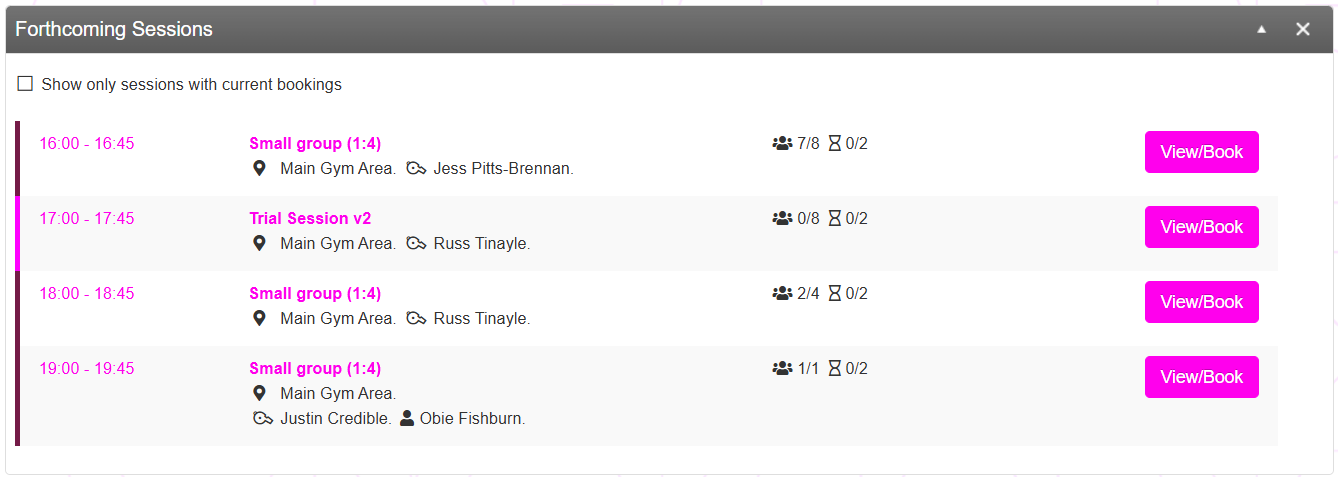
By default, the listing will show all sessions scheduled for the rest of the day. You can exclude those without any bookings by checking the Show only sessions with current bookings checkbox.
For each session, the following information (where available) is shown:
- Time of the session (start to finish)
- The session type
- The location of the session ()
- The lead coach assigned to the session ()
- The number of bookings and session capacity ()
- The number on the wait list and the wait list capacity ()
- The attendee (). This applies to single capacity sessions only
A colour bar at the left-hand side of the listing provides an at-a-glance view of different session types. These colours are assigned as part of the Session Type configuration.
Clicking the button opens the pop-up bookings window, where the list of attendees may be reviewed and administered.