Cleaning log
The Cleaning Log is an area within GymOS where you can record that cleaning activity has been undertaken.
A new log entry is created by clicking the Cleaning Log button at the top of the GymOS dashboard. Upon clicking the button the entry pop-up window is displayed:
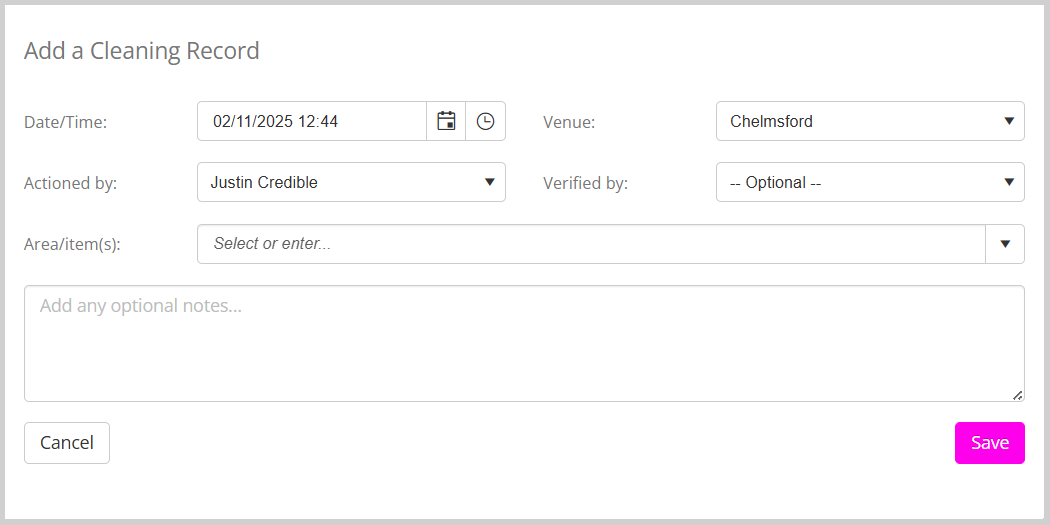
By default, the current date and time, along with your name, are selected as the person who is taking the action. You can override these as needed. The venue is populated from the chosen venue on the dashboard, but this can also be overridden.
The Area/Item(s) entries are populated from the settings configured in Lists and Groups.
To add a cleaning log entry:
- Complete the required fields.
- Click the Save button.
Viewing the Cleaning Log
The cleaning log may be reviewed within the Reporting section of GymOS.
The Business > Cleaning Log report provides access to all recorded cleaning activity. It may be refined by date range, venue, and/or employee.
As per all reports, it is output in Excel XLSX format, where you may filter or process the data further.