
Configuring a membership allowance
A weekly allowance is the simplest way to sell “x classes per week”. You set it on a membership plan, and every member on that membership can book that many classes in each week. There are no credits to issue, no credit packs to create and no expiry dates to get right.
A membership plan can have one allowance, or several: for example, “2 strength classes a week” and “unlimited Open Gym” on the same membership, each for its own session types.
If you are not yet familiar with how an allowance works, we suggest taking a few minutes to read Allowance principles first.

Adding a weekly allowance to a membership plan
Allowances are set on the Deliverables tab of a membership plan record. If you are creating a new membership plan, save its basic details first (see Creating a new membership plan); the Deliverables tab then appears.
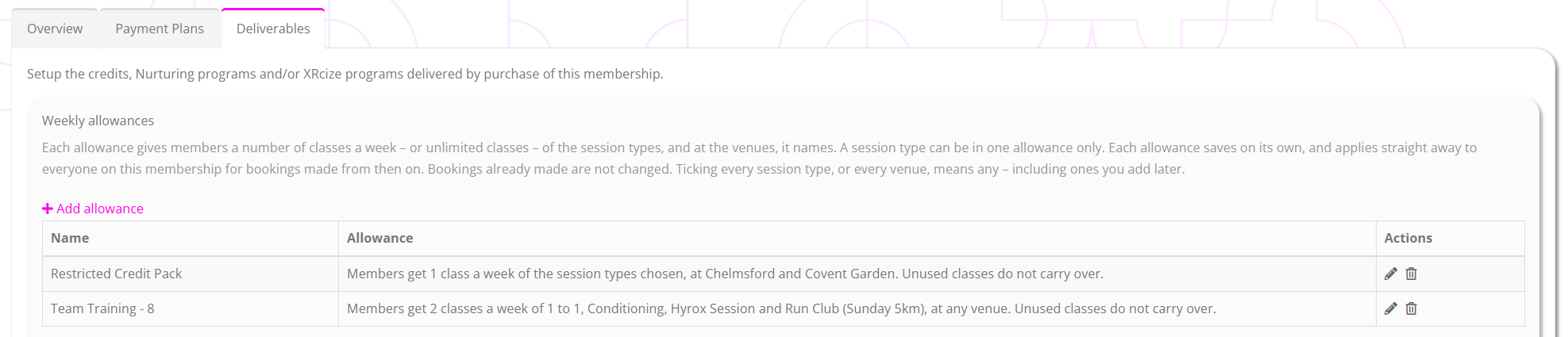
At the top of the tab, under Weekly allowances, GymOS lists the membership’s allowances, each with its name and a sentence saying what it gives. To add one, click Add allowance. Its settings are then shown:
Name
What the allowance is called, for example Classes, Open Gym or PT. Members see it beside the allowance when a membership has more than one, so choose something they will recognise. If you leave it blank, GymOS names the allowance after its session types.
Classes per week
How many classes a member may book in each week, from 1 to 50. Each booking uses one class, whatever the class would cost in credits. Or tick Unlimited to let members book as many of these classes as they like: nothing is counted, and nothing carries over.
Unused classes carry over for
Whether classes a member doesn’t use in a week can still be used afterwards, and for how long: None, or 1, 2, 3 or 4 weeks. For example, with 1 week of carryover, a class not used in the week of 6 October can still be used for a class up to Sunday 19 October. A member always uses the class’s own week first, and carried-over classes only once their week has ended. If you are unsure, start with None.
Session types
Tick the session types the allowance covers. Ticking every one (or Any session type, at the top of the list) means any session type, including ones you add later.
Venues
Tick the venues the allowance covers. Ticking every one (or Any venue) means any venue, including ones you add later.
Click Save allowance. Each allowance saves on its own, and GymOS then reads it back to you as a sentence, for example “Members get 3 classes a week of any session type, at any venue. Unused classes carry over for 1 week.” Check that it says what you mean.
If anything is missing, the allowance is not saved, and the reason is shown beneath it: a number of classes outside 1 to 50 (with Unlimited not ticked), or no session types or venues chosen.
More than one allowance
Give a membership several allowances when different kinds of class have different limits, for example 2 strength classes a week and unlimited Open Gym. Two rules keep it clear which allowance a booking uses:
- A session type can be in one allowance only. If you choose a session type that is already in another of the membership’s allowances, GymOS tells you which, and the allowance is not saved.
- An allowance for every session type must be the membership’s only allowance. To add a second allowance, first give the existing one just its own session types.
Each allowance is counted separately, week by week. A booking uses the allowance that covers the class’s session type, provided that allowance also covers the class’s venue. Take care when your allowances name different venues: a class whose session type is in one allowance, but whose venue is only in another, is covered by neither, so the member’s credits (or a card payment) must pay for it. Ask Alphie’s configuration check points out any such classes.
Things to look out for
Beneath the allowances, GymOS points out two combinations worth thinking about, without stopping you saving:
- The membership is unlimited. An unlimited membership already gives access to every session, so its allowances will never be used.
- The membership also issues credit packs. Members use their allowance first, then their credits, so they effectively get both. This can be deliberate (a top-up for extra classes), but if not, remove the credit packs.
Changing or removing an allowance
To change an allowance, click its icon, make your changes and click Save allowance. Changes apply straight away to everyone on the membership, for bookings made from then on, including bookings for the current week. Bookings already made are never changed.
To remove an allowance, click its icon and confirm. Members lose that allowance straight away, for bookings made from then on; bookings already made with it stand. Removing a membership’s last allowance leaves its members booking with credits only.
An allowance added part way through a week counts from the day it was added, so that first week’s allowance is reduced in proportion, just as it is for a member who joins part way through a week.
Choosing which classes can be booked with an allowance
Every session type, schedule and session has a Can be booked with a weekly allowance option, ticked by default. Untick it for a class that members should pay for separately, such as a workshop or a special event. When it is unticked, members cannot use their allowance for that class; their credits, or a card payment, may still pay for it as usual.
It works in the same way as a session’s credit cost:
- The session type’s setting is the default for new schedules and new ad hoc sessions of that type.
- A schedule’s setting is copied to each session it creates. To change sessions a schedule has already created, change the schedule and use its option to apply the update to existing sessions.
- Each session’s own setting is the one that counts when a member books. You can change it on a single session.
Changing a session type does not change its existing schedules or sessions.
Adding the membership to clients
A membership with an allowance is added to a client, or bought in the store, exactly like any other. When the membership issues no credits, the Issue grace credits option is not shown when you add it, as there are no credits for it to issue.
Clients see their allowances in the FitnessHub app and member website, under their memberships: each weekly allowance, and how many of this week’s classes are left on it. When they book, the payment choice reads Membership, which uses their weekly allowance and then their credits.

Common questions
I can’t see the Weekly allowances section.
The section appears on the Deliverables tab once a membership plan has been saved.
Can a membership have more than one allowance, for example 2 strength classes and 1 yoga class a week?
Yes. Add an allowance for each, each with its own session types. See More than one allowance, above.
GymOS won’t let me add a session type to an allowance.
A session type can be in one of a membership’s allowances only, and GymOS names the allowance it is already in. Take it out of that allowance first, or leave it where it is. Likewise, an allowance for every session type has to be the membership’s only one.
Does a class that costs 2 credits use 2 classes?
No. Every booking uses one class from the allowance, whatever its credit cost. A class that is free to everyone uses nothing.
What if a client wants an extra class one week?
Once a week’s allowance is used, credits the client holds (for example, a credit pack bought in the store, or credits you add for them) pay for further classes, and so can a card payment where the class allows it.
Does the payment schedule have to match the allowance?
No. The allowance is weekly whatever the payment plan, so a member can pay monthly, or every four weeks, and still have the same number of classes each week.