
Hooks
Hooks form an optional (but recommended) part of a GymOS campaign. A given campaign may have an unlimited number of hooks, and these are administered via the Hooks tab on the campaign record.
Hook listing

The list of hooks currently configured for a campaign is on the Hooks tab. For each hook, the information displayed comprises:
- The name of the hook.
- The unique ID of the hook.
- The source assigned to the hook.
- The campaign landing page that the hook has been linked to.
- Publish URLs comprising:
- The Landing page URL. Clicking the link puts the URL in your clipboard.
- The Sign-up form URL. Clicking the link puts the URL in your clipboard.
- Embed code. Clicking this link opens a popup window allowing you to tailor the colours of your form and copy the embed code.
- Post options comprising:
- – Publish to Meta.
See Publishing a campaign hook to Meta - – Download as HTML.
GymOS will create a formatted HTML page that includes your hook information and a link to the chosen landing page. - – Copy hook URL to clipboard.
Copies the URL of the hook to your device clipboard
- – Publish to Meta.
- Further actions comprise:
- – Edit the hook.
- – Clone the hook.
- – Delete the hook.
Creating/editing a hook
A new hook may be created by clicking the Add Hook button on the Hooks tab of the campaign.
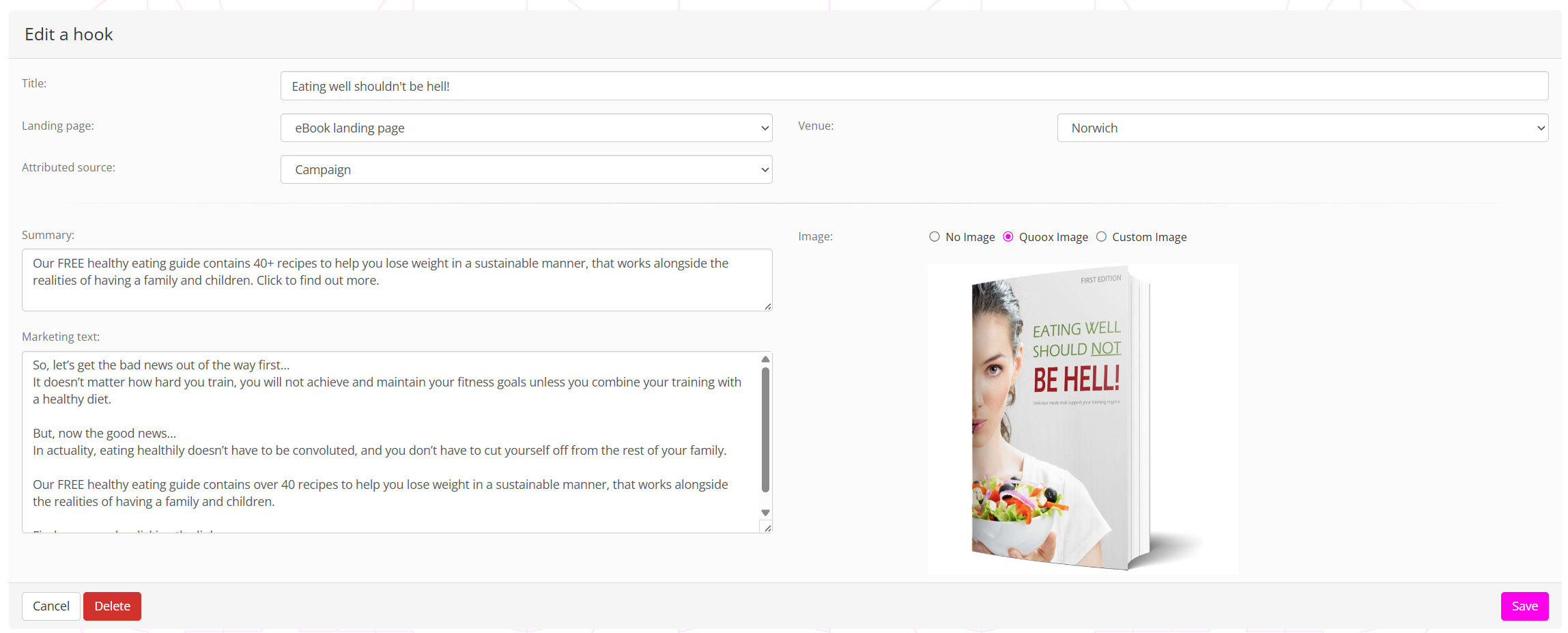
A hook comprises the following elements:
- Title – a meaningful title that enables you to identify the purpose of the hook.
- Landing page – the campaign landing page to which the hook should direct people.
- Venue – the default venue to assign to the lead sign-up form, overriding that set against the root-level of the campaign.
- Summary – a short form summary of marketing narrative associated with the hook.
- Marketing text – a longer form of promotional marketing narrative that is used when posting to Meta.
- Image – Select whether to upload your own image, use an image provided by GymOS, or not use any image with your hook.
Note: You will need to create (or at least stub) your landing page before you create the corresponding hook.
Click Save to commit your hook to the campaign.
Publishing a campaign hook to Meta
You may have GymOS publish a campaign hook as a post directly on your Facebook feed by clicking the (Publish to Meta) icon.
If you have not previously posted on GymOS, you will be prompted to complete Meta’s authentication process. Select the page you wish to post to, then approve the requested permissions.
GymOS will publish the hook as a post on your Facebook feed, and confirmation will be displayed on the GymOS screen. A link to the newly published post will also be provided, enabling you to easily review and edit it as you see fit. You may then, subject to Meta’s rules, promote/boost the post for increased visibility.
At the time of writing this article, GymOS does not provide administration of Meta adverts or campaigns. As Meta is constantly changing their methods, this is typically best handled within the Meta platform, or using an appropriate 3rd party marketing service or product.