Member tab: Details
The details tab is effectively the member profile. The member can update much of this data themselves via the GymOS FitnessHub mobile app and the FitnessHub Member portal. The administration view does, however, include a small number of fields not administrable by the member.
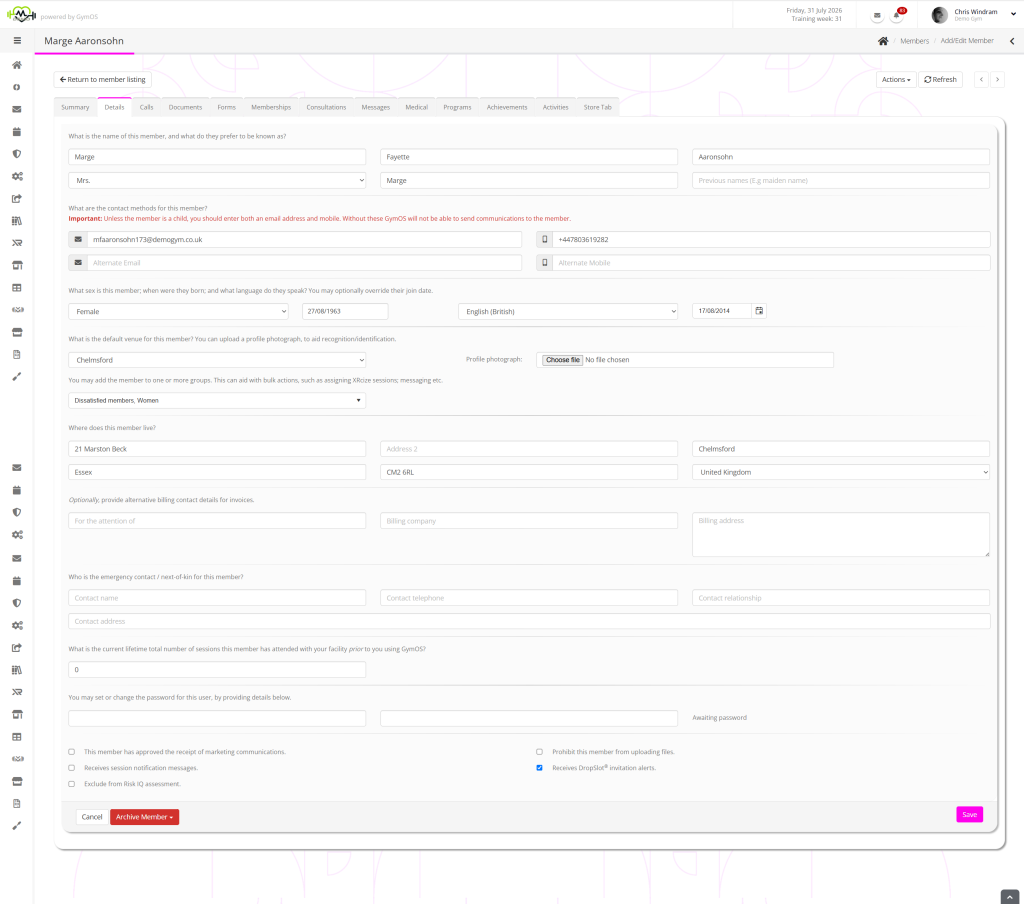
To update the member profile, make changes to the corresponding fields and click the Save button.
The Achive Member drop-down provides options for:
- Archive member data
This marks the member as archived. Their data is retained, but is removed from the default views. An archived record can be unarchived at a later point (E.g., if a lapsed member resumes their membership). - Mark for permanent deletion
This archives a member record and marks it for permanent deletion. This action cannot be undone. Once marked for permanent deletion, the member record will be purged from the GymOS database within a period of time.
Notes
Whilst the profile is largely self-explanatory, your attention is drawn to the following notes:
- By default, the member’s “join” date will be the date their record is created in GymOS. If you are migrating a member(s) from a previous system, you can use the “join date” field to provide a date earlier than the date GymOS is aware of.
- The sex/body type field is used to determine the body avatar displayed on the medical tab.
- If a value is provided in the What is the current lifetime total number of sessions this member has attended with your facility prior to you using GymOS field, this is taken into account by the x Lifetime Sessions trigger.
- If you leave the password field blank, any existing password will be left unchanged. If no password has yet been assigned, GymOS will assign a secure, randomly generated password.
- Passwords must be at least eight characters in length. They must comprise an uppercase letter, a lowercase letter, a number, and a symbol.
- The member’s postcode is used to geo-locate their home address, and this data is then used in the KPIs and Metrics functions. The mapping data is provided by Google Maps.
- For the member record to be of any real value, and usable by the member themselves, you must enter the member’s email address and mobile telephone number.