
Pausing an assigned membership
You may pause a membership that has been assigned to a member by clicking the Pause button alongside the member’s membership and then selecting Pause membership. This will open the popup Pause Membership window.
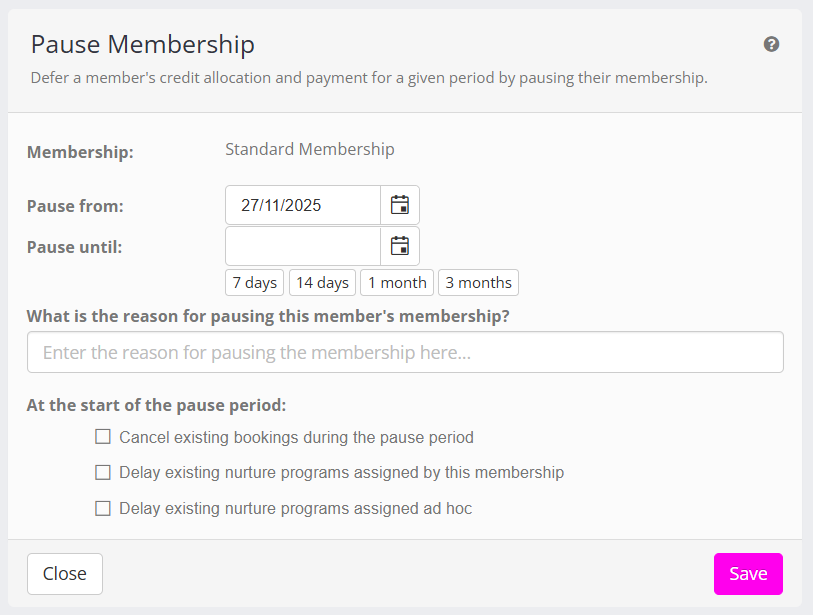
As GymOS supports “layered memberships” (multiple, simultaneous memberships), the name of the selected membership is displayed for clarity.
A membership can be paused immediately or from a future date. Date fields are provided to allow you to indicate the date you wish to pause the start, and the date upon which the pause should end. “Quick complete” buttons are provided for common pause periods.
The pause runs from the start date up to, but not including, the end date. The end date is the day the member comes back – so a pause from 1 March to 1 April covers the whole of March, and the membership is live again on 1 April.
When configuring a membership pause, enter the reason for the pause. This is recorded as a private note on the member’s record, so that you may reference it in the future.
Several checkboxes are provided to enable you to select the actions you wish to undertake at the time the pause commences:
- Cancel existing bookings during the pause period
If you select this checkbox, when the pause period commences, any existing bookings that occur during the pause period are cancelled. Where a booking was made using credits, those credits are returned to the member. Where it was paid for, the payment is refunded. - Delay existing nurture programs assigned by this membership
If you select this checkbox, when the pause period commences, any nurture programs assigned by this membership are delayed by the number of days equal to the total pause period. - Delay existing nuture programs assigned ad hoc
If you select this checkbox, when the pause period commences, and nuture programs that have been assigned to this member on an ad hoc basis (or by any means other than assignment against the membership) are delayed by the number of days equal to the total pause period. - Extend the membership end date
If the membership is not auto-renewing, checking this box will extend the membership term by the number of days equal to the total pause period.
Clicking Save will close the pause window.
If you have selected an immediate start to the pause, the pause will be processed immediately, and the membership tab will be updated with the revised information.
A note will be added to the Documents tab of the member record, providing information about the pause and the resulting calculations.
Booking during a pause
While a membership is paused, the member cannot book any session that falls inside the pause period. This applies whether they are using credits, booking a free session, or paying for the session directly.
Sessions outside the pause period can still be booked as normal – both those before the pause begins and those on or after the day it ends. A member part way through a pause can therefore book ahead for their return.
If a member holds more than one membership and only some of them are paused, they can continue to book on the memberships that are still running.
This restriction applies to the member booking for themselves, in the app and in the member portal. A team member can still book a paused member into a session from the admin portal where that is what you intend.
Calculations
Pausing a membership stops the clock. The member does not pay for the time they are away, and they do not lose the credits they had already been given.
In most cases a member has already paid in advance for some days they are now not going to use. GymOS works out what those days are worth and gives that value back at the other end of the pause, as free days and a reduced payment when they return. It is carried forward rather than refunded.
The daily rate
Every pro-rata figure comes from a single daily rate, worked out from what the membership costs over a year:
| Payment plan | Daily rate | Example at £50 |
|---|---|---|
| Monthly (on a set date, or on the anniversary) | cost × 12 ÷ 365 | £1.64 |
| Every 28 days | cost ÷ 28 | £1.79 |
| Every 14 days | cost ÷ 14 | £3.57 |
| Weekly | cost ÷ 7 | £7.14 |
| Every 4 weeks | cost ÷ 28 | £1.79 |
Monthly plans are averaged across the year because months are not the same length. Without that, a day of membership would cost more in February than in July, and the same pause would come to a different figure depending on when it happened. Every other payment frequency has periods of a fixed length, so its daily rate is exact.
A whole payment period is always charged at the normal price. The daily rate is only used for part periods.
Credits
When a pause commences:
- The member’s current credit pack from this membership is split in two.
- The first part covers what they have already used. It is closed off at the pause start date and is no longer valid.
- The second part holds whatever credits were left. It becomes valid on the day the pause ends, and it runs for the same length of time that was left on the original pack when the pause started.
- Any credits already issued ahead of the pause – the next period’s allocation, for example – are moved forward by the length of the pause, keeping the same amount of time on them.
- The date the next credits are due is moved forward by the length of the pause.
- The number of credits the member receives never changes. They keep what they had, and they continue to receive the same allocation as before.

Payments
No payment is taken while a membership is paused. If no future payments were due, that remains the case.
What happens next depends on whether the pause finishes before or after the member’s next payment was due.
- The pause ends before the next payment was due
The payment goes ahead on its normal date, reduced by the value of the days the member was away. - The pause ends after the next payment was due
That payment is not taken. When the member returns, the days they had already paid for are used up first – which may cover them for a while at no cost – and the first payment after that is reduced by whatever value is left over. Payments then return to normal.
Plans that bill on a set date keep that date. A member who pays on the 1st still pays on the 1st when they come back. Plans that bill on the anniversary of joining, or every so many days or weeks, move with the pause – their next payment falls a full period after they return.
A worked example
A member pays £50 a month on the 1st. They paid on 1 January, and they pause from 10 January to 17 March.
- On 10 January they had paid up to 1 February, so there are 22 days they have paid for and will not use. At £1.64 a day that is worth £36.16.
- No payment is taken on 1 February or 1 March.
- They return on 17 March. The 22 days they are owed cover them from 17 March to 1 April – 15 days – at no charge, with 7 days of value still to come.
- On 1 April they pay for 23 of April’s 30 days: £37.81.
- From 1 May they are back to £50 on the 1st, as before.
If the same member had paused on 1 February instead – their payment date, before that month’s payment was taken – they would have nothing paid in advance. No payment would be taken during the pause, and on returning on 17 March they would pay £24.66 for the 15 days to 1 April, then £50 on the 1st from then on.
Scheduled cost adjustments
Where a reduced payment is due, GymOS lowers the membership price for that one payment and creates a scheduled cost adjustment to put it back to normal afterwards. You can see these under Scheduled cost adjustments on the membership.
They are part of how the pause works, so amending or deleting one will change what the member is charged.
Editing a paused membership
If you have configured a membership pause to commence in the future, you can amend (or cancel) the pause by clicking the Pause button and then selecting Revise pending pause.
When you adjust a membership that is already paused, you can only move the pause end date. Doing so will cause the future credits and payments to be revised in accordance with the new pause period.
A pause that has already finished cannot be edited. If the member needs another break, add a new pause.
To cancel a pending pause, click the Delete button.
Unpausing a membership
To unpause a membership with immediate effect, select the Unpause Membership option from the Pause dropdown.
At this point, deferred future credits will be adjusted to become valid immediately and next payment points will be adjusted.
It is possible that a payment may become due and be queued for immediate payment.
Triggers
Four triggers are provided in relation to membership pausing:
- Membership Pause Commencing
- Membership Paused Starting
- Membership Pause Ending
- Membership Pause Ended
These provide additional control and flexibility with regards to actions that occur on or around a given membership pause.
System Alerts
When a membership pause commences, a system alert is raised for information. This alert is skipped if the pause is configured to start immediately.
When a membership pause reaches its end date on its own, a further system alert is raised for information. No alert is raised where a team member has unpaused the membership by hand, since they are already looking at it.
Reports and indicators
Two reports are available in relation to membership pauses:
- Memberships > Current Paused Memberships
- Memberships > Forthcoming Paused Memberships
When a member’s membership is paused, this is indicated on the member listing (by a symbol), the member’s summary page (by a pause symbol), or the member’s membership tab (lozenge with pause end date shown)
Dynamic Member Groups
A criteria is provided as part of the configuration of Dynamic Member Groups to include/exclude members with an actively paused membership.
Notes
- It is not possible to pause a membership that has been marked for cancellation.
- A membership can only have one pause covering any given period. If you need to change the dates of a pause, revise the existing one rather than adding another.
- Memberships paused prior to 23/10/2024 were processed using our legacy pause function. They will not be tagged, will not appear in reports, and will not cause any triggers to fire.
- If your member has a “layered membership” (I.e. multiple memberships) and you are pausing more than one, only select to delay the ad hoc nurture elements on one of the memberships. If you select this option on more than one membership that you delay for the same member, the nurture elements will be delayed by more than multiple of the delay period – delaying the nurture elements longer than you likely intend.