
WhatsApp in Triggers, Nurturing, and RoboNudge
Your automations can send by WhatsApp as well as by email, text and push notification. An event trigger, a nurture programme and a session reminder can each send an approved WhatsApp template, and each falls back to a text for anybody who is not on WhatsApp. This article covers all three, and the rules they share.
WhatsApp must be switched on for your gym, and your gym must be using Conversations, before any of these options appear. See Setting up WhatsApp.
What all three have in common
- They send a template. Press Choose an approved template and pick one. A manager can also create a new template from the same list.
- You complete the fill-ins once, when you set the automation up. Each fill-in can hold text, a merge field, or both. A merge field that cannot be filled when the message is sent is left blank.
- Anybody not on WhatsApp gets the same message as a text, charged as a text. If WhatsApp is not available to your gym at the moment the message is sent, everybody gets the text.
- The message is filed in the person’s conversation with your gym, so that their reply lands beside it and your team can pick it up.
- It is shown to your team as a single compact line. See How automated messages look, below.
A message that names its sender needs a person to send it
Several templates, including five of the six starter templates, use Your first name: “Hi Sam, it’s Alex from the gym”. A message like that cannot be sent in the gym’s name, because the gym has no first name.
- If you choose such a template and leave From as your gym, the automation will not save, and reads: This message includes the sender’s first name, so choose a person to send it from rather than the gym. Choose a member of your team, or Member’s assigned mentor.
- If, when the message is sent, there is nobody to name (the member has no mentor, say, or the chosen employee has left), it goes in the name of your gym’s primary contact or, failing that, a manager.
From only decides whose name is used. A WhatsApp message always comes from your gym’s number.
If the template is deleted or no longer approved
An automation can only send a template that is approved at the moment it sends. If the template has been deleted, or WhatsApp has paused or rejected it, the step is skipped: nothing is sent by WhatsApp, and no text is sent in its place. Your event log records it, for example: WhatsApp step skipped in trigger 123 (Welcome): the template “Welcome message” no longer exists. Choose another template to put it right.
Event triggers
In a trigger’s actions, choose WhatsApp (with SMS fallback) and press Add action. Set From, choose the template, and complete any fill-ins. A delay and a target time can be set as for an email or a text.
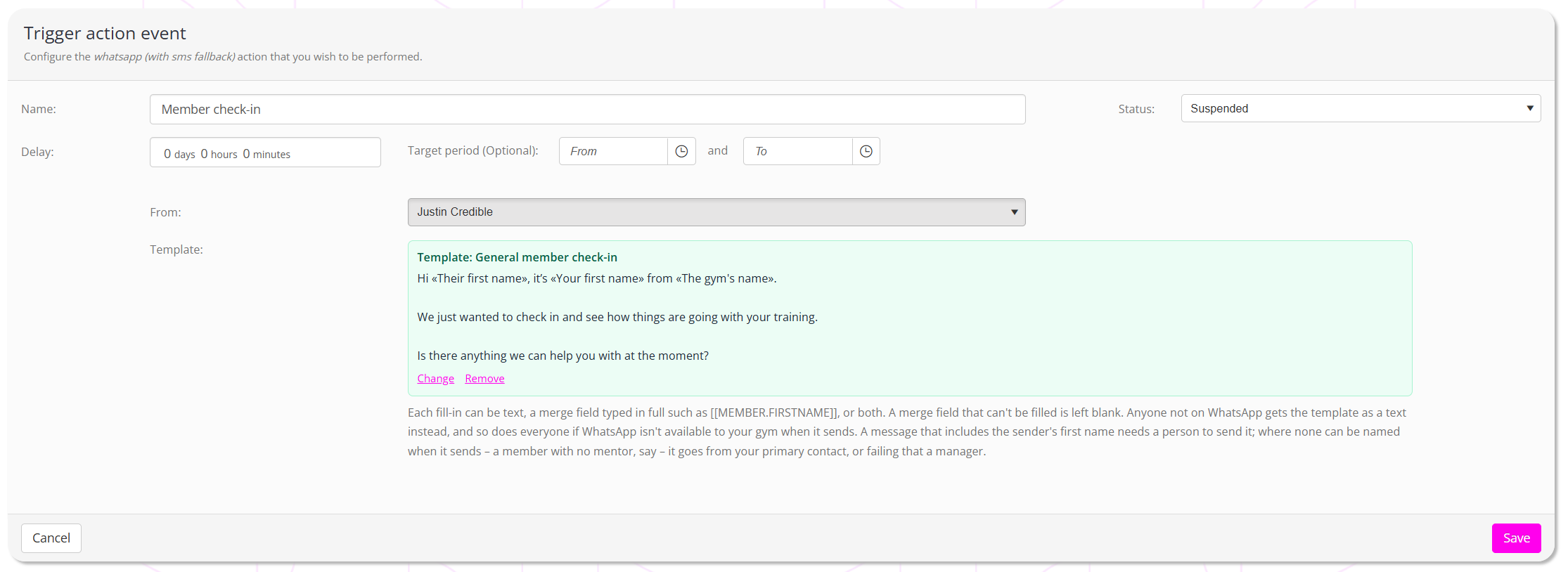
- For members and leads. A DropSlot guest is never sent a WhatsApp message.
- Not offered on DropSlot triggers: appointment booked, attended, cancelled or not attended, and invitation issued or expired.
- Merge fields are typed in full, for example
[[MEMBER.FIRSTNAME]]. There is no list to pick from here, because the fields available depend on the trigger. Use the fields the trigger provides. See Context merge fields for event triggers. - It counts as contact, recorded against the trigger, like the trigger’s other messages.
Nurture programmes
In a member or lead programme, open Add Nurturing Element and choose Add a WhatsApp message. Set the Day and Target time as for any other message, then From and the template.
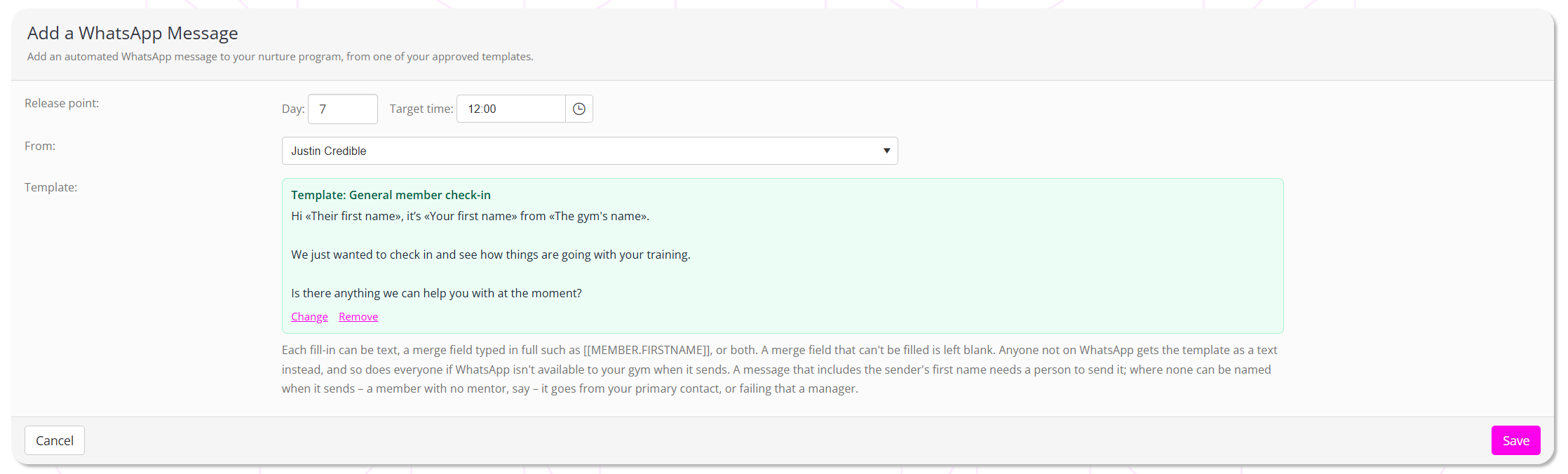
- In the programme’s list it shows as WhatsApp: followed by the template’s name.
- Lead programmes have no mentor option in From, because leads have no mentor.
- Merge fields come from the member’s or lead’s own details, and are typed in full.
- Copying a programme keeps its WhatsApp messages.
- A programme imported from the Marketplace arrives without its WhatsApp messages. Templates belong to the gym that created them, so add your own after importing.
Session reminders
In a reminder scheme’s alert, set Reminder method to WhatsApp (with SMS fallback). The text box is replaced by WhatsApp template, and the email content stays, relabelled Email message content (for anyone with no mobile number).
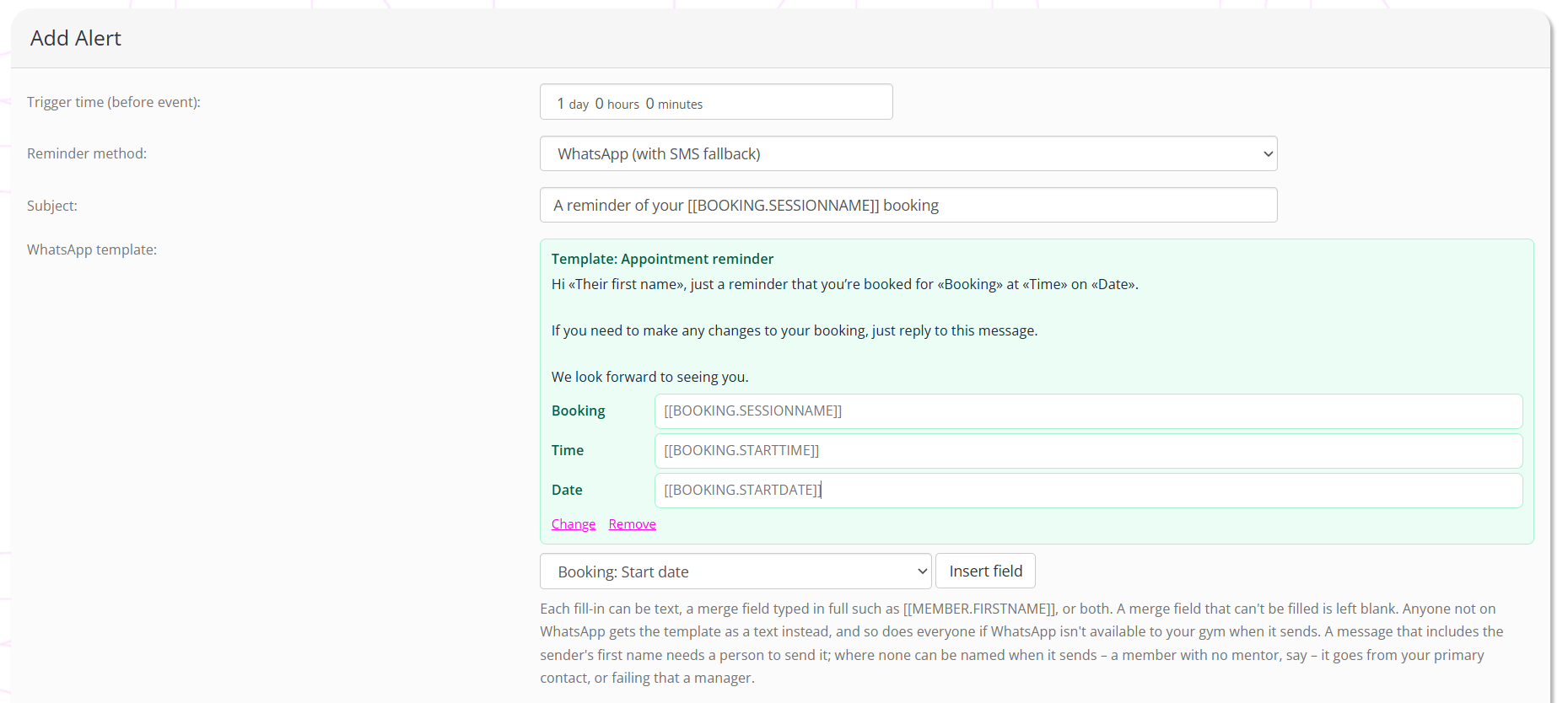
- There is an Insert field list here. Choose a field and press Insert field to place it in the fill-in you are editing. The most useful are Session: Session name, Booking: Start date and Booking: Start time. The starter template Appointment reminder was written for exactly these three.
- There is no From. A reminder is sent by the gym. If the template uses Your first name, your gym’s primary contact is named.
- A member with no mobile number is sent the alert’s email instead.
- A guest booked onto a session is not sent a WhatsApp message. They are sent the same wording as a text or, with no mobile number, the email.
- Members who have switched session reminders off are sent nothing, as before.
- A reminder does not count as contact on the member’s record.
How automated messages look
A member who books three sessions a week would otherwise fill their conversation with reminders. So a WhatsApp message sent by an automation is treated as a quiet message:
- Your team sees it as one compact line, marked Automated, with the start of the message, its time and its delivery tick. Click the line to open the whole message, and again to close it.
- The member sees an ordinary message, in WhatsApp and in their conversation in the FitnessHub app.
- It does not bring the conversation to anyone’s attention. It does not change when the conversation was last active, and it does not mark it as unread.
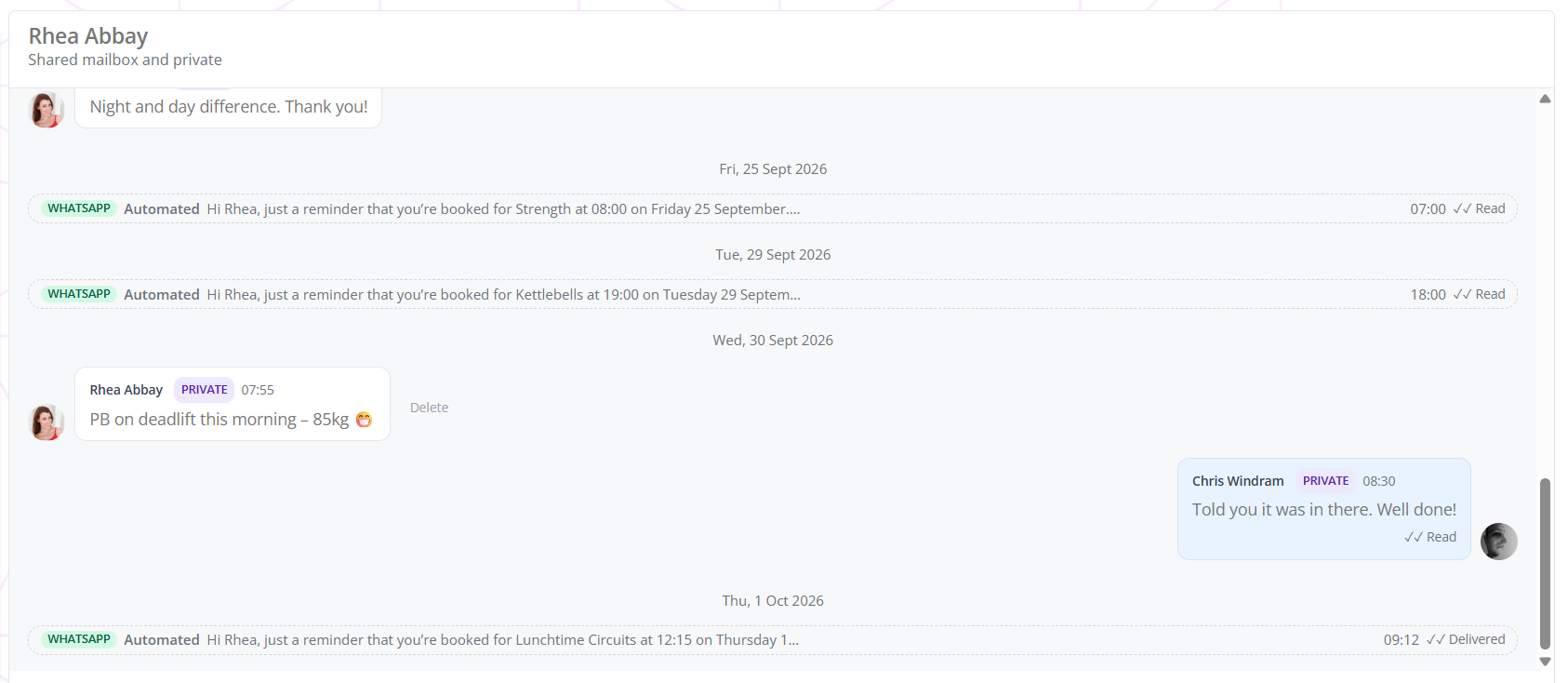
A WhatsApp message your team sends themselves, from the reply box or from New message, is always shown in full.
Common questions
Why will my trigger or nurture message not save “from the gym”?
The template, or one of its fill-ins, uses the sender’s first name. Choose a person in From.
Why was a step skipped?
Its template was deleted, or is no longer approved by WhatsApp. Your event log names the template. Choose another, and the automation carries on from the next time it runs.
Why is there no list of merge fields on the trigger’s WhatsApp action?
The fields a trigger can fill depend on the trigger, so they are typed in full. One the trigger cannot fill is left blank.
Do guests receive WhatsApp reminders?
No. A guest is sent the same wording as a text, or the email if they have no mobile number.
What if a member has no mobile number?
A session reminder sends them the alert’s email. A trigger or a nurture message sends nothing.
Why do these messages look different in the conversation?
Automated WhatsApp messages are shown to your team as one compact line, so that reminders do not crowd out real conversation. Click a line to read it.
I imported a nurture programme and its WhatsApp message is missing. Why?
Templates belong to the gym that created them, so the Marketplace cannot bring them across. Add a WhatsApp message with one of your own templates.
What happens to these automations if we stop using WhatsApp?
They keep running, and send the same wording as a text.