
Introducing WhatsApp in Conversations
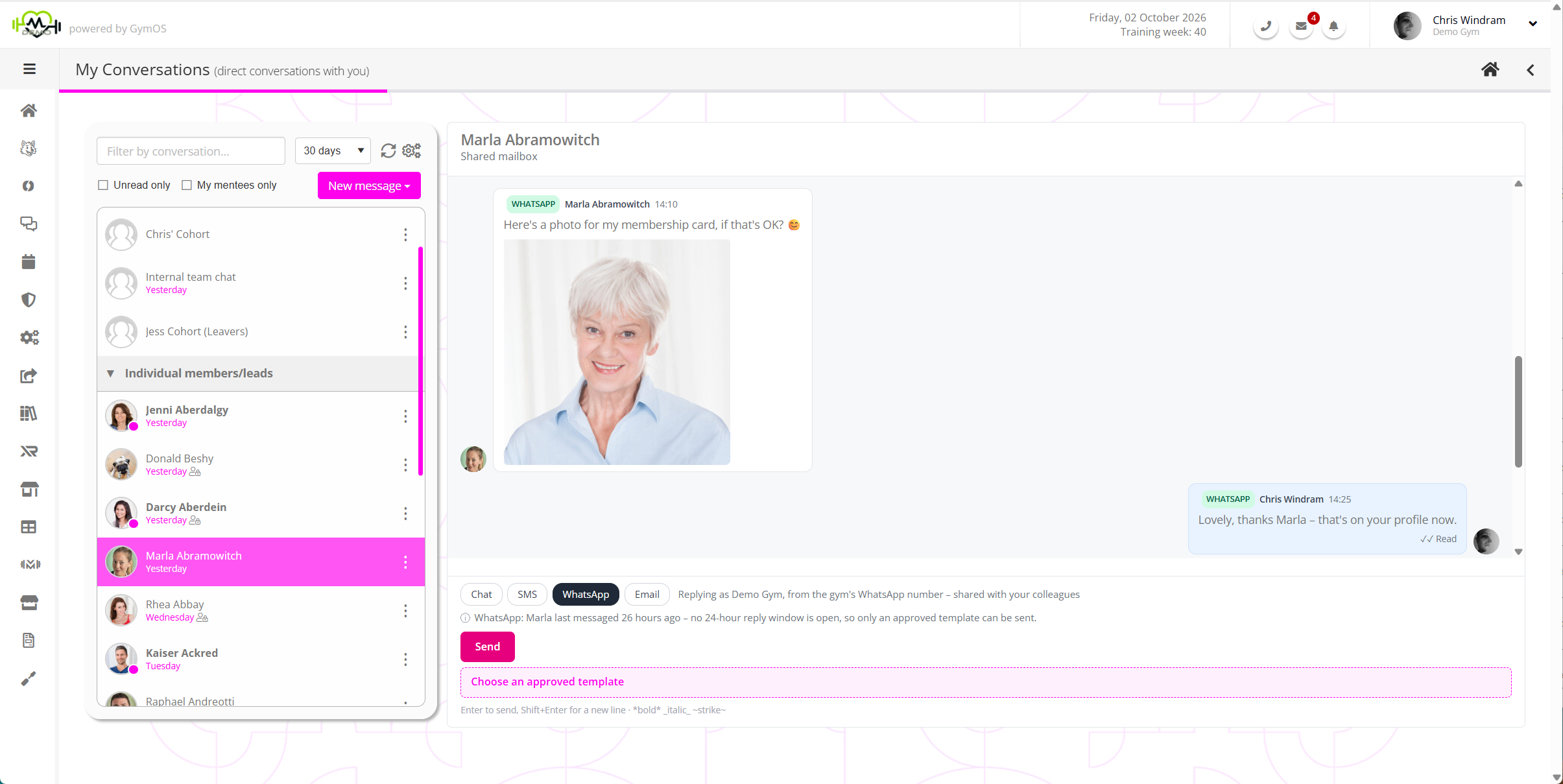
WhatsApp is the messaging app your members and leads already use every day. With WhatsApp in Conversations, your team can message them there from your gym’s own GymOS number, and their replies arrive in GymOS, in the same conversation as your emails, texts and chat.
Why use WhatsApp?
- It is where people already are. A WhatsApp message is more likely to be seen, and answered, than an email.
- Replies come back to GymOS. Whatever a member or lead sends you on WhatsApp appears in their conversation, where your whole team can see it and pick it up.
- You can see what happened to a message. Each message you send shows whether it was sent, delivered and read.
- Photos, voice notes and documents arrive too. A photo is shown in the conversation, a voice note or video plays in place, and a document can be downloaded.
- Nobody is missed. If the person you are messaging is not on WhatsApp, GymOS sends the same message as a text instead.
- It works in your automations. Event triggers, nurture programmes and session reminders can all send by WhatsApp.
How WhatsApp messaging works
WhatsApp sets rules for businesses that are different from texts and email, and GymOS follows them for you. There are two kinds of message:
- A reply. When somebody messages your gym on WhatsApp, you can reply freely, in your own words, for the next 24 hours.
- A template. To start a conversation, or to message somebody more than 24 hours after they last wrote, you send a template: a message whose wording WhatsApp has approved in advance. GymOS gives you a starting set, and your managers can create more.
GymOS always shows which applies, so your team never has to work it out. See WhatsApp templates, the 24-hour window and the text fallback.
Where you will find it
- Replying in a conversation. WhatsApp appears beside the other channels when you reply to a member or a lead. See Replying in a conversation.
- Sending a new message. Choose New WhatsApp message from the New message menu to send a template to one person, several, a group or a membership, now or at a time you choose. See Sending a new message.
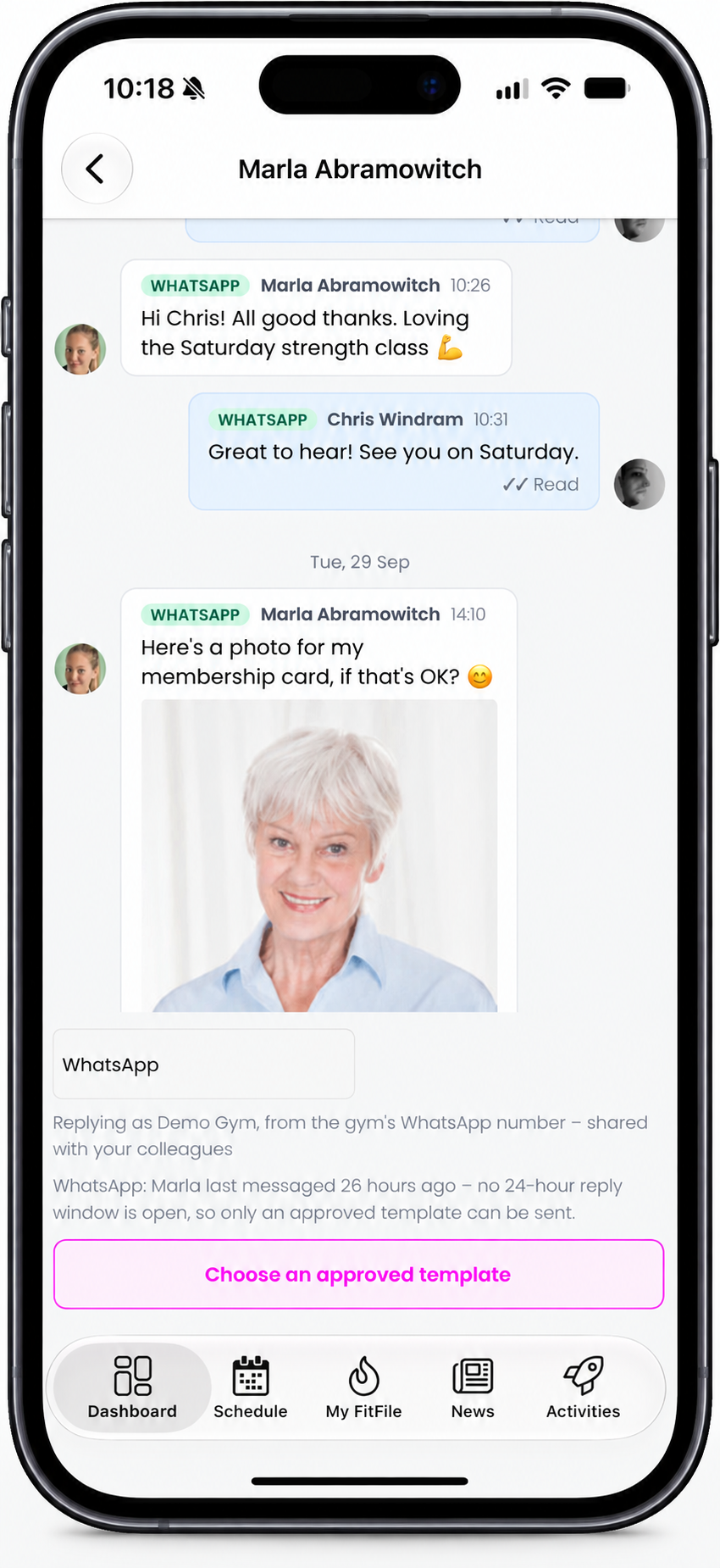
- In the FitnessHub app. Your team can read WhatsApp messages, reply, and send approved templates from their phones.
- In your automations. A trigger, a nurture programme or a session reminder can send an approved template. See WhatsApp in triggers, nurture programmes and session reminders.
What your members and leads see
Your messages arrive in their WhatsApp like any other chat. They show your gym’s trading name, your picture (your FitnessHub app icon, unless you upload another) and a short line about who they are talking to. They simply reply in WhatsApp. There is nothing for them to install or sign up to, and they never need the FitnessHub app for it.
Who can see WhatsApp messages
WhatsApp messages are sent from your gym’s number, so they always belong to the gym’s conversation with that person. Every member of your team can see them and reply. A WhatsApp message cannot be sent privately, as an individual member of staff.
What you can receive
- Text, including emoji.
- Photos (JPEG, PNG and WebP), shown in the conversation.
- Voice notes, audio and video, which play in the conversation.
- Documents: PDF, Word, Excel, PowerPoint and plain text files, which can be downloaded.
Each file may be up to 16 MB. If somebody sends a type of file GymOS cannot accept, the message says so, for example (They also sent a file we could not accept: …).
A WhatsApp message from a number GymOS does not recognise appears under your unrecognised senders.
Where GymOS WhatsApp chats are available
WhatsApp is available to gyms in the United Kingdom and Ireland. It is optional: everything else in Conversations works without it.
What you need
- A manager to switch it on. See Setting up WhatsApp in GymOS.
- Your gym’s GymOS number. It must not already be registered with WhatsApp, including the WhatsApp Business app.
- Access to your business’s Facebook account, which WhatsApp’s owner, Meta, uses to confirm who you are.
- To have read and accepted the charges. See WhatsApp pricing.
What is not available
- Sending photos and files. You can receive them, but outbound WhatsApp messages are text only.
- Replying to an unrecognised sender. Add the person as a lead or a member first.
- Free text to a group, or scheduled for later. Only a template can be sent to several people or scheduled.
Getting started
- Read WhatsApp pricing, so that you know what it costs.
- Ask a manager to follow Setting up WhatsApp.
- Read WhatsApp templates, the 24-hour window and the text fallback, then send your first message.
Common questions
Do we need a new phone number?
No. WhatsApp uses your existing GymOS number, the same one your texts come from.
Can we use the WhatsApp account or number we already have?
No. The number or account you use today stays exactly as it is. WhatsApp in Conversations uses your GymOS number, which must not already be on WhatsApp, and a new WhatsApp Business Account that is created during setting up.
Can members message us first?
Yes. Their message arrives in their conversation with your gym, costs you nothing, and gives your team 24 hours to reply freely.
Can a member of staff message somebody privately on WhatsApp?
No. WhatsApp always goes from the gym’s number, so every WhatsApp message is visible to your whole team.
Can we send a photo or a PDF?
Not yet. You can receive photos and files, but you cannot send them by WhatsApp. Email remains the way to send an attachment.
What happens if the person is not on WhatsApp?
A template is sent to them as a text instead, charged as a text. See WhatsApp templates, the 24-hour window and the text fallback.
Is WhatsApp for GymOS available outside the United Kingdom and Ireland?
No, not at present.
Can I use this WhatsApp number from outside GymOS?
No. The number you are assigned for GymOS may only be used with GymOS and is routed through our servers. It is against our terms and conditions of use to use the GymOS WhatsApp number with any other system or app.