
Business Analysis: Monthly performance
The Monthly performance function is found within the Business Analysis section of Reporting from the main navigational menu.
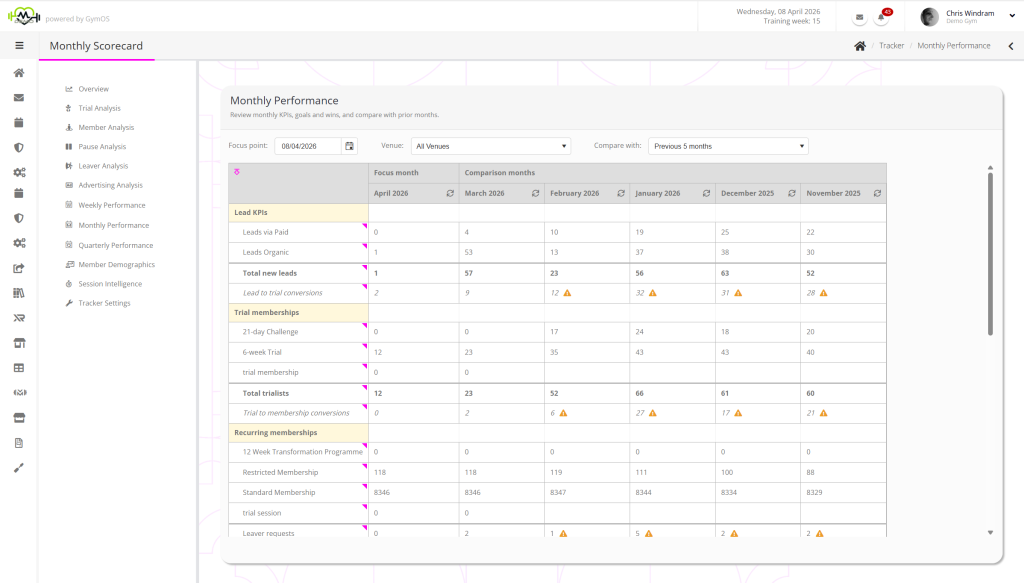
You may select the focus month for the analysis, using the Focus point selector. You may also select the months with which you wish to compare the focus month.
The data may be filtered by venue.

Adding additional data
Within a the focus month, you may enter data for the numbers that GymOS doesn’t have visibilty for:
- External revenue
- External refunds
- Outgoings/expenses
Having entered this data, click Save & Update. GymOS will recalculate the month, taking into account the updated data.
Refreshing data
Data is refreshed hourly. If you require a more immediate recalculation, click the icon in the header of the period that you wish to recalculate.