
Business Analysis: Member analysis
The Member Analysis function is found within the Business Analysis section of Reporting from the main navigational menu.
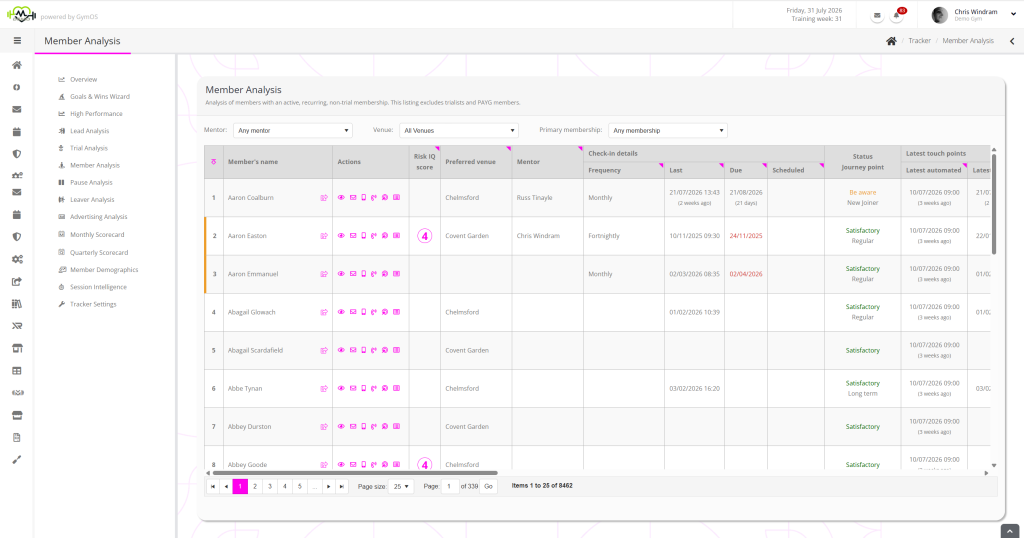
The Member Analysis function shows those individuals with an active, recurring, non-trial membership. The listing excludes trialists and PAYG members.

Data filters
Filters are provided for:
Actions
Clicking a member’s name opens their member record. Clicking on the icon alongside their name opens the member record in a new browser tab.
Actions are provided for:
- View the member record
- Send the member an email. Hovering over the icon shows the member’s email address.
- Sends the member an SMS message. Hovering over the icon shows the member’s mobile number.
- Log or schedule a call with the member.
- Update the goals and aims for the member.
- View the touch point history for the member.
Data columns
The data columns are automatically calculated and are always up to date when the table is displayed.
Many columns feature a symbol in the top-right corner of the column heading. Hovering over this triangle will provide more details as to how the value in a given column is calculated and where the data comes from. Very often, this will answer questions you may have about how a cell value is calculated.
The data columns comprise:
- Risk IQ score
The latest Risk IQ score for this member, within the last 30 days. Click for more details. - Preferred venue
The current, preferred venue assigned to the member. - Mentor
The current mentor assigned to the member. - Check-in Details
- Frequency
The target check-in frequency for this member. - Last
The latest check-in, derived from the latest call logged/DropSlot consultation of the check-in category type recorded prior to this point. - Due
The date the member is next due a check-in, based upon the last check-in date and target check-in frequency. - Scheduled
The date/time the next check-in call or DropSlot consultation has been scheduled for the member.
- Frequency
- Status Journey point
- Latest Touch Points
- Latest automated
The latest automated touch point recorded against the member record. - Latest manual
The latest manual touch point recorded against the member record.
- Latest automated
- Session Attendance
- Last session
The most recent session marked as attended for this member. - Next session
The next scheduled session for this member.
- Last session
- Pause Status
- Paused
Whether the member’s membership is presently paused. - Start
If the member’s membership is paused, the date the pause commenced. - End
If the member’s membership is paused, the date the pause concludes.
- Paused
- Primary Membership
- Membership
- Start
- End
- PAR-Q
- T & Cs
- Cancelled
- Total memberships
The total number of active non-trial memberships on the member’s record. - Goals & actions
- 30-day target
- 3-month target
- Actionables
- Longevity & Loyalty
- Member record created
- Current membership started
Goals and Aims
You may update the goals and aims for a given member by clicking the action icon.
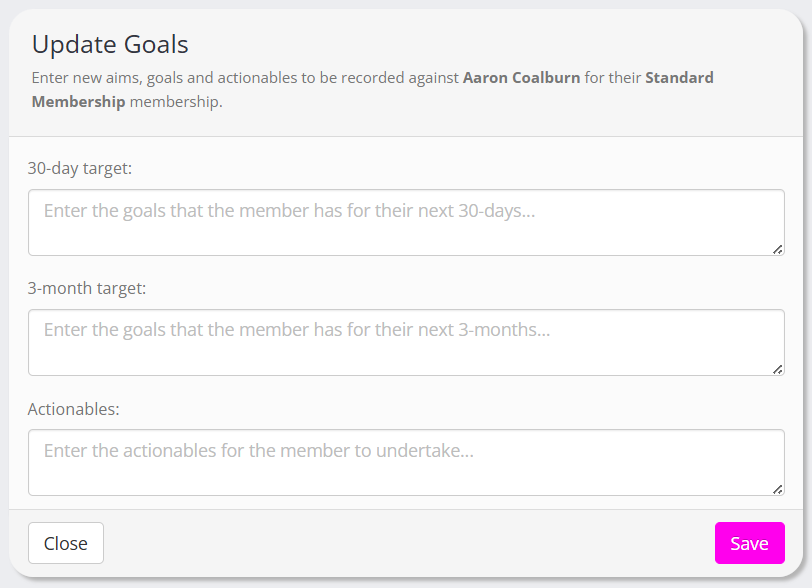
Enter revised goals into the boxes provided and click the Save button.
Statistics
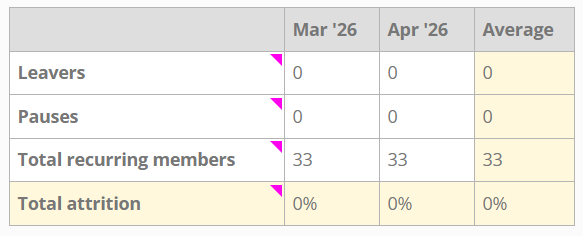
When a mentor has been selected, and the current user is either a manager or the mentor themselves, at the bottom of the page, statistics are provided for:
- Leavers
- Pauses
- Total recurring members
- Total attrition