Custom URLs and QR codes
GymOS has its own built-in URL prettifier, shortener and QR code generator. The advantage of using these is that you know them to be “trusted”, and that GymOS is not going to inject either adverts or middleware into your link, as is the case or risk with many free shorteners that people use.
To add or edit URLs and codes within the portal, first navigate to FitnessHub App/Portal from within the Settings section of the main navigational menu. Next, click the Custom URLs button from within the Pages & Content section at the top of the page.
Your existing URLs will be displayed:
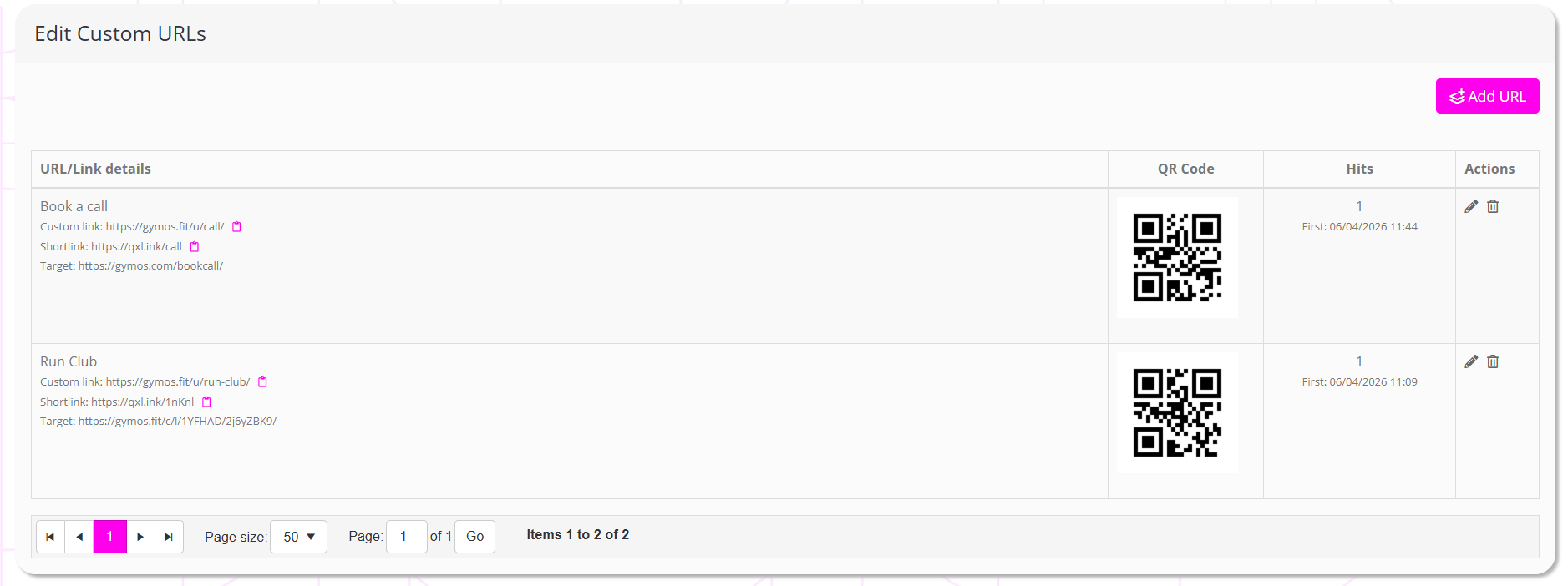
For each URL, the information displayed will comprise:
- Name – the name you provided for the link
- Custom link – the new, unique link created by GymOS.
- Shortlink – An ultra-short qxl.ink URL, which routes through to your target page.
- Target – The target URL you specified for the link.
- QR code – The GymOS-generated QR code, which you may download to your device by clicking on the image.
- Hits – The number of times the shortlink has been used, along with the first and last occurrences.
- Actions, comprising:
- Edit the link
- Delete the link
Adding a new custom link
To add a new custom link, click the Add URL button.

Provide the information for your link:
- Link title
Enter a meaningful name for the link, so you know what it represents later. - URL suffix
Enter a unique suffix for your URL, which is ‘more ‘prettier’ than the default target. - Target
Provide the full URL to which the shortcode should bounce when followed.
Click to save your changes and (re-)generate the QR code, or to abort. Your link is available for immediate use.