
Configuring a membership allowance
A weekly allowance is the simplest way to sell “x classes per week”. You set it on a membership plan, and every member on that membership can book that many classes in each week. There are no credits to issue, no credit packs to create and no expiry dates to get right.
If you are not yet familiar with how an allowance works, we suggest taking a few minutes to read Allowance principles first.

Adding a weekly allowance to a membership plan
The allowance is set on the Deliverables tab of a membership plan record. If you are creating a new membership plan, save its basic details first (see Creating a new membership plan); the Deliverables tab then appears.
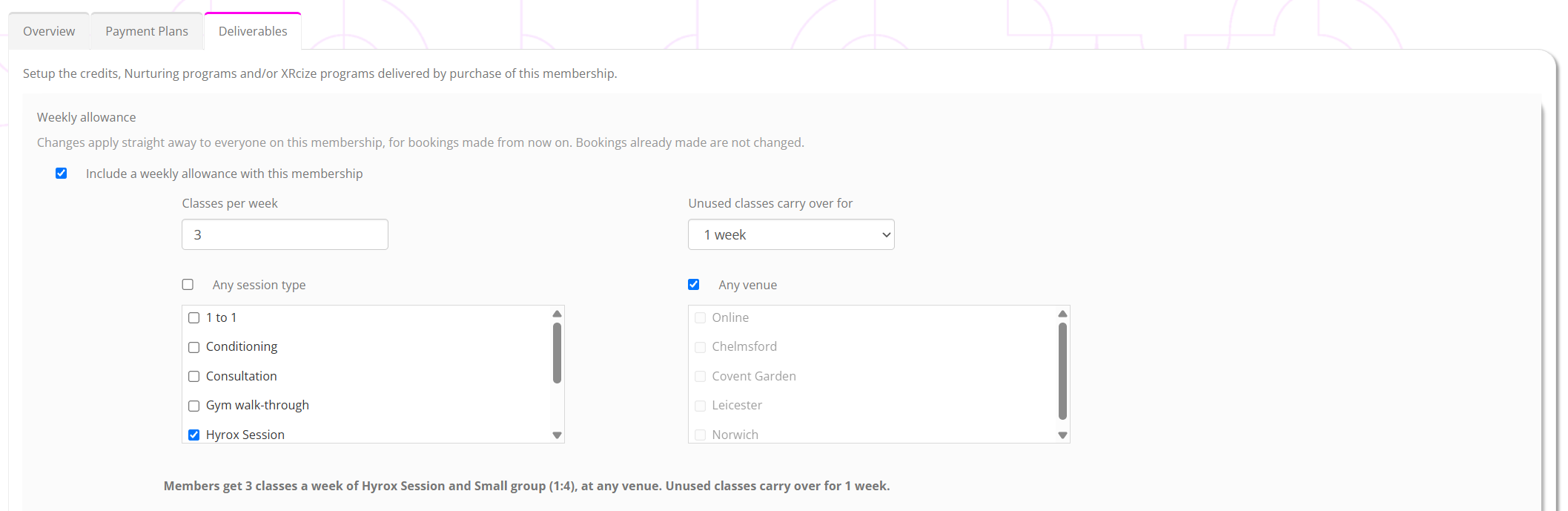
At the top of the tab, under Weekly allowance, tick Include a weekly allowance with this membership. The allowance’s settings are then shown:
Classes per week
How many classes a member may book in each week, from 1 to 50. Each booking uses one class, whatever the class would cost in credits.
Unused classes carry over for
Whether classes a member doesn’t use in a week can still be used afterwards, and for how long: None, or 1, 2, 3 or 4 weeks. For example, with 1 week of carryover, a class not used in the week of 6 October can still be used for a class up to Sunday 19 October. A member always uses the class’s own week first, and carried-over classes only once their week has ended. If you are unsure, start with None.
Any session type
Tick to let members use the allowance for every type of session, or leave it unticked and choose the session types it covers.
Any venue
Tick to let members use the allowance at all of your venues, or leave it unticked and choose the venues it covers.
As you complete the settings, GymOS reads them back to you as a sentence, for example “Members get 3 classes a week of any session type, at any venue. Unused classes carry over for 1 week.” Check that it says what you mean, then press Save.
If anything is missing, nothing on the tab is saved, and the reason is shown: a number of classes outside 1 to 50, no session types chosen (and Any session type not ticked), or no venues chosen (and Any venue not ticked).
Warnings to look out for
GymOS warns you, without stopping you saving, about two combinations that are rarely what you want:
- The membership is unlimited. An unlimited membership already gives access to every session, so the allowance will never be used.
- The membership also issues credit packs. Members use their allowance first, then their credits, so they effectively get both. This can be deliberate (a top-up for extra classes), but if not, remove the credit packs.
Changing or removing an allowance
Changes to an allowance apply straight away to everyone on the membership, for bookings made from then on, including bookings for the current week. Bookings already made are never changed.
To remove the allowance, untick Include a weekly allowance with this membership and press Save. Bookings already made with it stand. There is no confirmation, so take care.
An allowance added part way through a week counts from the day it was added, so that first week’s allowance is reduced in proportion, just as it is for a member who joins part way through a week.
Choosing which classes can be booked with an allowance
Every session type, schedule and session has a Can be booked with a weekly allowance option, ticked by default. Untick it for a class that members should pay for separately, such as a workshop or a special event. When it is unticked, members cannot use their allowance for that class; their credits, or a card payment, may still pay for it as usual.
It works in the same way as a session’s credit cost:
- The session type’s setting is the default for new schedules and new ad hoc sessions of that type.
- A schedule’s setting is copied to each session it creates. To change sessions a schedule has already created, change the schedule and use its option to apply the update to existing sessions.
- Each session’s own setting is the one that counts when a member books. You can change it on a single session.
Changing a session type does not change its existing schedules or sessions.
Adding the membership to members
A membership with an allowance is added to a member, or bought in the store, exactly like any other. When the membership issues no credits, the Issue grace credits option is not shown when you add it, as there are no credits for it to issue.
Members see their allowance in the FitnessHub app and member website, under their memberships: the weekly allowance, and how many of this week’s classes are left. When they book, the payment choice reads Membership, which uses their weekly allowance and then their credits.

Common questions
I can’t see the Weekly allowance section.
The section appears on the Deliverables tab once a membership plan has been saved. If you still can’t see it, weekly allowances are not yet available to your gym.
Can a membership have more than one allowance, for example 2 strength classes and 1 yoga class a week?
No. A membership has one weekly allowance. If you need that level of control, credit packs remain available, and are designed for exactly that.
Does a class that costs 2 credits use 2 classes?
No. Every booking uses one class from the allowance, whatever its credit cost. A class that is free to everyone uses nothing.
What if a member wants an extra class one week?
Once a week’s allowance is used, credits the member holds (for example, a credit pack bought in the store, or credits you add for them) pay for further classes, and so can a card payment where the class allows it.
Does the payment schedule have to match the allowance?
No. The allowance is weekly whatever the payment plan, so a member can pay monthly, or every four weeks, and still have the same number of classes each week.