
Booking a lead into a marketing session appointment
The marketing sessions for which a lead has an appointment may be viewed on the Summary tab of the Lead record.
Typically, a lead would book themselves into a marketing session via an appointment promotion campaign. However, you can also manually allocate a member to a session.
- Navigate to the Summary tab of the lead that you wish to book into the marketing session.
- If the lead is not already registered against a corresponding campaign, firstly add the campaign to the lead.
- Click the icon alongside the campaign. This will open the appointment pop up window.
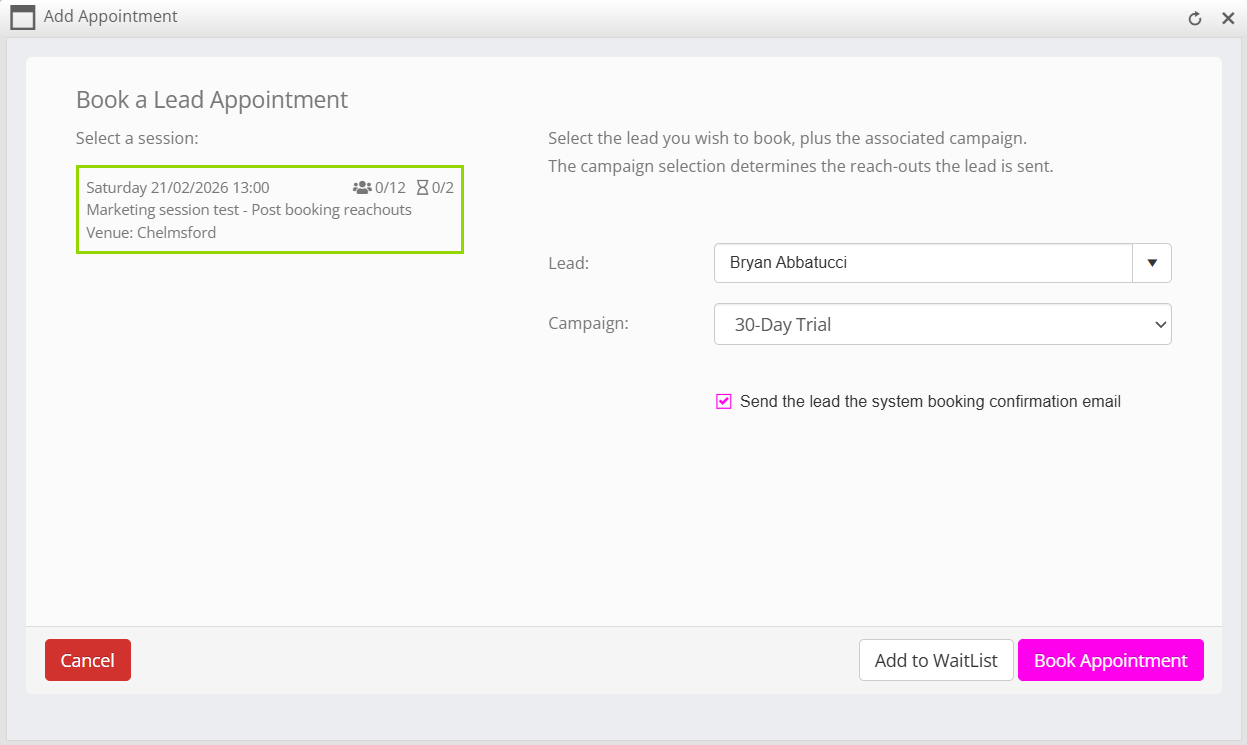
- The left-hand side of the window will show a list of forthcoming scheduled marketing sessions. Click on the session into which you wish to book the lead.
- Verify the lead’s information on the right-hand side is correct, amending as necessary.
- By default, the lead will be sent the default system booking confirmation email. You can suppress this email if you wish to send one of your own manually, or if you have a trigger configured to send an alternate email.
Click the Book Appointment button to confirm the appointment. Alternatively, you may click the Add to WaitList button if you wish to add the lead on to the session’s waitlist.