
Business Analysis: Weekly performance
The Weekly performance function is found within the Business Analysis section of Reporting from the main navigational menu.
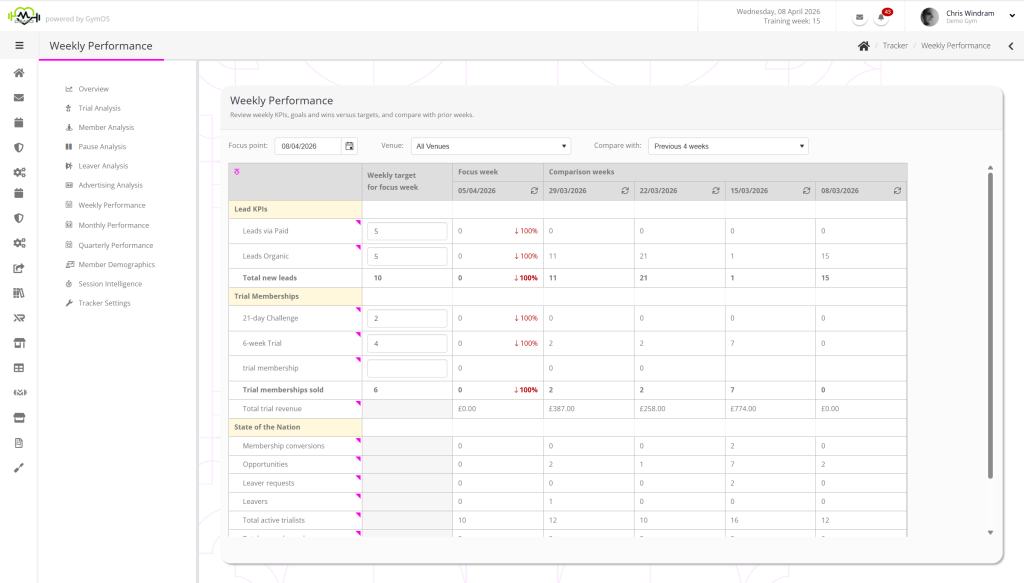
You may select the focus week for the analysis, using the Focus point selector. You may also select the weeks with which you wish to compare the focus week.
The data may be filtered by venue.

Assigning Targets
You may assign targets to compare against your week. To do this:
- Select the week you want the targets to apply from as the “focus point”.
- Enter your targets in the boxes in the “weekly target” column.
- Click the Save Targets button.
Once targets have been assigned, the focus week will indicate deviation from the target.
Refreshing data
Data is refreshed hourly. If you require a more immediate recalculation, click the icon in the header of the period that you wish to recalculate.