
Introducing Conversations
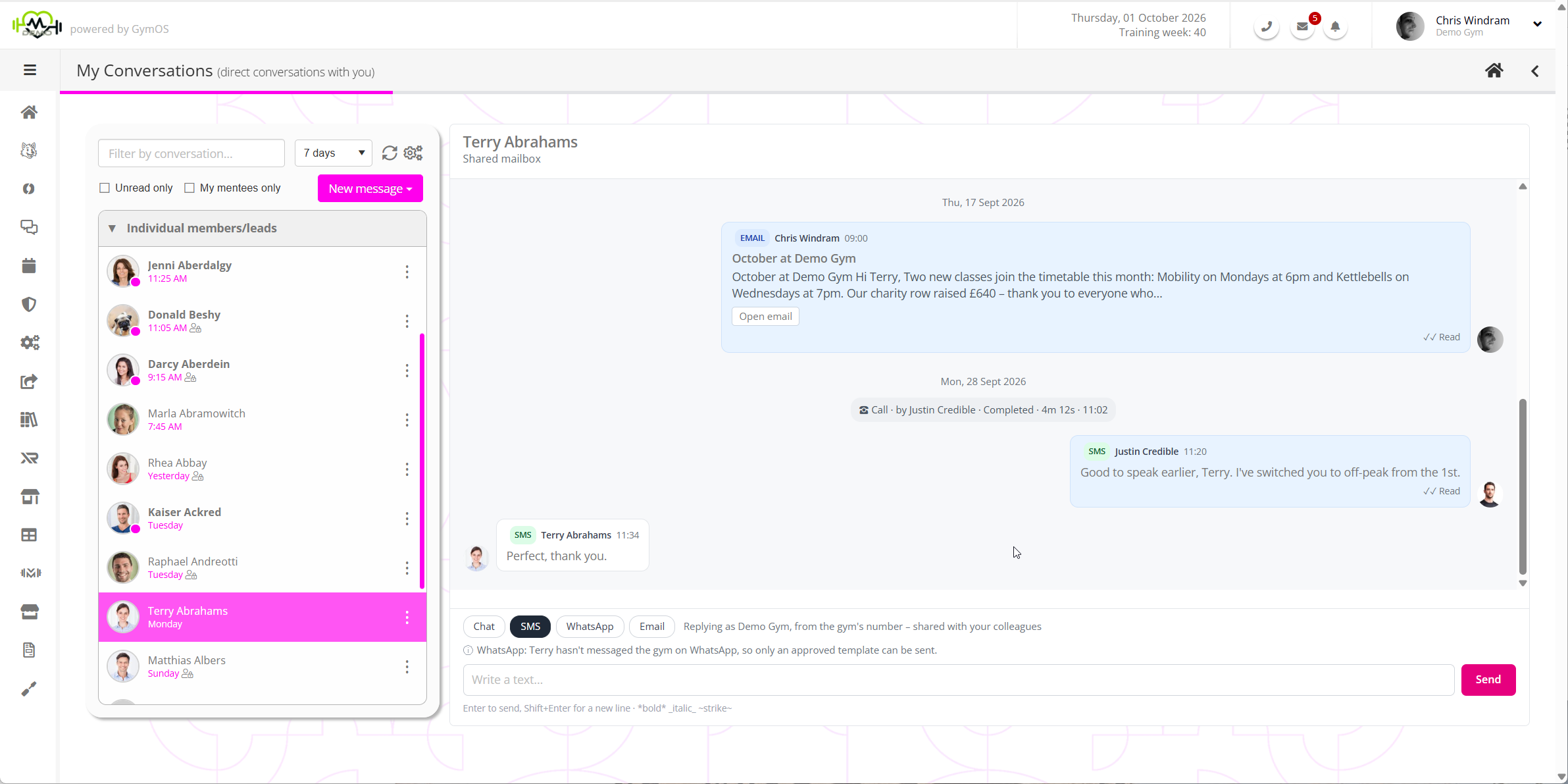
Conversations gives your gym a cohesive timeline of communications, in one place. It is a reimagining of our previous Message Centre and Broadcasts functions, and is designed to support a rich conversation flow between gyms and their members and prospects. Every email, text, push notification, chat and WhatsApp message sits together, in the order it happened, against the person it was with.
Why Conversations?
Until Conversations, messaging in GymOS lived in several places. Individual emails and texts were sent from the Message Centre, newsletters and group messages from Scheduled Broadcasts, and each kept its own history in a traditional “in-box/out-box” style structure. To see everything that had been said to one member, you had to look in more than one place, and a reply did not always land beside the message it answered.
Conversations delivers a single, modern messaging experience:
- One timeline per person. Open a member or a lead and you see everything in one place: the emails, texts, push notifications, chat and WhatsApp messages you have exchanged, and any Konduo calls, oldest at the top and newest at the bottom.
- Reply the way they wrote to you. When a member texts, your reply defaults to a text. When they email, it defaults to an email. You can always choose a different channel.
- Real-time chat. Members who use the FitnessHub app can chat real-time with your team as they would in any messaging app, with ticks that show when a message has been read, and a note when somebody is typing.
- One place to send from. The same screen sends every type of message, to one person, several people, a group or everyone on a membership, straight away or at a time you choose.
- Nothing falls between colleagues. Messages to your gym are shared by the whole team, so anyone can pick up a reply, and everyone can see that it has been dealt with.
- Your own conversations too. As well as speaking for the gym, each member of staff can hold their own ring-fenced conversation with a member, and has their own dedicated GymOS email address for it.
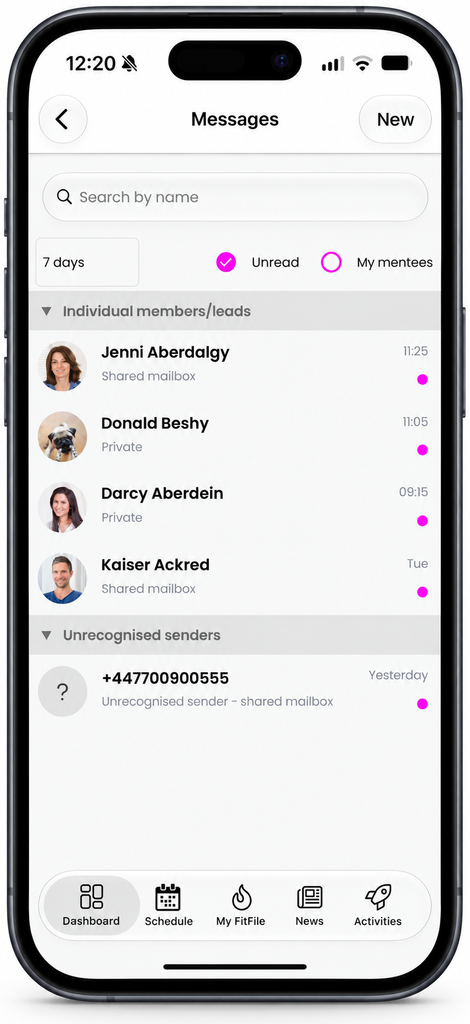
- The same on your phone. Everything above is available to your team in the FitnessHub app as well as in the administration portal.
The channels
A conversation can carry any of these types of media channel. GymOS only offers a media type/channel where the person is able to receive it.
| Channel | Who can receive it | Good to know |
|---|---|---|
| Members and leads with an email address | A plain email, templated email, or a designed email (“immersive email”) built in the email designer. See Designed emails and newsletters. | |
| Text (SMS) | Members and leads with a mobile number | Sent from your gym’s dedicate GymOS number, and charged as texts are today. |
| Push notification | Members who use the FitnessHub app | A short alert on the member’s phone. |
| Chat | Members who use the FitnessHub app | Real-time, with read ticks. Also used for group chats and community wide communications. See Chat, groups and the community. |
| Members and leads with a mobile number | Optional, and available to gyms in the United Kingdom and Ireland. See Introducing WhatsApp in Conversations. |
Calls made with Konduo appear in the timeline as well, so a conversation shows when you last spoke to somebody, not only when you last wrote.
The different kinds of conversation
- Gym conversations. Between your gym and one member or lead. Every member of staff can read and reply to them, which makes them your “shared mailbox”. Texts and WhatsApp messages always live here, because a reply comes back to your gym’s number. Gym conversations are essentially the Message Centre mailbox that existed prior to the launch of Conversations.
- Your own conversations. Between you and one member, and marked Private in your list. Use them for chat, and for email sent from your own address, so that replies come back to you. Private means it is yours rather than the gym’s. It is not hidden: your colleagues can still read it from the member’s record.
- Group chats. A chat for the members of any group you choose to switch chat on for, and your staff.
- The community. One conversation for all of your members and staff.
- Unrecognised senders. Messages from an email address or number that GymOS cannot match to a member or a lead. Only your staff see these.
A member only ever sees their own conversations. They never see a message sent to somebody else, and where a message went to several people, they never see who else received it.
Where you can access Conversations
- In the administration portal. Select Conversations from the main navigation menu, or press the envelope icon at the top of the screen. Each member’s and lead’s record also has a Messages tab showing that person’s conversations. See Finding your way around Conversations.
- In the FitnessHub app. Signed in as a member of staff, you can read, reply and start new messages from your phone. See Conversations in the FitnessHub app.
Who can use Conversations
Conversations is for your team: owners, managers and staff. Your members take part from their side, in the FitnessHub app, where they see their own conversations with your gym and can chat wherever you allow it.
What it costs
There is no additional charge for the Conversations functionality itself. You pay only for what you use, as you do today:
- Email, push notifications and chat carry included within your standard monthly GymOS subscription.
- Texts (SMS) are charged on a usage per-block basis.
- Konduo calls are charged per minute. See Konduo pricing.
- WhatsApp sending is charged on a usage basis. See WhatsApp pricing.
What happens to the legacy Message Centre and Broadcasts
- Conversations takes their place. It appears in your main navigation menu instead of the Message Centre and Scheduled Broadcasts.
- Your history comes with you. The messages your gym has already sent and received, however long ago, are shown in each person’s conversation. There is nothing to move or import.
- Newsletters and group messages are written in Conversations. What you used Scheduled Broadcasts for is now part of sending a new message. See Sending a new message and Designed emails and newsletters.
- Your automations carry on as they are. Event triggers, nurture programmes and session reminders keep working, and the messages they send appear in each person’s conversation.
- Existing clients may keep the previous Message Centre for now. Until 1 January 2027 a gym that was a client of GymOS prior to the release of Conversations may choose to stay on it. See Switching to Conversations.
Getting started
- Read Switching to Conversations, so that you know what changes for your team.
- Open Conversations from the main navigation menu and look around. Finding your way around Conversations explains what you are seeing.
- Reply to a message, then send a new one. See Replying in a conversation and Sending a new message.
- Decide who on your team should be told about new messages. See Notifications – who is told about what.
Common questions
Has my message history been kept?
Yes. The messages your gym sent and received before Conversations are shown in each person’s conversation, alongside anything new.
Do my members need to do anything?
No. Emails and texts reach them exactly as before. To chat, a member needs the latest version of the FitnessHub app.
Can everyone on my team see every conversation?
Your staff can all see the gym’s conversations. A conversation that belongs to one member of staff appears in that person’s own list, and colleagues can read it from the member’s record. This ensures that there can never be any doubt as to who said what, to whom.
Can a lead use chat?
No. Chat and push notifications need the FitnessHub app, which leads do not have. Leads can be reached by email, by text and, where your gym has activated it in GymOS, by WhatsApp.
Does Conversations cost anything?
No. Conversations is part of your monthly GymOS subscription at no extra charge. Texts/SMS messages and Konduo calls are charged as they always have been, and WhatsApp, if you choose to use it, has its own charges.
Do I have to use WhatsApp?
No. WhatsApp is optional, and everything else in Conversations works without it. See Introducing WhatsApp in Conversations and WhatsApp pricing.
Can I carry on using the Message Centre?
For a short time, yes. You may choose to stay on the previous Message Centre until 1 January 2027, after which every gym uses Conversations. See Switching to Conversations.