Konduo tips, rules, guidance, and troubleshooting
This article collects the rules Konduo follows, some tips for getting the most out of it, and answers to the problems your team is most likely to meet.
The rules
Who you can call
- Landlines and mobiles in your own country only. International, premium rate and freephone numbers cannot be called. This protects your gym from call fraud, and keeps calling to the members and leads Konduo is for.
- Konduo cannot call the emergency services (999 or 112). In an emergency, always use another phone.
- A member is called on the mobile shown on their record. For a family member whose messages go to a parent or guardian, that is the parent’s or guardian’s mobile: the call is still logged against the member you called, and shows who you spoke to.
- If a number cannot be called, the dialler tells you why, however you tried to call it.
How calls work
- One call at a time. There is no hold, transfer or conference calling.
- Calls show your gym’s number. Calls made to that number are forwarded to your forwarding number.
- Keypad calls are not linked to a member or lead, even if the number belongs to one, because several people can share a number. Call from the person’s record whenever you can.
- Recorded calls are always announced. If a recording cannot be started, the announcement is not played and the call is not recorded.
Your responsibilities
- Marketing calls. You are responsible for making sure your calls follow the rules that apply to them. In particular, marketing calls, such as offering a lapsed member a discount to return, are covered by rules on who you may call (in the UK, the TPS and PECR). Konduo does not check them for you.
- Recordings. Your gym is responsible for telling your members and leads that calls may be recorded and transcribed, and for how long you keep the recordings.
- Requests from members. A member’s recordings and transcripts are on their record, under Call log, so you can find them, and delete them, if a member asks.
Tips
- Use a headset on a computer. It stops the person you call hearing an echo of their own voice, and sounds far better than a laptop microphone.
- Call from the record, not the keypad, so the call appears in the person’s history and counts as contact.
- Wrap up straight away, while the call is fresh. Choose the call type carefully: your call reporting depends on it.
- Untick “I spoke to them” for voicemail. An answerphone counts as answered to the phone network, so only you can say whether you actually reached the person.
- Check a transcript against the recording before acting on anything important. Automatic transcription can mishear names, numbers and accents; the recording is the true record of what was said.
- Get your gym’s name right in the announcement. Write it the way it sounds.
Troubleshooting
The dialler does not open
Your browser is probably blocking pop-up windows for GymOS. Allow pop-ups for GymOS in your browser’s settings (usually from an icon at the right of the address bar), then click the number again.
Messages in the dialler
| The dialler says | What it means |
|---|---|
| Konduo calling is not available to you. | Konduo is for staff only. If you are a member of staff, ask a manager to check your account. |
| Konduo calling has not been switched on for this gym. | A manager needs to switch Konduo on. See Configuring and enabling Konduo. |
| This gym has no number it can call from. | Your gym does not yet have a number that can make calls in your country. Please contact support. |
| That number cannot be called from Konduo. | The number is outside your country, premium rate, or freephone. This also appears when a member’s stored mobile is a foreign number. |
| You are already on a call. | You have a call in progress on this or another device. If a call ended abruptly, wait a few seconds and try again. |
| Under maintenance. | We are updating Konduo. Please try again in a couple of minutes. |
“GymOS could not start your microphone”
- Make sure you allowed the microphone when asked. In a browser, click the icon at the left of the address bar to check; in the app, see Using Konduo in the FitnessHub mobile app.
- Another app may be using the microphone, such as Teams, Zoom or another call. Close it and try again.
- Check your headset is plugged in, switched on, and not muted.
- Run Check my microphone and speaker in the dialler.
The person I called cannot hear me, or I cannot hear them
- Run Check my microphone and speaker. If the bar does not move when you speak, check your microphone is not muted on the headset itself.
- Check that your computer is using the headset you expect for both sound and microphone.
The person I called hears an echo
This happens with a computer’s built-in speakers and microphone, unless you have noise reduction. Use a headset.
My call ended when I left the app
That is deliberate. In the FitnessHub app, a call ends if you leave the app for more than a few seconds, and the person you called hears that the call was interrupted. See Using Konduo in the FitnessHub mobile app.
The transcript or summary has not appeared
- Transcripts usually take a few minutes after the call ends.
- Calls shorter than 30 seconds are not transcribed.
- The call is only transcribed if it was recorded and your gym’s setting is Record calls and write a transcript and summary.
- If the outcome says the summary could not be produced, please write the outcome yourself.
Somebody called our number and it did not ring at reception
Check the forwarding number on the Konduo settings page. It must be a landline or mobile in your own country.
Sending your call log to support
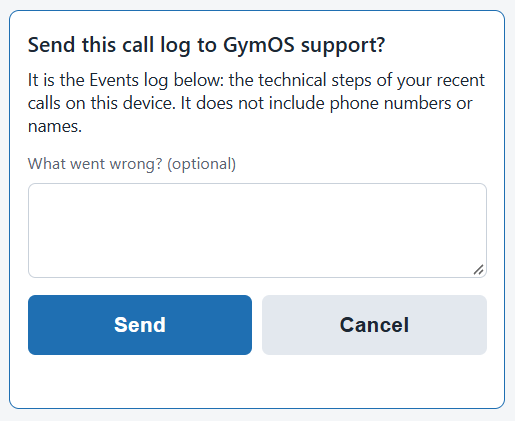
If something goes wrong with a call, the dialler can send its technical log to our support team, so that we can see exactly what happened. Tap the Konduo™ Dialler name at the top of the dialler five times, add a note of what went wrong if you wish, and click Send.
The log records the technical steps of your recent calls on that device. It does not include phone numbers, names, or recordings.