
Sending an ad hoc QuikPay payment link
You can send an ad hoc QuikPay Payment Link to a lead or member by selecting the “Send QuikPay Payment Link” option from the dropdown Actions menu on the lead/member record. The following pop-up form will be displayed:
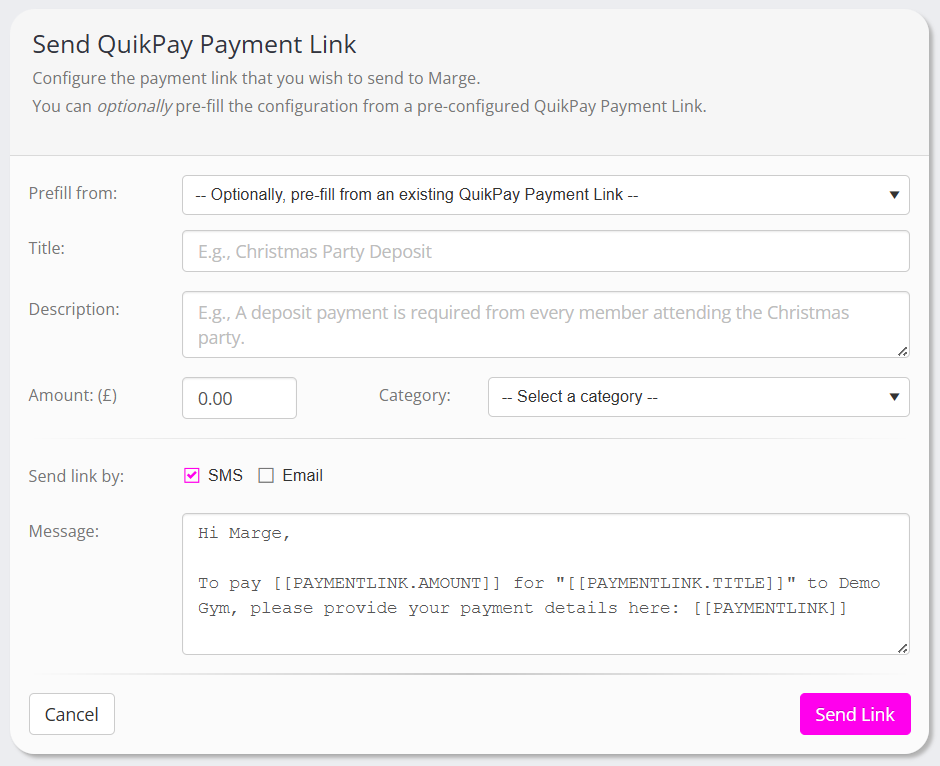
You may either complete the form manually or, if you wish, you can select an existing (preconfigured, reusable) link from the drop-down list to pre-populate the form.
The fields on the form comprise:
- Prefill form – A list of existing, reusable QuikPay links. Optionally make a selection from this list to pre-populate the form.
- Title – The title of the payment. This will be shown to the lead/member, and should be something meaningful.
- Description – An optional description for the payment link.
- Amount – The amount the lead/member will be charged.
- Category – The category assigned to the payment link
The bottom section allows you to optionally send the link to the lead/member by SMS or email. If you uncheck both boxes, the link will still be generated but not sent. The link will be shown on the screen, which you can then advise the lead/member of manually.
The message contains merge fields that will populate from the information you provide in the form. The SMS/Email is sent immediately.
Note: You can configure the default ad hoc send message by editing the “QuikPay: Default message when sending a payment link” system template.
Buttons are provided for:
- Send Link or Create Link – Send the QuikPay link, or create it for manual sharing
- Cancel – Close the popup window without creating a link