
Business Analysis: Pause analysis
The Pause Analysis function is found within the Business Analysis section of Reporting from the main navigational menu.
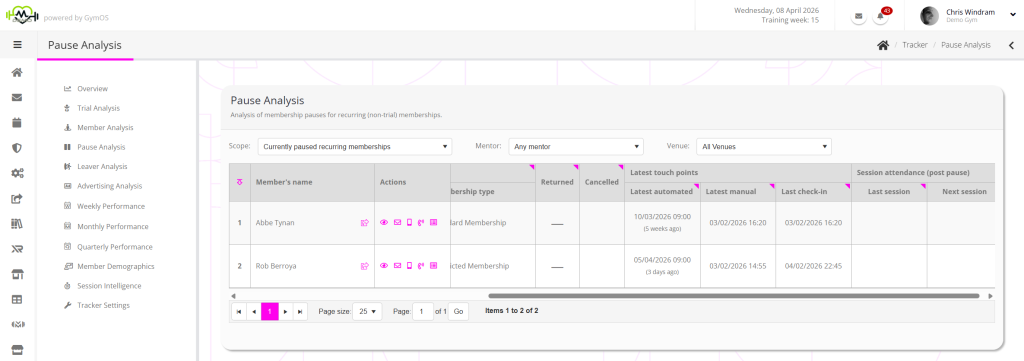
By default, the Pause Analysis function shows current pauses for recurring (non-trial) memberships.
You may change the Scope to view forthcoming recurring membership pauses, or review pauses by month for the past 12 months.

Data filters
Filters are provided for:
Actions
Clicking a member’s name opens their member record. Clicking on the icon alongside their name opens the member record in a new browser tab.
Actions are provided for:
- View the member record
- Send the member an email. Hovering over the icon shows the member’s email address.
- Sends the member an SMS message. Hovering over the icon shows the member’s mobile number.
- Log or schedule a call with the member.
- View the touch point history for the member.
Data columns
The data columns are automatically calculated and are always up to date when the table is displayed.
Many columns feature a symbol in the top-right corner of the column heading. Hovering over this triangle will provide more details as to how the value in a given column is calculated and where the data comes from. Very often, this will answer questions you may have about how a cell value is calculated.
The data columns comprise:
- Preferred venue
The current, preferred venue assigned to the member. - Assigned mentor
The current mentor assigned to the member. - Pause Details
- Start
- End
- Reason
- Membership type
- Returned
- Cancelled
- Latest Touch Points
- Latest automated
The latest automated touch point recorded against the member record. - Latest manual
The latest manual touch point recorded against the member record. - Last check-in
The latest check-in, derived from the latest call logged/DropSlot consultation of the check-in category type recorded prior to this point.
- Latest automated
- Session Attendance (Post Pause)
- Last session
The most recent (post-pause) session marked as attended for this member. - Next session
The next scheduled (post-pause) session for this member.
- Last session