
Switching to conversations
Conversations takes the place of the Message Centre and Scheduled Broadcasts. This article explains what changes for your team when your gym moves to it, what to do beforehand, and how a gym that is not ready can stay on the previous Message Centre for a while.
The setting
A manager may choose which interface a gym uses:
- Open Settings and find the section headed Conversations and messaging.
- Set Message centre version to Current, for Conversations, or to Legacy (no chat or conversations), for the previous Message Centre.
- Save the page.
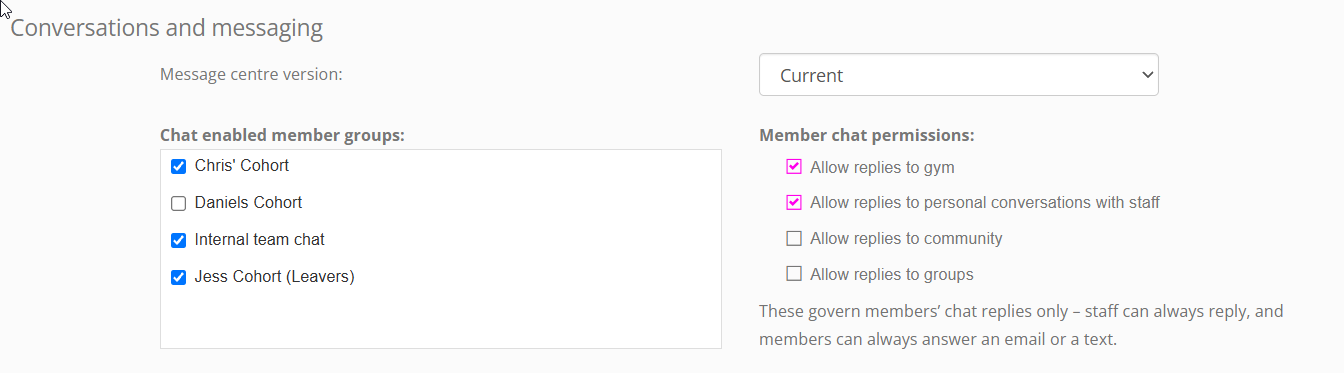
Current is the default, starting choice. A gym that has never changed the setting moves to Conversations as soon as it becomes available to it.
What changes when you move to Conversations
| Where | What changes |
|---|---|
| The main navigation menu | Conversations appears, with My Conversations and Drafts/Pending Messages. Legacy Message Centre and Scheduled Broadcasts are no longer shown. |
| The envelope icon | Opens Conversations. Any bookmark pointing to the old Message Centre brings you to Conversations too. |
| Member and lead records | The Messages tab shows that person’s conversations. |
| The FitnessHub app | A messages icon appears at the top of every page, for your team and for your members, in place of the notifications icon. |
| Settings | The Conversations and messaging section shows your chat groups, your members’ chat permissions and, where it is available to you, WhatsApp. |
| Your team’s email | Each member of staff can send email from their own GymOS email address. See Your own email address. |
| Notifications | Your team is alerted about new messages on their phones. See Notifications – who is told about what. |
What does not change
- Your message history. Every message your gym has sent and received is shown in each person’s conversation.
- Your automations. Event triggers, nurture programmes and session reminders carry on exactly as they are.
- What you pay. There is no charge for Conversations. Texts/SMS messages are charged as before.
- Your members’ email and texts. They arrive as they always have.
- Broadcasts you have not yet sent. A broadcast that is already scheduled still sends at its time. They are listed under Drafts/Pending Messages, labelled Broadcast.
Before you move
- Tell your team. Point them to Introducing Conversations and Finding your way around Conversations. Conversations is built using common, recognised conversation UI practices, but will present a bit of a change from the legacy message centre you team have been used to.
- Ask your team to update the FitnessHub app, and to allow it to send notifications. If they have previously declined notifications, these can be re-enabled in the phones notifications settings.
- Review your “Message received” triggers. GymOS now tells staff about new messages itself. If you have set up triggers to alert staff when a message arrives, you will probably want to turn them off or edit them, or your staff may be notified twice.
- Decide how your members may chat. By default, members can reply to your gym and to your team, and can read the community without posting in it. You can change these settings as you wish. See Chat, groups and the community.
- Decide who should be notified of messages to the gym. Everybody team member is, to begin with. Each individual person can turn it off for themselves, or managers can update it for them on the employee summary tab. See Notifications – who is told about what.
Staying on the previous Message Centre
If your gym is not ready, a manager can set Message centre version to Legacy (no chat or conversations). Your gym then keeps the Message Centre and Scheduled Broadcasts as they were.
- There is no chat, no group chats or community, and no WhatsApp.
- Your team’s own email addresses are not used. An event trigger or a nurture message can be sent from your gym only.
- Your team is not notified of new messages by the app.
- The rest of the Conversations and messaging section is hidden until you choose Current.
This choice ends on 1 January 2027. From that date every gym uses Conversations, and the Message centre version setting is no longer shown. We recommend moving well before then, so that your team has time to settle in.
If you move to Conversations and then temporarily move back to Legacy, drafts will become unavailable. Scheduled messages will still be sent. We do not recommend flipping between interfaces, as this will cause your team and your members confusion.
Common questions
Who can change the setting?
A manager.
Will we lose any messages by moving?
No. Your history is shown in each person’s conversation.
Do our members need to do anything?
No. To chat with you, they just need the latest version of the FitnessHub app. If there is a new version available, it will be highlighted on their FitnessHub app home page.
Will our triggers and nurture programmes still send?
Yes, unchanged. Review any trigger that alerts your staff to a new message, since GymOS now does that itself.
Can we try Conversations and go back?
Until 1 January 2027, a manager can change the setting either way. We recommend that you do not repeatedly flip between options, as this will cause your team and members confusion or frustration.
Why can I not see the Conversations and messaging section?
It is shown to managers, once Conversations is available to your gym.
What happens on 1 January 2027?
The previous Message Centre is automatically retired. Every gym uses Conversations from midnight on that date.