
Your own GymOS email address
Every member of your team has their own email address in GymOS, ending in @gym.email. It lets you email a member as yourself and have their answer come back to you, in Conversations, without sharing a personal address or checking a separate mailbox.
Your GymOS address
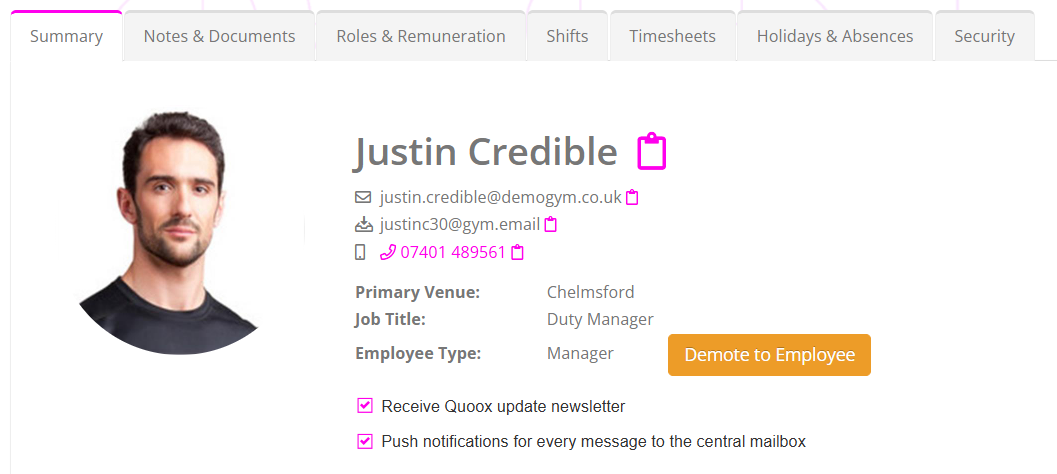
Your address is created for you when your employee record is set up. It is made from your first name, the initials of your surname and a number, for example [email protected]. It is yours alone, across the whole of GymOS, and it is never given to anybody else.
You will what your allocated email address is:
- On your employee record. On the Summary tab, on the line beneath your usual email address, with an icon to copy it.
- When you write an email. It appears beside your name in From.
It is not a mailbox you sign in to. Anything sent to it appears in Conversations.
What your email address is used for
When you send an email as you, it goes from your own name and your own address. The member’s reply comes back to that address, and so lands in your own conversation with them, not in the gym’s shared mailbox. You are always notified of it.
You send as yourself by:
- choosing As you when you reply by email in a conversation. See Replying in a conversation.
- choosing your own name in From when you write a new email. See Sending a new message.
A member can also write to your address first. It arrives in the same place.
Your address and the gym’s
| From the gym | From you | |
|---|---|---|
| The name they see | Your gym’s trading name | Your own name |
| The address they see | Your gym’s address | Your gym.email address |
| Where a reply arrives | The gym’s conversation with them, shared by your team | Your own conversation with them |
| Who is notified of a reply | Your team, according to each person’s notification setting | You |
Your gym’s address is your own domain’s, if GymOS has set one up for you, and otherwise your gym’s fitnesshub.net address.
Leads always see the gym’s address
When you email a lead as yourself, they see your name with your gym’s address, not your @gym.email one. Their reply still comes back to you.
This is deliberate. The @gym.email addresses are shared by every member of staff at every gym, and it is important to every gym that email from them keeps arriving reliably. Email to people who are not yet members is more likely to be marked as unwanted, so it is sent from your gym’s own address instead. The new message screen tells you so, beside your name in From: leads see followed by your gym’s address.
When a reply goes to the gym instead
An email reaches your own conversation only when it is clearly meant for you. It goes to the gym’s shared mailbox instead if:
- the gym’s address is on the email as well as yours, so that nothing is hidden from the team;
- another member of your team is on it too;
- it comes from an address GymOS does not recognise as a member’s or a lead’s;
- you are no longer a member of staff.
When a team member leaves
- Nothing is lost. Email sent to their address goes to the gym’s shared mailbox, in the sender’s conversation with the gym.
- Automations keep working. An event trigger or a nurture message set to send from them is sent from the gym instead.
- Their address is not reused.
In event triggers and nurture programmes
An email in an event trigger or a nurture programme has a From list too. Unlike a message you write yourself, it can be sent from any member of your team:
- Your gym, which is the starting choice.
- Member’s assigned mentor, for member triggers and member programmes. If the member has no mentor, it is sent from the gym.
- Any current member of your team, by name.
The same rule applies to leads: they see the gym’s address under that person’s name.
Common questions
Can I choose or change my address?
No. It is created for you and stays the same.
Does it use our own domain?
No. A personal address is always at gym.email. An address on your own domain could clash with a real mailbox there, and replies to it would never reach GymOS.
Why did a reply to my email arrive in the shared mailbox?
The gym’s address was on it as well, a colleague was copied, or it came from an address GymOS does not recognise.
Can my colleagues read emails sent to me?
They are not in your colleagues’ own lists, but they can be read on the member’s or lead’s record.
Why does a lead see the gym’s address and not mine?
By design, to protect the delivery of every gym’s email. They still see your name, and their reply still reaches you.
Can I send an email as a colleague?
Not when writing a message yourself: you may send as the gym or as you. An event trigger or a nurture programme can send from any member of your team.
What happens to email for somebody who has left?
It goes to the gym’s shared mailbox.
Can I connect my GymOS gym.email address to an email client?
No, this isn’t possible. The email domain is shared across all GymOS clients, and cannot be connected to an email client.