
Mobile App: My Account
My Account
The My Account section allows members to manage their personal details, payment methods, bookings, and membership information. It can be accessed from the Dashboard tab by tapping the cog icon in the top-right corner and selecting My Account.
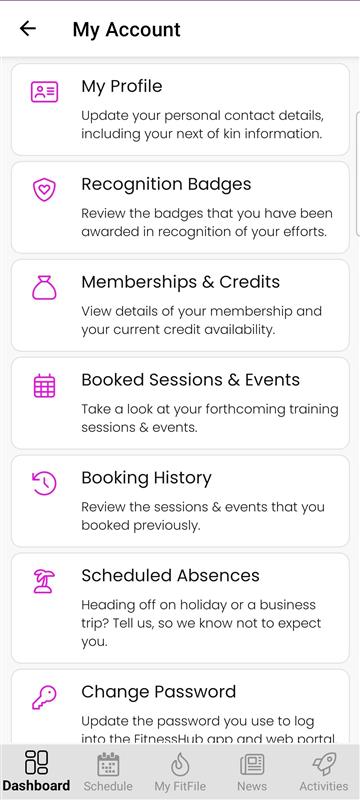
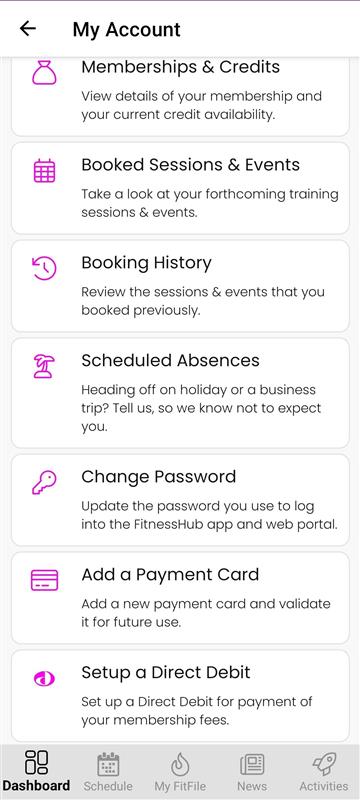
Once opened, the member will see the following options:
My Profile
This area enables the member to update their personal contact information, as well as their next of kin or emergency contact details.
Recognition Badges
This section displays all recognition badges that have been awarded to the member.
Memberships & Credits
Here, the member can view details of their active membership(s), including current credits, payment information, and credit issue dates. Additional credit details can also be accessed from this screen.
Booked Sessions & Events
This page shows the member’s upcoming booked sessions and future activities.
Booking History
The member can view their previously booked sessions and events, including past attendance and cancellations.
Scheduled Absences
This option allows the member to notify the gym if they will be away for a period of time, ensuring their attendance records remain accurate.
Change Password
This feature enables the member to update the password used to log in to both the mobile app and the web portal.
Add a Payment Card
The member can add and validate a new debit or credit card for future use, such as session payments or adhoc charges.
Set Up a Direct Debit
Here, the member can complete a Direct Debit mandate for their membership fees, ensuring automatic collection each billing cycle.