
Notifications – who is told about what
Conversations tells the right people when a message arrives, and stays quiet the rest of the time. The principle is simple: you are notified when somebody is talking to you, or to someone you are responsible for. General chatter in a group never interrupts anyone. This article sets out exactly who is told about what, for your team and for your members.
Two kinds of notification
- A push notification. An alert on your phone, sent by the FitnessHub app. Tapping it opens the conversation. Push notifications only reach people who have the app installed, are signed in, and have allowed notifications on their phone.
- The unread count. A number showing how many conversations have something new for you. It appears on the envelope icon at the top of the administration portal, on the messages icon at the top of the FitnessHub app, and on the app’s icon on your phone.

What your team is notified about
| What happens | Push notification | Unread count |
|---|---|---|
| A message to you personally: a chat message in your own conversation with a member, or an email to your own address | Always | Yes |
| A message to your gym from a member you mentor | Always | Yes |
| Any other message to your gym’s central mailbox, including one from an unrecognised sender | Yes, unless you have turned it off (see below) | Yes |
| A colleague’s chat message in a group you belong to, or in the community | Yes | Yes |
| A member’s chat message in a group or in the community | No | No |
You are never notified about a message you sent yourself, and you only ever receive one notification for a message, even where two of the rules above apply to you.
The central mailbox
Your gym’s central mailbox is every conversation between the gym and a member or lead, together with messages from unrecognised senders. It is shared by your whole team, so that an email, text or WhatsApp message to the gym is never waiting on one person.
To make sure nothing is missed, every member of your team is notified of each new message to the central mailbox unless they choose not to be. A busy gym may prefer that only some of the team are notified. Each person has their own setting:
- In the FitnessHub app. Open My Profile and find Staff notifications at the bottom. Switch Every message to the central mailbox on or off.
- In the administration portal. A manager can set it for any member of the team. Open the employee’s record and, on the Summary tab, tick or untick Push notifications for every message to the central mailbox.
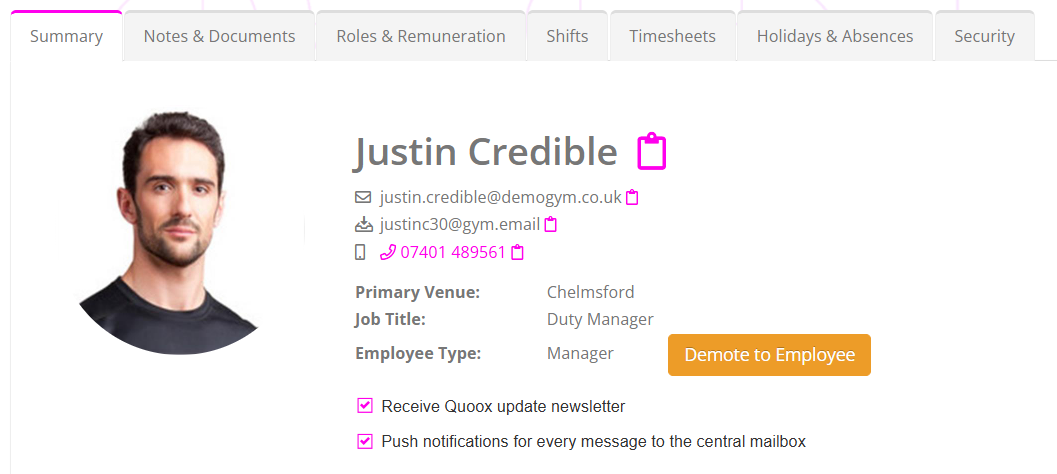
Turning the setting off only affects those general messages. You are still notified about messages sent to you personally, and about messages from members you mentor.
What your members are notified about
| What happens | Push notification | Unread count |
|---|---|---|
| A member of your team sends them a chat message, in their conversation with the gym or with one of your team | Yes | Yes |
| A member of your team posts in a group they belong to, or in the community | Yes | Yes |
| Your team sends them an email, a text or a WhatsApp message | No. It reaches them the usual way, so the app does not notify them a second time | Yes |
| Another member posts in a group or in the community | No | No |
This means a message from your team always gets through, while a busy group never becomes a nuisance. An announcement such as “classes are cancelled tomorrow” notifies every member of the group. Members chatting among themselves notifies nobody.
The same rules apply however the message was sent: typed into the conversation, sent from the new message screen, or scheduled for later.
How the unread count works
- It counts people, not messages. Five new messages from one member count as one.
- The central mailbox is read for everyone at once. When one of your team opens a message to the gym, it stops counting as unread for the rest of the team too. That is how everyone can see it has been picked up.
- Your own conversations are yours to read. A message sent to you personally stays unread until you open it yourself.
- So are your mentees’ messages. A message to the gym from a member you mentor stays unread for you until you open it yourself, even if a colleague has read it.
- It looks back 30 days, and leaves out conversations that have been archived.
- A group or the community only counts while it holds an unread message from your team. Members’ own chat never adds to the count, although the group still shows as having something new in the list.
Two things to know about the app’s icon
- Reading in the portal does not update your phone straight away. If you read a conversation in the administration portal, the number on the app’s icon is corrected the next time you open the app, or when the next notification arrives.
- Not every Android phone shows a number. Some Android home screens show a number on an app’s icon (Samsung’s does). Many show only a dot. The number inside the app is always correct.
A private chat for your team
Because colleagues are notified of each other’s messages in a group they belong to, a group makes a good private chat for your team. Create a member group (for example, “Internal staff”), add each member of your team to it, and switch chat on for it. See Chat, groups and the community for the steps.
Common questions
I am not receiving any notifications. What should I check?
Notifications come from the FitnessHub app, so check that it is installed, that you are signed in as a member of staff, and that notifications are allowed for it in your phone’s settings. Then check that Every message to the central mailbox is switched on under My Profile.
Several of us were notified about the same message. Is that right?
Yes. A message to the gym belongs to the whole team, so everyone who has the central mailbox setting switched on is told. As soon as one of you opens it, it stops showing as unread for everyone.
I only want to hear about my own members. How do I do that?
Switch Every message to the central mailbox off. You will still be notified about messages sent to you personally and about messages to the gym from members you mentor.
A member posted a question in a group and nobody was told. Why?
That is deliberate. Members’ messages in a group or the community never notify anyone, so that group chat does not become a distraction. A member who needs an answer from your team should message the gym, or their coach, directly. Those messages always notify.
Can I mute a group?
There is no need to. Only messages from your team notify, so a group cannot flood anyone with alerts.
Am I notified when a lead replies?
A lead’s message arrives in the central mailbox, so you are notified if your central mailbox setting is switched on.
Why did my member not get a notification for the email I sent?
The email itself is their notification. The FitnessHub app shows the message as unread in their conversation, but it does not alert them a second time. The same is true of texts and WhatsApp messages.
The number on my app’s icon is wrong. What should I do?
Open the app. The number is corrected whenever the app is opened and whenever a new notification arrives.